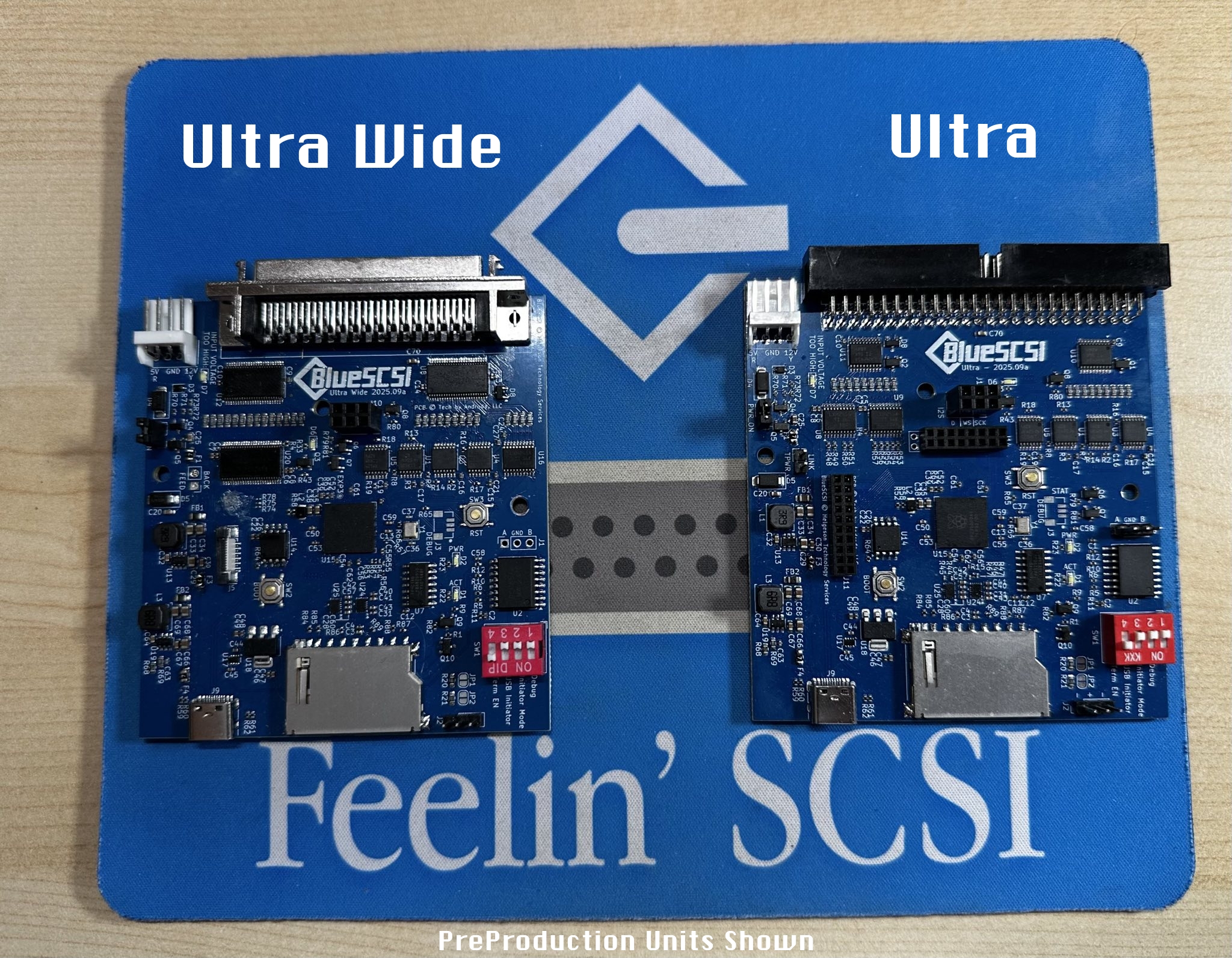
BlueSCSI Ultra & Ultra Wide

eric

Administrator
Staff member
Sep 2, 2021
1,289
2,264
113
MN
bluescsi.com

We're starting the year with a bang! Today we're announcing two new versions of BlueSCSI: Ultra and Ultra Wide. These new models support faster ultra wide SCSI connections to better support more high-end workstations and SCSI cards. These are more than iterative updates and continue our 100% original hardware designs and GPL firmware.

BlueSCSI Ultra and Ultra Wide PreProduction PCBs

BlueSCSI Ultra and Ultra Wide are next-generation, open-source SCSI emulators designed for higher-end vintage systems, delivering faster SD card performance, new audio capabilities, and expanded hardware features while preserving BlueSCSI's simplicity and ease of use. Ultra supports 50-pin Narrow SCSI, while Ultra Wide adds 68-pin Wide (and upcoming SCA) support for workstations and servers from the early-to-mid 1990s. Both models feature an integrated RP2350B, USB-C, 16 MB of flash, I²S CD audio (via an optional audio board), web-based configuration via front-panel integration, enhanced power protection, and significantly faster SD transfers through dynamic voltage switching. These are not incremental updates, but a major evolution of BlueSCSI's original hardware platform—continuing its GPL firmware tradition and commitment to open, user-friendly design.

--- See announcement page for full details --- https://bluescsi.com/ultra
 

Trash80toG4

Active Tinkerer
Apr 1, 2022
1,447
463
83
Bermuda Triangle, NC USA
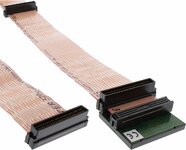
UltraWide for my 81/110 JackHammer? Is that an internal or external cable setup, looks external? Assuming it'll seem quicker due to near instantaneous response times, but throughput will be higher bandwidth with SCA Spinners for VidCap etc?

Love it!
 

Fizzbinn

Active Tinkerer
Nov 29, 2021
290
295
63
Charlottesville, VA
Great stuff! I see there are other cool improvements in the new "Ultra" hardware design but wondering if performance wise you could expect the same/very similar performance as BlueSCSI v2 with a Pico2 (and with Ultra SCSI Fast20 OverClock) as it uses the same RP2350 chip? Do the SD Card Improvements of the new design give extra overhead for more consistent 20MBps performance?
 
Last edited:

Androda

Emeritus Board Member
Staff member
Sep 25, 2021
542
608
93
USA, Western
androda.work
Is that an internal or external cable setup, looks external
With Wide SCSI, I believe the internal and external 68 pin cable ends are identical. This connector plugs into my internal Wide SCSI cable just fine. As mentioned in the announcement, we're seeing 30+ megabyte per second read speeds with some systems and SD cards. This is very system and SD card dependent though, I've tested some "nice" SD cards and only gotten 23 megabyte per second reads, where other "cheaper" ones were faster.
 

Androda

Emeritus Board Member
Staff member
Sep 25, 2021
542
608
93
USA, Western
androda.work
Do the SD Card Improvements of the new design give extra overhead for more consistent 20MBps performance?
The Fast20 Overclock is likely to provide similar speeds on BlueSCSI v2 50-pin. But on v2 it's definitely an "overclock", pushing things further and harder than they were originally designed to go from an electrical design perspective.

BlueSCSI Ultra is better electrically, with more closely matched SD communication trace lengths, termination resistors, and the transceivers. Ultra is designed from the ground up to talk to the SD card at up to 83MHz, where v2 wasn't built with that in mind.
 

Androda

Emeritus Board Member
Staff member
Sep 25, 2021
542
608
93
USA, Western
androda.work
The EVT board for BlueSCSI Ultra Wide SCA arrived today (and this time the PCB was the right color!)

Already working with the standard Ultra Wide firmware, and now I get to implement SCA SCSI ID detection.

BlueSCSI_Ultra_Wide_SCA.jpg
 
  • Like
Reactions: eric
The EVT board for BlueSCSI Ultra Wide SCA arrived today (and this time the PCB was the right color!)

Already working with the standard Ultra Wide firmware, and now I get to implement SCA SCSI ID detection.

View attachment 25763


So I found an working Adaptec AHA-2940U2W ULTRA2-LVD / SE (and yes this is the Mac version) can I connect this to this one?


Have also this cable :

But on the website shop.onegeekarmy.eu it seems a different connector (metal)

thanks
 

Attachments

  • 1200x970.jpg
    1200x970.jpg
    136.9 KB · Views: 87

eric

Administrator
Staff member
Sep 2, 2021
1,289
2,264
113
MN
bluescsi.com
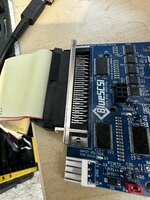
Yes I believe that’s the same Mac card I have or very similar model. Here is what it looks like connected
 

Attachments

  • IMG_7891.jpeg
    IMG_7891.jpeg
    1.6 MB · Views: 87

ESM-NL

Tinkerer
Jun 4, 2025
52
34
18
The Netherlands
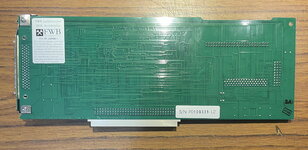
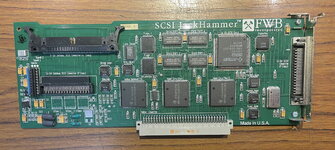
Recently I bought a FWB Jackhammer for my IIfx. It works (at the moment only with the external port), but besides quicker scores in Norton System Info, I don’t mention very much improvement in the startup.

Are there any ini-settings to improve the speed?
 

eric

Administrator
Staff member
Sep 2, 2021
1,289
2,264
113
MN
bluescsi.com
Do you have the manual/specs for this Jackhammer card? What OS are you running? Do you have SCSI Manager 4.3 installed?

RE: Startup - I wouldn't expect there to be much change - it's a bunch of small random transfers - so the same 1ms seek time + faster transfer of small blocks probably wouldn't notice over that short period. You would notice as you said in benchmarks and large transfers/copies/etc.

As an example in I did this test in my 9600 with a real UW card a long time ago: BlueSCSI v1 vs BlueSCSI v2 vs a real UW SCSI drive - the startup times were within seconds of each other - raw speed didn't make much of a difference for Starting up. Now coping a game and loading it did show significant differences.

edit: please also provide the log file and any ini settings you currently have so we can see what it's negotiating and configured.
 
Last edited:

ESM-NL

Tinkerer
Jun 4, 2025
52
34
18
The Netherlands
Do you have the manual/specs for this Jackhammer card? What OS are you running? Do you have SCSI Manager 4.3 installed?
I have a downloaded version of the manual. I don't have SCSI Manager 4.3 installed right now, but I look it up.

My setup is as follow:
Macintosh IIfx, 68Mb RAM, BlueSCSI V2W/BlueSCSI Ultra Wide (powered over the Berg connector), BMOW Rominater II
NUBUS:
J10: Apple Videocard
J11: FWB Jackhammer (using the external port with round SCSI-cable, while still not having a right ribbon cable for internal use)
J12: Hurdler - CPI Parallel Interface
J13: Ethernet card
System 7.1 NL+System Update 3.0

EDIT: as SD card I have a 16Gb Sandisk that can write up to 90Mb/sec.

The manual does not mention a product number, but on the card I can find: © 1992,1994 FWB Inc PN111592B. I Assume that there is only one version of this card.

The manual mentioned on page 2 as system and hardware requirements: one full size NUBUS slot, System 7.1 or newer (System Update 3.0 recommended), 4Mb RAM and a supported SCSI device. SCSI Manager 4.3 is not on this list.

The log file of the BlueSCSI Ultra Wide is this:
Platform: BlueSCSI Ultra (Wide)
FW Version: 2026.08.17-rel Aug 17 2026 16:08:59
Flash chip size: 16384 kB
=== Bootloader Log ===
[0ms] Bootloader version: Aug 17 2026 16:08:45 BlueSCSI Ultra
[0ms] Looking for firmware: BlueSCSI_Ultra_Wide*.bin
[121ms] SDIO check error rcv: blk 0 calc 0x0000000000000000 expect 0x000000000000000F
[121ms] readSec(0x00000001) failed: 6
[122ms] SDIO check error rcv: blk 0 calc 0x0CBE53241A39A800 expect 0x0CBE53241A39A80F
[122ms] readSec(0x00000000) failed: 6
[122ms] SDIO check error rcv: blk 0 calc 0x0000000000000000 expect 0x000000000000000F
[122ms] readSec(0x00000001) failed: 6
[122ms] SDIO check error rcv: blk 0 calc 0x0CBE53241A39A800 expect 0x0CBE53241A39A80F
[122ms] readSec(0x00000000) failed: 6
[122ms] SDIO check error rcv: blk 0 calc 0x0CBE53241A39A800 expect 0x0CBE53241A39A80F
[122ms] readSec(0x00000000) failed: 6
[123ms] SDIO check error rcv: blk 0 calc 0x0CBE53241A39A800 expect 0x0CBE53241A39A80F
[123ms] readSec(0x00000000) failed: 6
[129ms] SDIO check error rcv: blk 0 calc 0x0000000000000000 expect 0x000000000000000F
[129ms] readSec(0x00000001) failed: 6
[129ms] SDIO check error rcv: blk 0 calc 0x0CBE53241A39A800 expect 0x0CBE53241A39A80F
[129ms] readSec(0x00000000) failed: 6
[130ms] SDIO check error rcv: blk 0 calc 0x0000000000000000 expect 0x000000000000000F
[130ms] readSec(0x00000001) failed: 6
[130ms] SDIO check error rcv: blk 0 calc 0x0CBE53241A39A800 expect 0x0CBE53241A39A80F
[130ms] readSec(0x00000000) failed: 6
[130ms] SDIO check error rcv: blk 0 calc 0x0CBE53241A39A800 expect 0x0CBE53241A39A80F
[130ms] readSec(0x00000000) failed: 6
[130ms] SDIO check error rcv: blk 0 calc 0x0CBE53241A39A800 expect 0x0CBE53241A39A80F
[131ms] readSec(0x00000000) failed: 6
[131ms] Bootloader SD card init failed
[131ms] Bootloader continuing to main firmware
=== End Bootloader Log ===
Clocking to standard I2S-compatible base speed
Reclocking with these settings are compatible with CD audio playback
Initial Clock set to 150MHz
Reclocking the MCU to 155MHz
Setting the SDIO clock to 26MHz
After reclocking, system reports clock set to 155MHz
BlueSCSI CD Audio enabled - requires DAC
SD Config Result: 0x06
SDIO High Speed

=== SD Card Info ===
SD card detected, FAT32 volume size: 15185 MB
SD Name: SU16G, MID: 0x03 (SanDisk), OID: "SD" (0x53 0x44)

=== Global Config ===
bluescsi.ini not found, using defaults

=== Finding images ===
=== Finding images in / ===
== Opening /HD10_512 Data 1.dsk for ID:1 LUN:0
---- Configuring as disk drive
== Opening /HD00_512 IIfx 1.dsk for ID:0 LUN:0
---- Configuring as disk drive
== Opening /HD20_512 Data 2.dsk for ID:2 LUN:0
---- Configuring as disk drive

== Platform supports ROM drive up to 12284 kB

=== Configured SCSI Devices ===
ID: 0, BlockSize: 512, Type: Fixed, Quirks: Apple, Size: 1843264kB
ID: 1, BlockSize: 512, Type: Fixed, Quirks: Apple, Size: 1843264kB
ID: 2, BlockSize: 512, Type: Fixed, Quirks: Apple, Size: 2048096kB

Clock set to: 155MHz
Initialization complete!
INFO: Pico Voltage: 3.258V.
SCSI ID 2 negotiated synchronous mode 10 MB/s (period 4x25 ns, offset 8 bytes)
INFO: You may get a boost from overclocking as your system supports synchronous SCSI speeds. https://bluescsi.com/docs/Ultra-SCSI-Fast20-OverClock
SCSI ID 1 negotiated synchronous mode 10 MB/s (period 4x25 ns, offset 8 bytes)
SCSI ID 2 negotiated synchronous mode 10 MB/s (period 4x25 ns, offset 8 bytes)
SDIO card reports write failure, S: 0x00000068 M: 0x01
SdioCard::writeSector(0x00004000) failed: 8
SCSI ID 1 negotiated synchronous mode 10 MB/s (period 4x25 ns, offset 8 bytes)

I see some SDIO check errors, but the working seems fine to me. And there is the note about the "overclocking" to Fast20.

I remember from my previous Mac IIfx years ago with a Jackhammer that the startup was much faster with the SCSI-2 drive than the normal SCSI-drive. Could be that the 80Mb hard drive on the internal SCSI bus was not that fast as the BlueSCSI V2W is now, so the comparison
is not easy to make.
 

Attachments

  • IMG_5089.jpg
    IMG_5089.jpg
    823.4 KB · Views: 2
  • IMG_5090.jpg
    IMG_5090.jpg
    926.6 KB · Views: 2
Last edited:

ktaggart

New Tinkerer
Aug 24, 2026
2
2
3
Hello,

I have been running a BlueSCSI card (50-pin, external enclosure) on my SPARCstation20 for a while now without issue - other than it being a bit slow. I recently purchased a BlueSCSI Ultra (68-pin SCA), installed it in the top slot of my SS20 (this is auto assigned to device ID 1. I have also tried reconfiguring for the bottom slot/ID 3, with the same result).

When booting from the Ultra, I get the following at the OBP:
Rich (BB code):
Boot device: /iommu/sbus/espdma@f,400000/esp@f,800000/sd@1,0 File and args:

The file just loaded does not appear to be executable.

Type help for more information
<#0> ok probe-scsi-all
/iommu@f, e0000000/sbus@f, e0001000/espdma@f, 400000/esp@f, 800000
Target 1
Unit 0    Disk    COMPA DGHS                  0BlueSCSI Ultrav2026.04.27
Target 3
Unit 0    Disk    SEAGATE ST373307LC    1.0 BlueSCSI Ultrav2026.04.27
Target 5
Unit 0    Disk    COMPA DGHS                  0BlueSCSI Ultrav2026.04.27
Target 6
Unit 0    Removable Read Only device    TOSHIBAXM-4101IASUNSLCD342412/08/94

Apart from the error, this all looks fine - and is identical to what I see if I insert the SD card in the 50-pin card, the difference being it boots on the 50-pin card but not on the 68-pin ultra card.

The boot-device is set to disk1, and entering the 'boot disk1' command at the OBP simply repeats the error.

For comparison, here is the OBP output when the 50-pin card is installed:
Rich (BB code):
<#0> ok probe-scsi-all
/iommu@f, e0000000/sbus@f, e0001000/espdma@f, 400000/esp@f, 800000
Target 1
Unit 0   Disk   COMPA DGHS                   0BlueSCSIv2024.10.26
Target 3
Unit 0   Disk   SEAGATE ST373307LC     1.0 BlueSCSIv2024.10.26
Target 5
Unit 0   Disk    COMPA DGHS                   0BlueSCSIv2024.10.26
Target 6
Unit 0   Removable Read Only device     TOSHIBA XM-4101TASUNSLCD342412/08/94

Here is the log from my ultra card:
Rich (BB code):
Platform: BlueSCSI Ultra (Wide)
FW Version: 2026.04.27-rel Apr 28 2026 00:35:26
Flash chip size: 16384 kB
SCA Model Detected, Assigned SCSI ID: 1

=== Bootloader Log ===
[0ms] Bootloader version: Apr 28 2026 00:35:10 BlueSCSI Ultra
[0ms] Looking for firmware: BlueSCSI_Ultra_Wide*.bin
[231ms] Bootloader continuing to main firmware

=== End Bootloader Log ===
Clocking to standard I2S-compatible base speed
Reclocking with these settings are compatible with CD audio playback
Initial Clock set to 150MHz
Reclocking the MCU to 155MHz
Setting the SDIO clock to 26MHz
After reclocking, system reports clock set to 155MHz
BlueSCSI CD Audio enabled - requires DAC
SD Config Result: 0x3F
SDIO 1.8v High Speed, Mode D

=== SD Card Info ===
SD card detected, exFAT volume size: 121936 MB
SD Name: SR128, MID: 0x03 (SanDisk), OID: "SD" (0x53 0x44)

-- SpeedGrade = TurboMax
Speed grade set to TurboMax reclocking system
Reclocking with these settings are compatible with CD audio playback
Initial Clock set to 155MHz
Reclocking the MCU to 251MHz
Setting the SDIO clock to 50MHz
After reclocking, system reports clock set to 251MHz

======== Reinitializing BlueSCSI after reclock ========
SD Config Result: 0xD1
SDIO 1.8v Ultra Speed, Mode D

=== Global Config ===
Reading configuration from bluescsi.ini
-- SpeedGrade = TurboMax
Using system preset "Generic"

=== Finding images ===
[SCSI1]
-- SectorsPerTrack = 218
-- HeadsPerCylinder = 10
-- Vendor = “COMPA
-- Product = “DGHS”
-- Version = “0
-- Serial = "T3751350”
[SCSI3]
-- SectorsPerTrack = 718
-- HeadsPerCylinder = 4
-- Vendor = SEAGATE
-- Product = ST373307LC
-- Version = 1.0
-- Serial = "T3751352”
[SCSI5]
-- SectorsPerTrack = 218
-- HeadsPerCylinder = 10
-- Vendor = “COMPA
-- Product = “DGHS”
-- Version = “0
-- Serial = "T3751351”

=== Finding images in / ===
[SCSI5]
-- SectorsPerTrack = 218
-- HeadsPerCylinder = 10
-- Vendor = “COMPA
-- Product = “DGHS”
-- Version = “0
-- Serial = "T3751351”

== Opening /HD50_9GB.hda for ID:5 LUN:0
---- Configuring as disk drive
[SCSI3]
-- SectorsPerTrack = 718
-- HeadsPerCylinder = 4
-- Vendor = SEAGATE
-- Product = ST373307LC
-- Version = 1.0
-- Serial = "T3751352”

== Opening /HD30_73GB.hda for ID:3 LUN:0
---- Configuring as disk drive
[SCSI1]
-- SectorsPerTrack = 218
-- HeadsPerCylinder = 10
-- Vendor = “COMPA
-- Product = “DGHS”
-- Version = “0
-- Serial = "T3751350”

== Opening /HD10_9GB.hda for ID:1 LUN:0
---- INFO: Image file is fragmented (2 fragments), FastSeek enabled for best performance.
---- Configuring as disk drive

== Platform supports ROM drive up to 12284 kB

=== Configured SCSI Devices ===
ID: 1, BlockSize: 9, Type: Fixed, Quirks: None, Size: 9437184kB
ID: 3, BlockSize: 73, Type: Fixed, Quirks: None, Size: 74752000kB
ID: 5, BlockSize: 9, Type: Fixed, Quirks: None, Size: 9437184kB

Clock set to: 251MHz

Initialization complete!

INFO: Pico Voltage: 3.258V.

Note: I followed the instructions to fix the fragmented file issue; copy the files off the SD, delete, then copy the files back. Now when I boot the SS20 with the ultra card, I get the OBP error "Illegal instruction."

The SD still boots fine from the 50-pin card.

Here is the log from the 50-pin:
Rich (BB code):
Platform: BlueSCSI
FW Version: 2024.10.26-rel Oct 26 2024 22:02:38
I2C Supported
Flash chip size: 2048 kB

=== SD Card Info ===
SD card detected, exFAT volume size: 121936 MB
SD Name: SR128, MID: 0x03, OID: 0x53 0x44

=== Global Config ===
Reading configuration from bluescsi.ini
Active configuration (using system preset "Generic"):

=== Finding images in / ===

== Opening /HD50_9GB.hda for ID: 5 LUN: 0
---- Image ready

== Opening /HD30_73GB.hda for ID: 3 LUN: 0
---- Image ready

== Opening /HD10_9GB.hda for ID: 1 LUN: 0
---- WARNING: file /HD10_9GB.hda is fragmented, see https://github.com/BlueSCSI/BlueSCSI-v2/wiki/Image-File-Fragmentation
---- Image ready

=== ROM Drive ===
Platform supports ROM drive up to 1692 kB
---- ROM drive image not detected

=== Configured SCSI Devices ===
* ID: 1, BlockSize: 512, Type: Fixed, Quirks: None, Size: 9437184kB
* ID: 3, BlockSize: 512, Type: Fixed, Quirks: None, Size: 74752000kB
* ID: 5, BlockSize: 512, Type: Fixed, Quirks: None, Size: 9437184kB

Initialization complete!

INFO: Pico Voltage: 3.228V.

Finally, here is my bluescsi.ini (note, the bolded sections were added for the ultra):
Rich (BB code):
[SCSI]
SpeedGrade="TurboMax"
MaxSyncSpeed=20
System="Generic"
[SCSI1]
Vendor = “COMPAQ”
Product = “DGHS”
Version = “01C0”
Serial = "T3751350”
HeadsPerCylinder = 10
SectorsPerTrack = 218
[SCSI3]
Vendor = "SEAGATE"
Product = "ST373307LC"
Version = "1.0"
Serial = "T3751352”
HeadsPerCylinder = 4
SectorsPerTrack = 718
[SCSI5]
Vendor = “COMPAQ”
Product = “DGHS”
Version = “01C0”
Serial = "T3751351”
HeadsPerCylinder = 10
SectorsPerTrack = 218

SCSI5 is just a backup of SCSI1 and is not mounted upon boot into Solaris 8.

Is there a change I need to make to anything to get the ultra card to boot from the SD?

Thx,

-k
 
Last edited:

eric

Administrator
Staff member
Sep 2, 2021
1,289
2,264
113
MN
bluescsi.com
I have a downloaded version of the manual. I don't have SCSI Manager 4.3 installed right now, but I look it up.
Can you attach the manual here? I'd like to understand what its capabilities are. I've upload SCSI Manager 4.3 here https://macintoshgarden.org/apps/scsi-manager-43 - it adds a lot of SCSI capabilities to MacOS.

Your log shows a SD error in the bootloader (I can address that, but thats not your issue, can ignore for now) - the issue is the card only ever negotiates 10MB/sec - Ultra Wide can negotiate up to 40MB/sec. This determination is done by the host, not BlueSCSI. So we'll need to figure out why the card (or macos (mabye because no scsimanager 4.3?)) isn't asking for faster speeds the BlueSCSI says it supports. Also I did notice a write error on the SD Card - it might be worth backing up your files then doing a full overwrite format with the SD Card Formatter utility (link on our wiki/docs) just incase there's an issue on the SD card.
 

ESM-NL

Tinkerer
Jun 4, 2025
52
34
18
The Netherlands
Can you attach the manual here? I'd like to understand what its capabilities are. I've upload SCSI Manager 4.3 here https://macintoshgarden.org/apps/scsi-manager-43 - it adds a lot of SCSI capabilities to MacOS.
Here is the Jackhammer manual. The SCSI Manager 4.3 is yet downloaded and put in the system folder (and on more macs too). I start up with it and watch later if I see changes in the log file or notice improvements.
 

Attachments

  • jackhammersc.pdf
    1.3 MB · Views: 3
  • Like
Reactions: eric