
Quadra 800 "Wombat" overclocking - options

AlpineRaven

New Tinkerer
Oct 9, 2025
15
6
3
Hey all,
As I have Quadra 800 logic board inside Quadra 700 case, it also has DOS compatible card installed with extension to the NuBus ports as well.
(Quadra 700 logicboard was battery cancer, and Quadra 800 case shattered into pieces hence two into one - Love the shape of Quadra 700 case, and it has feets too!

Anyway; I love Quadra 840av but I don't like moving it around too much as its so brittle, but if I could get Quadra 800 faster than 840av then I am very happy with that.

I have researched and I have found 3 options as I already have spare 68040 40mhz CPU;

Option A) Replace the Crystal Oscillator from 16.667mhz to 20.0 mhz and install 68040 40mhz CPU - then it'll run at 40 mhz.

Option B) Remove crystal oscillator and install Spicy O'Clock.

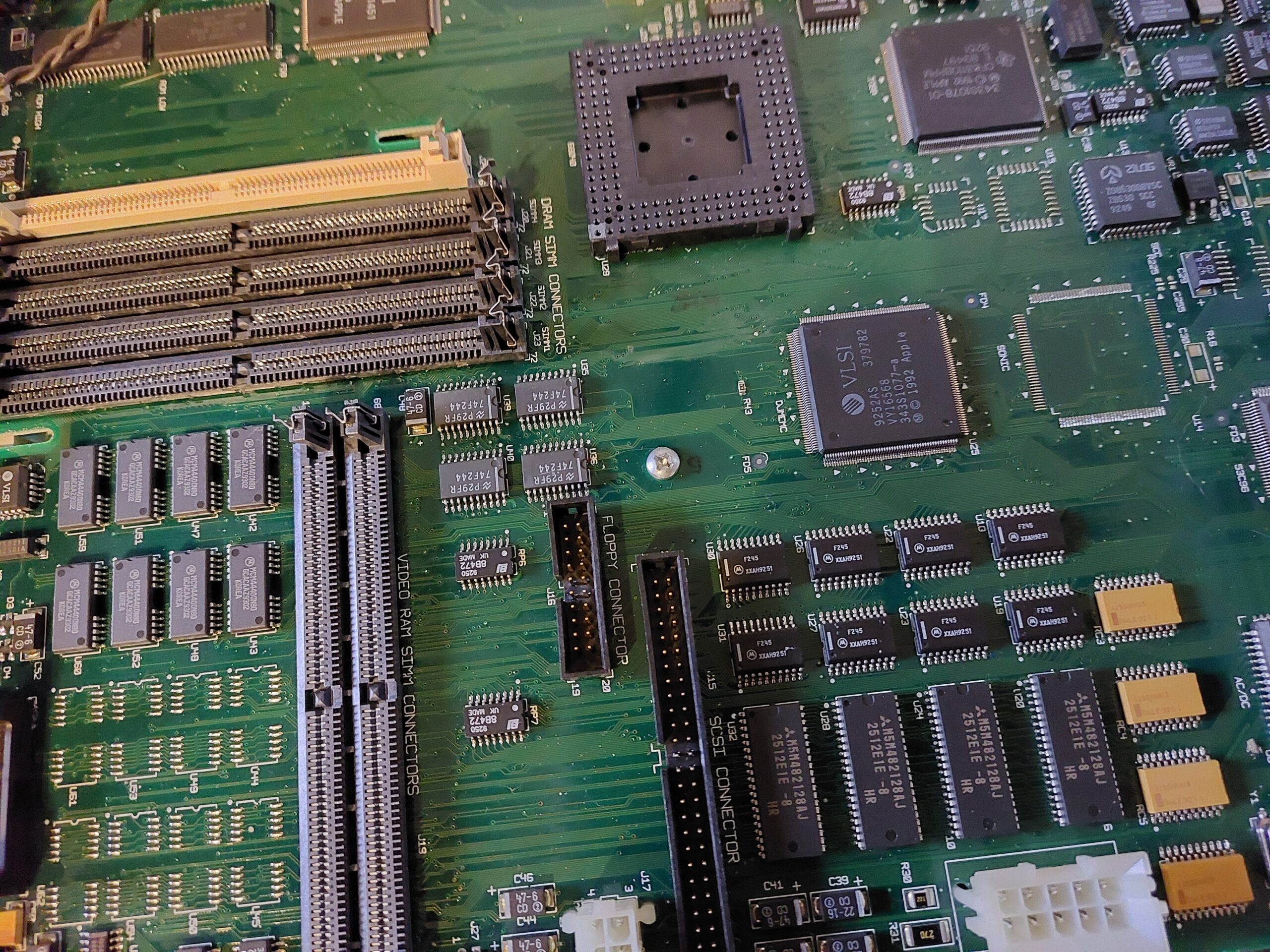
Option C) Install and run 68040 40mhz CPU, install jumper in J28 & 29 plus replace R152 resister to 1.2kΩ, replace to 330Ω in R233, and no resister in R151, URL link below;
[EMBED content="thread-46941"]https://68kmla.org/bb/threads/new-awesome-and-easy-way-to-bump-a-wombat-to-40mhz.46941/[/EMBED]


I am not interested any faster than 40mhz, I am thinking lending towards option B that way I can switch over from 40mhz to 33mhz if I wanted to.

Lastly; I am running System 7.1, my other concern which I haven't found info for - will it still boot in 7.1 - if so which enabler should I use?
Cheers
AP
 

phipli

Tinkerer
Sep 23, 2021
320
226
43
Good morning @AlpineRaven. If you don't mind, I'll have a go at answering. I have a soft spot for Wombat family machines.

As I have Quadra 800 logic board inside Quadra 700 case, it also has DOS compatible card installed with extension to the NuBus ports as well.
That's fun - my dad has a Quadra 650 in a IIcx case in a similar manner. One thing to start with - I've heard that DOS cards work in over clocked machines - but I don't have any personal experience of this. Keep that in mind. Hopefully someone else with experience can answer that, but I have always kept my Performa 630 DOS at stock bus speed just in case (I have another 630 that happily runs at 40MHz, so I'm not too fussed).

Option A) Replace the Crystal Oscillator from 16.667mhz to 20.0 mhz and install 68040 40mhz CPU - then it'll run at 40 mhz.

Option B) Remove crystal oscillator and install Spicy O'Clock.

Option C) Install and run 68040 40mhz CPU, install jumper in J28 & 29 plus replace R152 resister to 1.2kΩ, replace to 330Ω in R233, and no resister in R151, URL link below;
I'd add that there are more options within option C) (my site).
Option C-1 : Basic 40 MHz Overclock - Just Bridge J29 and nothing else. Either with solder, or a jumper.
Option C-2 : Adding 40 MHz Timings - Bridge J29 and remove resistors R151 and R152.
Option C-3 : The Ideal Setup - I believe this is what you described as Option C.

So to go through the options...

Option A - This modification is more difficult to do than option C-1, and provides no advantages. In fact - Option C-1, if you fit a jumper, is completely reversible by just reaching in and removing the jumper while the computer is off (keep in mind your DOS card), and so could be said to be better, without the difficult space envelope for soldering and risk of damaging the Nubus slot (it isn't a soldering skill issue - it is really tight up against plastic and hard to do the rework without damaging the Nubus slot - trust me - I've done two or three). The only advantage is that you can install a socket (again, tricky) to make it easier to swap the clock to higher values again if you want to go above 40MHz, or if you are starting from a 20MHz Centris 650 and want to turn it into a Quadra 650. Note that changing resistors R151 and R152 is just as much needed here (i.e. it is optional in that if you don't change them, you'll be overclocking your RAM / ROM / VRAM timings - which you might or might not want, and which might or might not be stable (it is usually stable).

TLDR - Option A is harder to do than option C (including C-1) and doesn't provide any advantages if all you want is 40MHz.

Option B - This provides flexibility - you can pick exactly what speed you want, higher or lower. As before, you still need to consider resistors R151 and R152 (their impact is independent of the method you use to change the speed). If you only want a 40MHz, I personally don't see why you would spend money and wait for shipping to do this.

TLDR - If you only want 40MHz, Option C-1 is cheaper, faster, easier.

Option C - As described above, there are three option Cs really. For your first step, what I'd suggest is soldering a 2 pin header (option C-1, but with the header, not just a blob of solder). This will mean by fitting a jumper (2.54mm - like an old fashioned hard disks SCSI ID jumper) you'll be able to select booting at 40MHz (with an overclock on the RAM, ROM and VRAM that will give you PowerPC 6100 like video performance)... but also allow you to just reach in and remove it if it is unstable, or doesn't work with your DOS card. If it is unstable, do the resistor mods I list on my website. That will give you a second jumper that lets you pick your RAM, ROM & VRAM timings between the ones for 33MHz and the ones for 40MHz. This should give you stable performance at both 33MHz and 40MHz as you've not actually overclocked the machine, but instead created an unreleased 40MHz Q800.

TLDR - I'd honestly just suggest doing C-1 for now, and then move to C-3 later.

I am not interested any faster than 40mhz, I am thinking lending towards option B that way I can switch over from 40mhz to 33mhz if I wanted to.
Option C also lets you switch between 33 and 40MHz, just by removing a jumper if you fit one. C-3 also lets you switch between 33MHz and 40MHz timings.

Lastly; I am running System 7.1, my other concern which I haven't found info for - will it still boot in 7.1 - if so which enabler should I use?
Cheers
This is only a problem if you move resistors to select 40MHz timings (i.e. remove the overclock from the RAM, ROM and VRAM). If you just clock up the CPU and run the RAM, ROM and VRAM faster than spec (due to still using 33MHz timings), the computer reports the same machine ID as normal - it will just report the same Machine ID as a 33MHz Quadra 800.

Note that when you have timings set for 40MHz, the 7.1 System Enabler wont recognise the computer... except... I recently made a modified version of the Enabler, I haven't shared it yet because I haven't had a chance to test it, but all I have done is added the extra computers, so it should be fine. Feel free to test it. I'll fetch it off my development emulator and upload it here shortly.

All later operating systems are fine running on a 40MHz reporting machine with the resistor mods, except that sometimes you need to use "Wish I Were" to run the installer, or hold option while launching the installer to bypass the machine check.

Hope this helps.

Edit - added the modified system enabler that should work with all unreleased wombat machine IDs. I didn't just add one - I added all the 650 and 800 variations, and even 610 variants. Note, this wont allow you to use 40MHz timings on a 610 as the ROM doesn't recognise 40MHz timings as a valid config (same as the LC 475) - you're stuck with 33MHz timings at most on a 610 (meaning I've struggled to get my 610 stable at 50 MHz, so I tend to only run it at 40 at most).
 

Attachments

  • System Enabler Wombats.sit.hqx
    38 KB · Views: 11
Last edited:
  • Like
Reactions: Nitram78

AlpineRaven

New Tinkerer
Oct 9, 2025
15
6
3
Good morning @AlpineRaven. If you don't mind, I'll have a go at answering. I have a soft spot for Wombat family machines.


That's fun - my dad has a Quadra 650 in a IIcx case in a similar manner. One thing to start with - I've heard that DOS cards work in over clocked machines - but I don't have any personal experience of this. Keep that in mind. Hopefully someone else with experience can answer that, but I have always kept my Performa 630 DOS at stock bus speed just in case (I have another 630 that happily runs at 40MHz, so I'm not too fussed).


I'd add that there are more options within option C) (my site).
Option C-1 : Basic 40 MHz Overclock - Just Bridge J29 and nothing else. Either with solder, or a jumper.
Option C-2 : Adding 40 MHz Timings - Bridge J29 and remove resistors R151 and R152.
Option C-3 : The Ideal Setup - I believe this is what you described as Option C.

So to go through the options...

Option A - This modification is more difficult to do than option C-1, and provides no advantages. In fact - Option C-1, if you fit a jumper, is completely reversible by just reaching in and removing the jumper while the computer is off (keep in mind your DOS card), and so could be said to be better, without the difficult space envelope for soldering and risk of damaging the Nubus slot (it isn't a soldering skill issue - it is really tight up against plastic and hard to do the rework without damaging the Nubus slot - trust me - I've done two or three). The only advantage is that you can install a socket (again, tricky) to make it easier to swap the clock to higher values again if you want to go above 40MHz, or if you are starting from a 20MHz Centris 650 and want to turn it into a Quadra 650. Note that changing resistors R151 and R152 is just as much needed here (i.e. it is optional in that if you don't change them, you'll be overclocking your RAM / ROM / VRAM timings - which you might or might not want, and which might or might not be stable (it is usually stable).

TLDR - Option A is harder to do than option C (including C-1) and doesn't provide any advantages if all you want is 40MHz.

Option B - This provides flexibility - you can pick exactly what speed you want, higher or lower. As before, you still need to consider resistors R151 and R152 (their impact is independent of the method you use to change the speed). If you only want a 40MHz, I personally don't see why you would spend money and wait for shipping to do this.

TLDR - If you only want 40MHz, Option C-1 is cheaper, faster, easier.

Option C - As described above, there are three option Cs really. For your first step, what I'd suggest is soldering a 2 pin header (option C-1, but with the header, not just a blob of solder). This will mean by fitting a jumper (2.54mm - like an old fashioned hard disks SCSI ID jumper) you'll be able to select booting at 40MHz (with an overclock on the RAM, ROM and VRAM that will give you PowerPC 6100 like video performance)... but also allow you to just reach in and remove it if it is unstable, or doesn't work with your DOS card. If it is unstable, do the resistor mods I list on my website. That will give you a second jumper that lets you pick your RAM, ROM & VRAM timings between the ones for 33MHz and the ones for 40MHz. This should give you stable performance at both 33MHz and 40MHz as you've not actually overclocked the machine, but instead created an unreleased 40MHz Q800.

TLDR - I'd honestly just suggest doing C-1 for now, and then move to C-3 later.


Option C also lets you switch between 33 and 40MHz, just by removing a jumper if you fit one. C-3 also lets you switch between 33MHz and 40MHz timings.


This is only a problem if you move resistors to select 40MHz timings (i.e. remove the overclock from the RAM, ROM and VRAM). If you just clock up the CPU and run the RAM, ROM and VRAM faster than spec (due to still using 33MHz timings), the computer reports the same machine ID as normal - it will just report the same Machine ID as a 33MHz Quadra 800.

Note that when you have timings set for 40MHz, the 7.1 System Enabler wont recognise the computer... except... I recently made a modified version of the Enabler, I haven't shared it yet because I haven't had a chance to test it, but all I have done is added the extra computers, so it should be fine. Feel free to test it. I'll fetch it off my development emulator and upload it here shortly.

All later operating systems are fine running on a 40MHz reporting machine with the resistor mods, except that sometimes you need to use "Wish I Were" to run the installer, or hold option while launching the installer to bypass the machine check.

Hope this helps.

Edit - added the modified system enabler that should work with all unreleased wombat machine IDs. I didn't just add one - I added all the 650 and 800 variations, and even 610 variants. Note, this wont allow you to use 40MHz timings on a 610 as the ROM doesn't recognise 40MHz timings as a valid config (same as the LC 475) - you're stuck with 33MHz timings at most on a 610 (meaning I've struggled to get my 610 stable at 50 MHz, so I tend to only run it at 40 at most).
Oooh thank you for thorough reply - and that enabler - opens more doors.

I just made a development today after I posted this, I found Newer Technology MacClip Jnr in my sash (which I had forgotten!) - I installed that today and managed to get it upto 44mhz.

I am still planning to do Option C mod - Let me get new fan and heat sink and go from there.

Will update some more info in couple of days
Cheers
Ap
 
  • Like
Reactions: phipli

constcast

New Tinkerer
Aug 14, 2025
4
10
3
Austin
constcast.org
Kind of a follow up question: what is the easiest way to get a 25 MHz Centris 650 to 33 MHz? I've read most of the Wombat overclocking threads but have seen few mentions of the 25 MHz board. 40+ MHz would be cool but I would probably need a higher speed 68040 (expensive...), even with the changes to the timings, right?
 
  • Like
Reactions: phipli

ClassicHasClass

Tinkerer
Aug 30, 2022
407
236
43
www.floodgap.com
I have a MacClip Jr in my own 800 and it works well, though I just run it at 38MHz. This works fine in A/UX and also allows me to install and remove the Power Mac 601 card "freely" (as free as you can with that damn case) without having to mess with the clip.
 

phipli

Tinkerer
Sep 23, 2021
320
226
43
Kind of a follow up question: what is the easiest way to get a 25 MHz Centris 650 to 33 MHz? I've read most of the Wombat overclocking threads but have seen few mentions of the 25 MHz board. 40+ MHz would be cool but I would probably need a higher speed 68040 (expensive...), even with the changes to the timings, right?
Mine actually started as a 25MHz machine :) I've run it all the way up to 50MHz with various mods.

Strangely, it is easier to convert a 25MHz machine to 40MHz than to 33MHz. I'd actually recommend going to 40MHz rather than 33.

1. If you're running System 7.1, install the System Enabler I shared above, or even better, have a second partition with something like Mac OS 7.6.1 set to boot.
2. Potentially replace your 25MHz grade CPU with a 33MHz part - you don't always have to, see if your existing one is stable at 40MHz and make sure it has a heatsink. I have some 25MHz parts that will happily run at 40 and even faster.
3. Then, solder a bridge or jumper on J29 as per the instructions on my website.
4. Then remove resistors R151 and R152 if either or both are there - unlike where this is optional on a 33MHz machine, on a 25MHz machine, you MUST do this.

Plug everything back in, and away you go with your new 40MHz Centris 650. I renamed mine as a Centris 839 - because it is a Centris, and almost an 840av.

Shout if you need any more detail, but there are photos etc. on my page that got linked above.
 
Last edited:
  • Like
Reactions: constcast

phipli

Tinkerer
Sep 23, 2021
320
226
43
(You'll have to forgive me - I made several edits to my last post, so make sure you read the final version)

1769464709938.png


1769464657821.png
 
Last edited:

constcast

New Tinkerer
Aug 14, 2025
4
10
3
Austin
constcast.org
Mine actually started as a 25MHz machine :) I've run it all the way up to 50MHz with various mods.

Strangely, it is easier to convert a 25MHz machine to 40MHz than to 33MHz. I'd actually recommend going to 40MHz rather than 33.

1. If you're running System 7.1, install the System Enabler I shared above, or even better, have a second partition with something like Mac OS 7.6.1 set to boot.
2. Potentially replace your 25MHz grade CPU with a 33MHz part - you don't always have to, see if your existing one is stable at 40MHz and make sure it has a heatsink. I have some 25MHz parts that will happily run at 40 and even faster.
3. Then, solder a bridge or jumper on J29 as per the instructions on my website.
4. Then remove resistors R151 and R152 if either or both are there - unlike where this is optional on a 33MHz machine, on a 25MHz machine, you MUST do this.

Plug everything back in, and away you go with your new 40MHz Centris 650. I renamed mine as a Centris 839 - because it is a Centris, and almost an 840av.

Shout if you need any more detail, but there are photos etc. on my page that got linked above.

Worked first try! That was super easy, thank you! Trickiest part was getting the jumper in without it falling out :) but got it.

Screenshot (7).png
 

phipli

Tinkerer
Sep 23, 2021
320
226
43
Worked first try! That was super easy, thank you! Trickiest part was getting the jumper in without it falling out :) but got it.

View attachment 26442
Excellent news - that was quick :) Your Centris should now be just a hair faster than a Quadra 840av!

What System version are you using? Did you use my System Enabler?
What type of jumper did you use? Do you have a picture of the jumper you fitted?
 

constcast

New Tinkerer
Aug 14, 2025
4
10
3
Austin
constcast.org
Excellent news - that was quick :) Your Centris should now be just a hair faster than a Quadra 840av!

What System version are you using? Did you use my System Enabler?
What type of jumper did you use? Do you have a picture of the jumper you fitted?

It is just a regular 2-pin header. That picture was with System 7.5.3 which I was able to run overnight without crashing. The CPU gets hot but not too hot to touch.

I just tried your enabler on a 7.1 Disk Tools floppy, and it seems to work fine. I got a "bad F-line trap" bomb when loading the desktop (after Welcome to Macintosh) the first time but it worked the second time... I don't think there's anything wrong with your enabler though, might have been a fluke or maybe my overclock isn't as stable as I thought... will test more.

IMG_6359.jpeg
 
  • Like
Reactions: phipli

phipli

Tinkerer
Sep 23, 2021
320
226
43
It is just a regular 2-pin header. That picture was with System 7.5.3 which I was able to run overnight without crashing. The CPU gets hot but not too hot to touch.

I just tried your enabler on a 7.1 Disk Tools floppy, and it seems to work fine. I got a "bad F-line trap" bomb when loading the desktop (after Welcome to Macintosh) the first time but it worked the second time... I don't think there's anything wrong with your enabler though, might have been a fluke or maybe my overclock isn't as stable as I thought... will test more.

View attachment 26453
Thanks for the update.

If you do have any stability issues, they might be most cheaply resolved by just adding a fan to the heatsink. The chipset is designed to handle 40MHz and so should be happy.

One other issue I had was that I found that some of my RAM didn't like running at 40MHz, I'm not entirely sure why as it shouldn't be overclocking it (the computer adds extra wait states when set up like this, to compensate). I only ever saw it with one specific type of RAM I had, so perhaps it was just an edge case.