Xyber Xcaliber piggy back board

  • Board Nominations
    Nominations have now closed and the results are available here.
  • Hey Guest, MARCHintosh 2026 is upon us. Check out community projects, join GlobalTalk, and have fun!

fezfox

New Tinkerer
Mar 17, 2026
1
0
1
Hi folks. Complete newbie to this board and this hobby. My name is Chris, I'm an anesthesiologist from Sydney Australia. Started coding at age 9 on the Exidy Sorceror, but never much of a hardware guy.

Inspired by Colin at "This Does Not Compute" YouTube channel I sourced a M0001 1984 Mac intending to restore it; had a sad Mac indicating a dodgy RAM chip, so the plan was to open it and replace the chip.

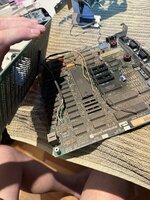
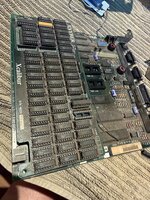
However, on opening it I discovered there was extensive internal modifications - in particular a Xyber Xcaliber RAM upgrade piggy backed on the motherboard. It was all jammed in tight, and in removing the motherboard from the chassis one of the chips on this board came off and was damaged. I expect it is damaged beyond repair.

I'd like to just take this upgrade board off and return the Mac to its humble 128k, but uncertain how to start. The board clicks in but also has lots of extra wiring - can these just be clipped off? Any guidance apprecaited!
 

Attachments

  • IMG_5702.JPG
    IMG_5702.JPG
    2.4 MB · Views: 49
  • IMG_5701.JPG
    IMG_5701.JPG
    3.3 MB · Views: 54

Builde68

New Tinkerer
Oct 19, 2025
6
1
3
Hi Chris, welcome to the hobby!

First off, I’d recommend grabbing a good set of schematics for the Macintosh 128K/512K. They are widely available online and will be your best friend for this project.

Looking at your pictures, that motherboard doesn't actually seem to match the first revision of the Macintosh 128K. That PCB looks like the later revision used for the 128K/512K or 512Ke. Since there is no jumper in place at W1, your board is a 512K or 512Ke, depending on which ROMs are installed. By the way, the ROMs seem to be missing, or perhaps there was another daughterboard installed on top of their sockets, likely a SCSI interface.

To return it to stock, you will need to do more than just clip the bodge wires. You’ll need to reinstall five specific components that were migrated from the motherboard onto the Xcaliber board:

  • RP2 & RP3: 47-ohm resistor packs.
  • U12E & U13E: 74LS244 chips.
  • U13G: A 74LS253 chip for the footprint where most of the bodge cables originate.
If you think those 74LS244/253 chips or the SIP resistor packs were damaged during the mishap, you can easily buy new ones.

A few tips for the reinstall:

  1. Check the Pins: Ensure the resistor pack pins are in good shape and make tight, reliable contact with the pin header sockets on the motherboard. Since the footprint for U13G has no socket, I’d advise soldering a new one in place rather than soldering the 74LS253 chip directly to the board.
  2. Leave the Sockets: I don't recommend removing the sockets already installed at the RP2, RP3, U12E, and U13E footprints. If you try to desolder them without the proper tools, it is very easy to accidentally lift a pad.
  3. Inspect for Cut Traces: It is unlikely this specific RAM expansion required cutting traces, but definitely give the motherboard a close look for any evidence of that. Take a detailed look especially around the TSM chip.


Good luck getting that Mac back to its original state!
 
Last edited:

Trash80toG4

Active Tinkerer
Apr 1, 2022
1,253
401
83
Bermuda Triangle, NC USA
Never restore a 128K to its inglorious stock condition! Especially important to preserve it as is if it's not the first release board! The 128K was obsolescent at release when SJ was forced to use a 512K prototype to handle its intro/announcement!

That RAM upgrade board installation would be what's important to resurrect and preserve in a working 128K for posterity. Folks from all over the tech world did their best to bring the all but brain-dead 128K up to a level of performance capable of meeting the demands of the Dawn of Desktop Publishing. PageMaker, the LaserWriter and upgrades such at yours saved the pathetic early Mac.

Welcome to this whacky world of ancient hardware!


All IMO of course. ;)