
My ESP32 SoftCard arrived and I have been having some fun with it! CVT, the creator (located in Bulgaria), has done some incredible work on this product! The wide array of features built into this card breathe new life, extended utility and neo-retro fun into Apple II computing!
Here are some specifics of my installation into my monochrome Apple IIe:
Installation was mostly OK. I had a few minor issues, as follows:
1. The audio pass-through jumper wires that came with the kit had jumpers with holes that were too big for the IIe speaker posts. Luckily, I had a bunch of debug jumper wires with jumpers that were the correct size. If you get this card, you may want to make sure you have some standard jumper wires or communicate with the seller before shipping.
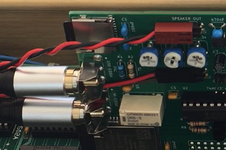
2. The audio pass-through set up could have been more clear. The instructions just say to use "trial and error" until sound works and there is no IIe diagram to show the motherboard connector polarity, and I didn't notice any polarity markings on the in/out board connectors on the ESP32 SoftCard, but I might have missed them. And, both of the original audio wires in my IIe are black - ah yes, the black wire is on that pin! After 2 failed jumper permutations, I went to YouTube and found CVT's beep video that also happens to clearly show the jumper polarity orientation for the card. It was exactly what I needed in combination with visualizing how the original dual jumper connected to the board -- worked first time after that. (n.b. + upper pin, - lower pin) Anyway, it would have been easy to label the board and also provide an image of the motherboard audio header orientation in the PDF manual.
3. One of my IIe slots was a little dusty and the card didn't initially show up on the bus, even though it was powered. However, it did work when I moved it to a different slot. I probably need to disassemble the IIe, give it an ultrasonic clean and/or deoxit everything. It is probably at least 30 years overdue for a deep clean.
4. The RCA jacks don't fit through the rear slots of the IIe, but it's easy to unscrew the outer cover on the connector, at which points it fits through the slot opening.
5. The final step was downloading and adding the boot disk to my floppy emu. I couldn't get the 3.5" ProDOS image to boot (but it should have worked). I was able to get the 5.25" image to work. The Floppy EMU should be able to deal with a 3.5" ProDOS image, so something isn't quite right with the source image...but the other one worked.
6. After detection, there are 3 menu choices -- HELLO, ESP32NTSC and ESP32PAL. The HELLO option doesn't work - maybe it is just intended to use an on-screen menu to say hello.
I benchmarked Mac 68K emulator mode on the ESP32 using the included Speedometer 3.06 and it was a zesty 2-3x faster than a Mac Classic. Yeah...it's an emulator and the IIe is just along for the ride, but I still LOL'd quite a bit. It is pretty funny to see a MacPlus running on a mono IIe screen -- almost worth the price of admission, including the Mac power-on beep!
After detection, the card boots into 80-column CP/M mode and the SD Card provides a huge amount of storage. So, I'm curious to try out some CP/M apps like dBase II, SuperCalc, WordStar and Turbo Pascal. I guess I'll put them on the main SD Card or download them via the wireless FTP server! I haven't tried that yet...but am looking forward to it.
Attached below are the files I used to get up and running. I got my ESP32 SoftCard from MacEffects. It shipped without any documentation and I had to search for it (not too hard). The home base for CVT is AppleFritter. The card is also available on Tindle, where there are specs and documentation -- maybe direct from the creator? I don't know.
n.b. If reading this post in the future, always check for updated documentation and software.
Here are some specifics of my installation into my monochrome Apple IIe:
Installation was mostly OK. I had a few minor issues, as follows:
1. The audio pass-through jumper wires that came with the kit had jumpers with holes that were too big for the IIe speaker posts. Luckily, I had a bunch of debug jumper wires with jumpers that were the correct size. If you get this card, you may want to make sure you have some standard jumper wires or communicate with the seller before shipping.
2. The audio pass-through set up could have been more clear. The instructions just say to use "trial and error" until sound works and there is no IIe diagram to show the motherboard connector polarity, and I didn't notice any polarity markings on the in/out board connectors on the ESP32 SoftCard, but I might have missed them. And, both of the original audio wires in my IIe are black - ah yes, the black wire is on that pin! After 2 failed jumper permutations, I went to YouTube and found CVT's beep video that also happens to clearly show the jumper polarity orientation for the card. It was exactly what I needed in combination with visualizing how the original dual jumper connected to the board -- worked first time after that. (n.b. + upper pin, - lower pin) Anyway, it would have been easy to label the board and also provide an image of the motherboard audio header orientation in the PDF manual.
3. One of my IIe slots was a little dusty and the card didn't initially show up on the bus, even though it was powered. However, it did work when I moved it to a different slot. I probably need to disassemble the IIe, give it an ultrasonic clean and/or deoxit everything. It is probably at least 30 years overdue for a deep clean.
4. The RCA jacks don't fit through the rear slots of the IIe, but it's easy to unscrew the outer cover on the connector, at which points it fits through the slot opening.
5. The final step was downloading and adding the boot disk to my floppy emu. I couldn't get the 3.5" ProDOS image to boot (but it should have worked). I was able to get the 5.25" image to work. The Floppy EMU should be able to deal with a 3.5" ProDOS image, so something isn't quite right with the source image...but the other one worked.
6. After detection, there are 3 menu choices -- HELLO, ESP32NTSC and ESP32PAL. The HELLO option doesn't work - maybe it is just intended to use an on-screen menu to say hello.
I benchmarked Mac 68K emulator mode on the ESP32 using the included Speedometer 3.06 and it was a zesty 2-3x faster than a Mac Classic. Yeah...it's an emulator and the IIe is just along for the ride, but I still LOL'd quite a bit. It is pretty funny to see a MacPlus running on a mono IIe screen -- almost worth the price of admission, including the Mac power-on beep!
After detection, the card boots into 80-column CP/M mode and the SD Card provides a huge amount of storage. So, I'm curious to try out some CP/M apps like dBase II, SuperCalc, WordStar and Turbo Pascal. I guess I'll put them on the main SD Card or download them via the wireless FTP server! I haven't tried that yet...but am looking forward to it.
Attached below are the files I used to get up and running. I got my ESP32 SoftCard from MacEffects. It shipped without any documentation and I had to search for it (not too hard). The home base for CVT is AppleFritter. The card is also available on Tindle, where there are specs and documentation -- maybe direct from the creator? I don't know.
n.b. If reading this post in the future, always check for updated documentation and software.
Attachments
Last edited: