

I had an empty Mac SE case sitting around doing nothing and recently ran across Jesse Argenbright's conversion of an SE with a Mac mini on FaceBook. I thought I could do something very similar - I already had a Raspberry Pi 3, Wombat ADB to USB converter, a USB hub, and a 3D printer so I was a good part of the way there! Taking the project a little bit further, I added an HD activity light and stereo sound. Here's the finished product:
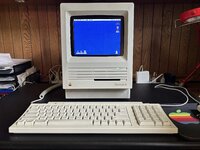
The 8" color LCD screen is available from Digikey. The monitor bezel can be downloaded from Thingiverse here and 3D printed.
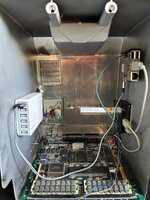
Everything is powered by the USB hub which is wired into the original power switch. I 3D printed a side bracket for the Pi, and everything is stuck to the side of the Mac with double-stick tape or hot glue. The Wombat on the right converts ADB to USB for the Pi. The sole purpose of the SE logic board is to provide an ADB input for the Wombat (and plug up the ports in the back).
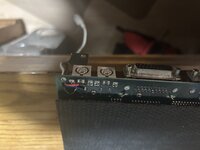
Here's the wiring from the ADB port to the cable that goes to the Wombat.
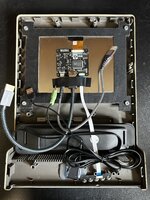
Here's the backside of the front of the machine with the two-piece bezel holding the monitor in. I hot-glued in a Syba USB-powered stereo speaker bar that I got cheap from Amazon. There are probably some better options out there - I'd go with one that has a volume control since Basilisk II doesn't save volume settings and it's really LOUD when it boots up...
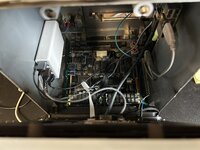
Here's a peek inside with the front semi-attached. I wired up an HD activity light from the GPIO of the Pi by using instructions from this site.
The PI runs MacintoshPi software which is a breeze to install and comes with both Basilisk II and SheepShaver emulators preconfigured. You can run Mac OS7, 8, and 9 with a simple command line command, and you can choose which one defaults upon boot. It's wirelessly networked and I was able to get on my netatalk file server and the internet without any issues. I'm not a fan of all the Pi's boot code so I played around with the boot files and was able to get rid of a good portion of it. Here's a video of it booting up:
One problem I ran into was that the Option and Command keys were reversed due to using a Mac keyboard. I was able to fix this by adding the line "swap_opt_cmd false" to usr/share/macintoshpi/macos7/macos7.cfg.
Overall this was a really fun project! I got to play with hardware, do some 3D printing, do some retrobriting, and tinker around with the software. It may just end up sitting on my shelf displaying Flying Toasters or an aquarium scene from After Dark, but it wasn't a big investment so I'm good with that!
The 8" color LCD screen is available from Digikey. The monitor bezel can be downloaded from Thingiverse here and 3D printed.
Everything is powered by the USB hub which is wired into the original power switch. I 3D printed a side bracket for the Pi, and everything is stuck to the side of the Mac with double-stick tape or hot glue. The Wombat on the right converts ADB to USB for the Pi. The sole purpose of the SE logic board is to provide an ADB input for the Wombat (and plug up the ports in the back).
Here's the wiring from the ADB port to the cable that goes to the Wombat.
Here's the backside of the front of the machine with the two-piece bezel holding the monitor in. I hot-glued in a Syba USB-powered stereo speaker bar that I got cheap from Amazon. There are probably some better options out there - I'd go with one that has a volume control since Basilisk II doesn't save volume settings and it's really LOUD when it boots up...
Here's a peek inside with the front semi-attached. I wired up an HD activity light from the GPIO of the Pi by using instructions from this site.
The PI runs MacintoshPi software which is a breeze to install and comes with both Basilisk II and SheepShaver emulators preconfigured. You can run Mac OS7, 8, and 9 with a simple command line command, and you can choose which one defaults upon boot. It's wirelessly networked and I was able to get on my netatalk file server and the internet without any issues. I'm not a fan of all the Pi's boot code so I played around with the boot files and was able to get rid of a good portion of it. Here's a video of it booting up:
One problem I ran into was that the Option and Command keys were reversed due to using a Mac keyboard. I was able to fix this by adding the line "swap_opt_cmd false" to usr/share/macintoshpi/macos7/macos7.cfg.
Overall this was a really fun project! I got to play with hardware, do some 3D printing, do some retrobriting, and tinker around with the software. It may just end up sitting on my shelf displaying Flying Toasters or an aquarium scene from After Dark, but it wasn't a big investment so I'm good with that!