Hi Guys,
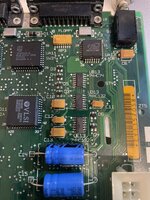
I bought an old Mac IIci and it was in really good shape. After turning it on everything worked except for the sound. I was advised to recap the board and this worked. I now have sound The only issue is after recapping, whenever I shutdown the IIci it now says "It is now safe to switch off your Macintosh" instead of shutting down by itself. I was advised to replace UB13, UD13, and UE13. I have now done this but still have the same result. I was then advised to recap the power supply. I have now done this but no change. Anyone have any suggestions?
Thanks
I bought an old Mac IIci and it was in really good shape. After turning it on everything worked except for the sound. I was advised to recap the board and this worked. I now have sound
The only issue is after recapping, whenever I shutdown the IIci it now says "It is now safe to switch off your Macintosh" instead of shutting down by itself. I was advised to replace UB13, UD13, and UE13. I have now done this but still have the same result. I was then advised to recap the power supply. I have now done this but no change. Anyone have any suggestions?Thanks