Hi all,
Long time reader, newbie poster!
I recently came to own a Lombard through a friend who does IT clearances and it found its way to me however it wasn't faultless.
Long story short, a parts unit was acquired from eBay and the rest is history. However, one issue remained, the ODD was awful! It could barely read CDs and if it did it was super slow (don't even bother with a burned CD-R).
Luckily with some cross referencing and image searches I was able to find a suitable drive that of all place came from a HP!
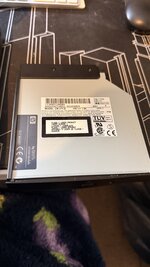
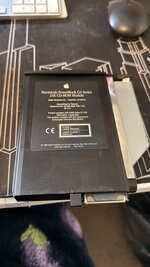
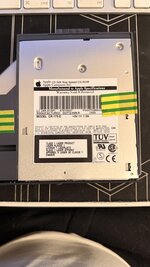
The drive in question that failed and what it was replaced with:
The Apple bezel will fit however you may need to trim part of the original bezel on the end nearest the front of the PowerBook to get a snug fit (a dash of super glue helps).
As the drives are a close match in dimensions and specifications the eject button (and emergency eject) all line up too!
Hope this helps some of you if your having issues with your Lombard's reading disks!
Long time reader, newbie poster!
I recently came to own a Lombard through a friend who does IT clearances and it found its way to me however it wasn't faultless.
Long story short, a parts unit was acquired from eBay and the rest is history. However, one issue remained, the ODD was awful! It could barely read CDs and if it did it was super slow (don't even bother with a burned CD-R).
Luckily with some cross referencing and image searches I was able to find a suitable drive that of all place came from a HP!
The drive in question that failed and what it was replaced with:
- If you have a CR-175-D drive (built by Matsushita) - Apple Original Drive
- Replace it with a CR-177-D (built by Matsushita) - HP Original Drive
- Some TOSHIBA models will work but the bezels will not line up!
The Apple bezel will fit however you may need to trim part of the original bezel on the end nearest the front of the PowerBook to get a snug fit (a dash of super glue helps).
As the drives are a close match in dimensions and specifications the eject button (and emergency eject) all line up too!
Hope this helps some of you if your having issues with your Lombard's reading disks!