New profile posts

  • Nominations will close March 25th. If you'd like to join the board and influence how TinkerDifferent runs in the next year, put your name in now!
  • Hey Guest, MARCHintosh 2026 is upon us. Check out community projects, join GlobalTalk, and have fun!
Heres a setup guide, notes on scaling and positioning and my LCD mounting bracket. Let me know if you need anything else I have a TON of notes but mostly partaining to my specific setup.

Attachments

  • MicroMacMinimalSetup.zip
    10.9 KB · Views: 1
🌈NiziMac
🌈NiziMac
Hey Tavis, thanks again for sending all the files and notes — I really appreciate it.

I went through the setup guide and display config. The way you handle the screen positioning with wlr-randr and the Mini vMac build at 576×430 makes a lot of sense. That was exactly the part I was curious about.

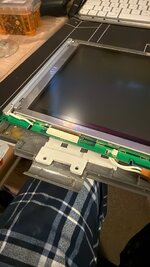
I also opened the LCD bracket STL — really clean design. Very clever way to mount the display inside the MacClock.

I'm going to study everything and start experimenting with my own MacClock build.

One question I had: how are you generating the floppy / system sounds? Is that coming from the ATtiny using PWM?

Tsuyoshi
Hey it’s tavis with the micro Mac project. Let me know what you need and I’ll get them together. There’s an lcd mounting bracket and then I have some other various mounts I made for my other boards and speaker and stuff.
Long time, no post and a Happy New Year to all!
Greetings from my slightly cranky PowerBook 180 the typical exploding hinges included!
Thank goodness for 3D printers!

Attachments

  • IMG_3179.JPG
    IMG_3179.JPG
    232.1 KB · Views: 3
Since 1974 Foto Amateur. First Cam: Edixa single Lens reflex 50mm 50-200mm; 1980 Minolta XD7 28mm 50mm Tokina 35-200mm; Scanned 6000 slides and Negatives with Reflect didgitDia 5000 and Nikon Coolscan V ED LS50. Since 2005 Nikon N5100, N5300, and compact cameras. Since 2023 Sony 6400 and Google Pixle 7 Pro, replacing the compact cameras. Now using Kodak Reels to scan family 8mm films from 60-80s.
I've got you on this....I have 3 Powerbook 180c; multiple years ago entered rabbit hole


Powerbook 180c 1 boots OK but the screen has a line right through the middle of it so the LCD caps have probably dissolved something or at lear need replacement

Powerbook 180c 2 is in pieces but worked except for a torn video cable, now destroyed LCD power board in an effort to to repair...I guess in short working logic board, power board, case bristle with hinges repaired JB Weld

Powerbook 3 worked OK the last time I fired up but needs screen caps need replaced

Shipping wise I guess the one in pieces particularly if you know the piece
Once upon a time, I installed a beta version of Windows 3.1 in DosBox, then moved this install to a real NEC V20 machine, and it worked and ran the game Chips Challenge. An 8088 can not run the game because it demands real mode or standard mode, but I saw the game run. I took the instance for granted and tried other versions of 3.1 beta that support Real Mode, and I have never been able to reproduce it ever again. This situation haunts me to this day, to the point where every few months I'll start installing versions of 3.0 and 3.1 Beta, moving .DLLs around, experimenting to see how I did it, because I can't reproduce it. How did I get Chips Challenge to run on an 8088 machine? This is the closest thing to seeing a ghost the has happened in my life. Granted, I've mashed 3.0a and 3.1 beta files to get a very slick looking 3.0a on an 8088, but I have never been able to get the ghost to come back.

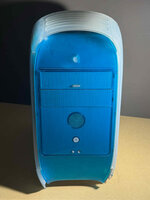
Bought a Radeon 7000 PCI graphics card for my Macintosh Server G3 Blue and White

I will have to get some replacement case parts and bottom handles for it

Attachments

  • s-l1600.jpg
    s-l1600.jpg
    148.3 KB · Views: 3
  • Like
Reactions: greenmachine
G
greenmachine
What case parts are you in need of? I don't have handles, but I have some other bits.
RetroTechTom
RetroTechTom
I need a replacement door with the handle to access to the insides of the system where the logic board is situated since it's cracked and damaged @greenmachine
G
greenmachine
I actually have that handle, just removed it from a side panel on a B&W G3 I purchased for the power supply. I've got the front, sides and top panel as well as one handle (I think it may actually be a bottom one). Internal case was corroded from being battery bombed.
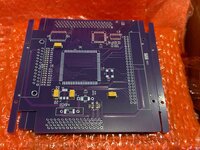
Next batch of Rocket SCSI Booster PCB's are here!
The should be assembled and ready in a few weeks, if your interested please keep a eye on the FS thread :)
IMG_4677.jpg
Here's a Macintosh Server G3 Blue and White that I bought on eBay for a future restoration project

I need to get some case parts and a graphics card for it alongside with the proper IDE hard drive cable

Attachments

  • e5615dae-789c-47e9-8533-9c1125af3ebf.jpg
    e5615dae-789c-47e9-8533-9c1125af3ebf.jpg
    144.4 KB · Views: 4
Hello,Nice to meet you. Are you referring to the discussions on the 68kMLA forum about installing the Total Systems Gemini Ultra accelerator into a Mac 512k? I’ve been following the community threads with great interest—it's a fascinating topic! I noticed your name came up when I searched here, so I couldn’t help but reach out. I’ve also tried installing it on a Mac Plus before.Best regards,


nekogaohtra280

Attachments

  • IMG_8301.JPG
    IMG_8301.JPG
    212 KB · Views: 4
  • IMG_8494.JPG
    IMG_8494.JPG
    158 KB · Views: 4
chrisrueckert
chrisrueckert
Hi# nice to meet you too. Yes, the Gemini board is quite impressive. I am not 100% sure in which Mac input it. I thought it went onto a Plus.
nekogahora280
nekogahora280
Thank you for your response. Installing GeminiULTRA on a Macintosh SE is easy. However, it's not the same with a Macintosh Plus. I removed the MPU from the Mac Plus board, combined a small 68000 with a conversion board and header pins to create a clip, and successfully connected it. I did that with Gemini II. I am very interested in putting Gemini on a Macintosh Plus. By the way, is the operating speed of your Gemini ULTRA 50MHz?
This is Akira Kogune from Japan.(ID nekogahora280)
Right off the bat, my adapter is malfunctioning.
When I switch my Carrera 040 to F mode,
the screen remains gray except for the Finder menu.
It still worked in M mode, but now it no longer works in M mode either. The SE30 works fine in S mode.
I've reinstalled System 7.1 several times, but the problem persists. Has anyone else had the same issue?
I'm wondering whether sending it to Germany and having it checked for symptoms is the best way to do this.
I'd appreciate your feedback if you read this.
I suspected a problem with my Carrera 040 and replaced it with my old DayStar adapter.
The S, M, and F modes switched properly, and the benchmark software ran, so I knew the Carrera 040 was still working. Of course, the screen is terrible, with a grid pattern.

Akira Kogune
Dear Bolle,Greetings. I am contacting you upon the recommendation regarding the adapter for using the Carrera040 with an SE/30. I reside in Japan and would like to inquire whether it is possible to proceed with a transaction. I look forward to your kind response.Sincerely, ID nekogahora280