
Macintosh LCII failure

indibil

New Tinkerer
Hi, I recently got an LCII that wouldn't boot. I recapped the power supply, and after that, the LCII powered on, but there was no chime, and the screen was just a blank image.

After that, I recapped the motherboard (just the electrolytic capacitors), but nothing changed. I've tried changing the RAM, the VRAM, removing the hard drive, the floppy drive... and nothing works. If, after turning it on and seeing the blank screen, I quickly turn it off and on again, it doesn't even show the blank screen anymore. I have to turn it off for a few seconds and then turn it on for it to display anything.

Is this a known problem? Does anyone have any idea what could be wrong? The motherboard doesn't seem to have any capacitor damage. I've cleaned everything thoroughly to rule it out, and it still doesn't work.


IMG_20260113_164708.jpg


IMG_20260113_164657.jpg
 

phunguss

Active Tinkerer
Dec 24, 2023
542
459
63
57
Stillwater, MN
It is hard to tell with your pic, it is a little out of focus. Take a couple more close up shots of the capacitor farm on the bottom left and the upper left where it looks cloudy.
 

indibil

New Tinkerer
I did another test. I was testing it with a dead battery (0.5V), and I tested it with a new battery (3.5V), and with both I get the same result, but if I remove the battery, I hear the chime of death. I put any battery back in and I don't hear it. The screen is always blank. Even removing the VRAM shows a blank screen.


phunguss

Active Tinkerer
Dec 24, 2023
542
459
63
57
Stillwater, MN
I am attaching photos that I was able to take yesterday.

As for the PSU, I have tested both the repaired one and the one I use in a fully operational LC. With both, the result was the same.View attachment 26075View attachment 26076View attachment 26077View attachment 26078
Based on these photos, I am going to suggest a thorough cleaning. Completely remove the motherboard and soak it in IPA and gently scrub with a toothbrush. No solder point on the board should be orange or brown, as lead does not rust. It is corrosion from something, most likely capacitor electrolyte.
Screen Shot 2026-01-15 at 6.19.33 AM.png

This look of everything being 'wet' is residue from something (capacitor electrolyte or solder flux). If you take a cotton swab and dip it in IPA and drag across these surfaces, does the cotton swab come out yellow? If yes, it needs a thorough cleaning.
Screen Shot 2026-01-15 at 6.19.45 AM.png

Compare the pins on this chip. The ones in the center do not look the same as the ones on the outer edge. They should all appear similar. It may be possible cold solder joints. Again, more orange/yellow/brown residue, it needs to be cleaned.
Screen Shot 2026-01-15 at 6.21.16 AM.png

This corrosion on the three pin transistor is due to capacitor leakage. the capacitor is not on straight, which makes me believe this board needs a full recap.
Screen Shot 2026-01-15 at 6.21.32 AM.png

Things should not appear this brown and wet/sticky looking.
Screen Shot 2026-01-15 at 6.22.21 AM.png


Thorough cleaning, then reinstall and test. If it is not better, then a full board recap is due. But that is just my opinion.
 
Last edited:

indibil

New Tinkerer
Based on these photos, I am going to suggest a thorough cleaning. Completely remove the motherboard and soak it in IPA and gently scrub with a toothbrush. No solder point on the board should be orange or brown, as lead does not rust. It is corrosion from something, most likely capacitor electrolyte.
View attachment 26079
This look of everything being 'wet' is residue from something (capacitor electrolyte or solder flux). If you take a cotton swab and dip it in IPA and drag across these surfaces, does the cotton swab come out yellow? If yes, it needs a thorough cleaning.
View attachment 26080
Compare the pins on this chip. The ones in the center do not look the same as the ones on the outer edge. They should all appear similar. It may be possible cold solder joints. Again, more orange/yellow/brown residue, it needs to be cleaned.
View attachment 26081
This corrosion on the three pin transistor is due to capacitor leakage. the capacitor is not on straight, which makes me believe this board needs a full recap.
View attachment 26082
Things should not appear this brown and wet/sticky looking.
View attachment 26083

Thorough cleaning, then reinstall and test. If it is not better, then a full board recap is due. But that is just my opinion.

Okay, I'm going to do a thorough cleaning. I've already done a little, but it doesn't seem to be enough.

As I mentioned in the first post, I've already recapped all the electrolytic capacitors, both on the PSU and the motherboard. That's why they're bent.
 

indibil

New Tinkerer
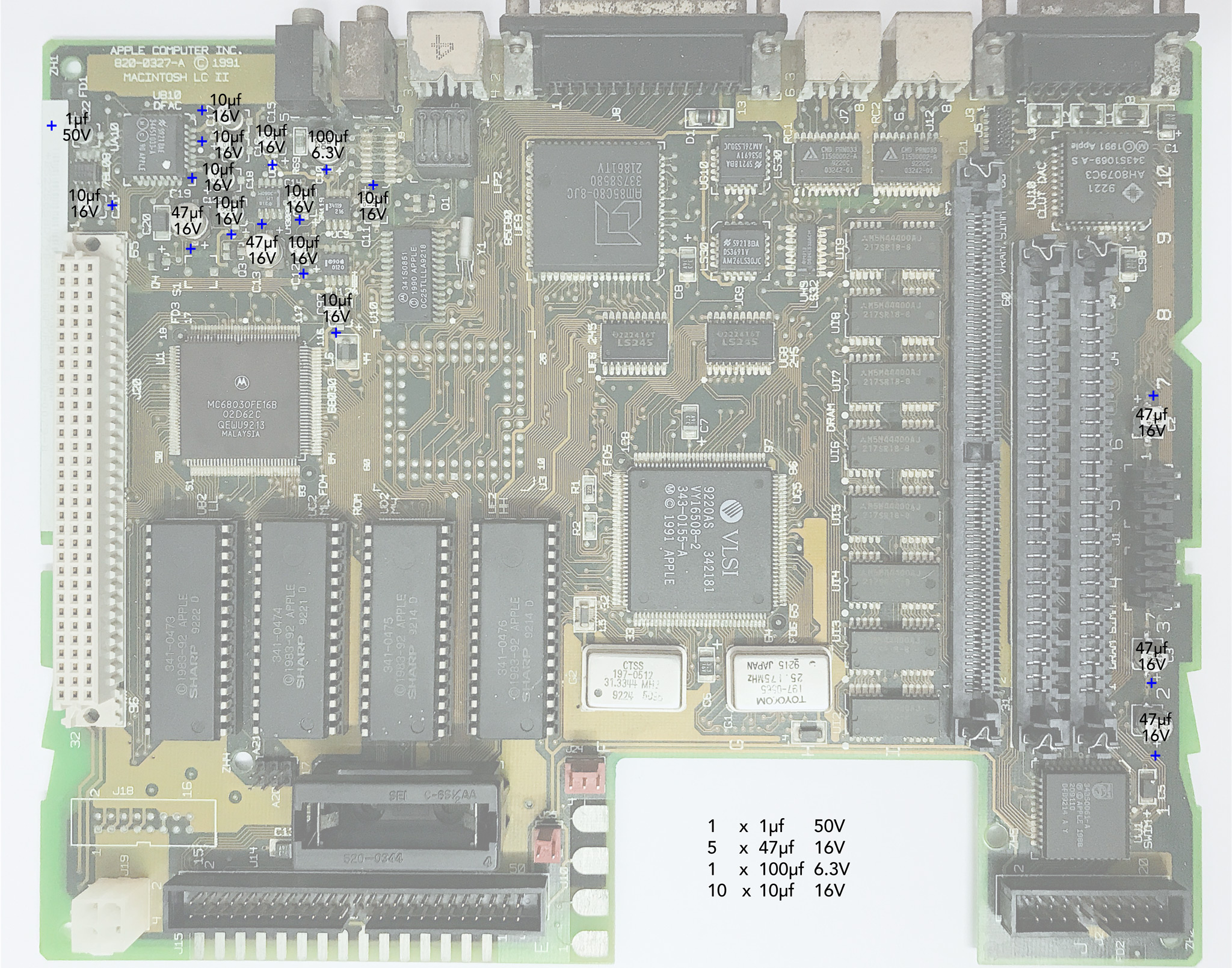
is the capacitor by UA10, C22 I think, the correct type?
Why not get a cap kit from somewhere like Console5 and redo everything? here is a guide:
1uF, like the original.
 

indibil

New Tinkerer
Hello again.

I've thoroughly cleaned the motherboard. It looks much better now, with no traces of acid.

The PSU is supplying +5.2V, +12.3V, and -5.1V when connected to the motherboard and powered on.

It's still the same, just a white screen and no chime. It won't boot.

Could it be the oscillators? Could you tell me where on the motherboard I could check them? I recently got a simple oscilloscope that I could try.

Thanks.

IMG_20260116_182200.jpg


IMG_20260116_182140.jpg


1768584384039.jpg
 

phunguss

Active Tinkerer
Dec 24, 2023
542
459
63
57
Stillwater, MN
First photo, top right is part Y1, looks like the old mac classic oscillator. Photo 3 looks like two obvious oscillators. I donr’t have schematics, but maybe someone can point those out.