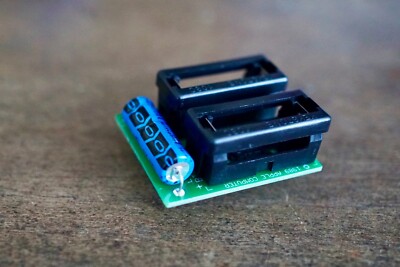
The Macintosh II and Macintosh IIx originally had soldered-on batteries for retaining parameter RAM memory and the clock. Later versions of the Macintosh II motherboard and all versions of the IIx motherboard had holes and spacing to accept batteries holders directly. (You can use these holes today when servicing the machines -- although you'll need to suck the solder out.)

However, Apple instead chose to use a daughterboard.


Besides batteries, the daughterboard also includes a 1000 uF capacitor. Notice the traces in the image below. The + lead of the capacitor attaches to the same point as the positive end of battery BT2. And, the - lead of the capacitor connects to the negative end of battery BT1.

But, when we look at the schematic, we see that only one battery is used to retain the contents of PRAM. The pair of batteries (and the added capacitor) together supply power to the power-on circuitry.

A common question is "What's the purpose of the added capacitor?". Fundamentally, it appears to provide assistance in keeping up the voltage of the power-on circuit when cold starting the machine. You can imagine that as these small batteries exhaust over time, they may struggle to provide enough current to get the computer started. Thus, it extends the usable lifespan of the batteries (and reduces the number of complaints to Apple dealers about a computer not starting).
Alternatively, it has been suggested that the capacitor is intended to retain the contents of PRAM when the batteries are being replaced. To test that theory, I measured the voltage across the PRAM chip. I did so on a recapped computer with the power plug removed and power turned off.

(Apple swapped the schematic IDs of the batteries on the daughterboard. Motherboard B1 -> daughterboard BT2. Motherboard B2 -> daughterboard BT1. Let's ignore all of that and call them bottom battery and top battery.)
If you remove only the top battery, no problem. Only the bottom battery actually feeds the PRAM. The computer won't turn on, but PRAM contents is retained for as long as the bottom battery is good.
If you briefly remove only the bottom battery, no problem. The capacitor voltage minus the top battery voltage is supplied to the PRAM for about a minute.
So, if you first replace either battery with a fresh one, while the other battery remains (and is not yet completely dead), you can indeed replace the batteries while retaining the PRAM and clock, thanks to the added capacitor.
However, if you remove both batteries -- even briefly, then there is no path from the positive end of the added capacitor to the PRAM retention supply. The voltage drops to 0V and the contents of the PRAM and clock are lost.
In summary, the added capacitor was probably designed to address start up problems, but has the advantage of preserving PRAM contents if you are instructed to replace only one battery at a time. Apple incorporated this capacitor onto the IIfx motherboard (C42).
- David
However, Apple instead chose to use a daughterboard.
Besides batteries, the daughterboard also includes a 1000 uF capacitor. Notice the traces in the image below. The + lead of the capacitor attaches to the same point as the positive end of battery BT2. And, the - lead of the capacitor connects to the negative end of battery BT1.
But, when we look at the schematic, we see that only one battery is used to retain the contents of PRAM. The pair of batteries (and the added capacitor) together supply power to the power-on circuitry.
A common question is "What's the purpose of the added capacitor?". Fundamentally, it appears to provide assistance in keeping up the voltage of the power-on circuit when cold starting the machine. You can imagine that as these small batteries exhaust over time, they may struggle to provide enough current to get the computer started. Thus, it extends the usable lifespan of the batteries (and reduces the number of complaints to Apple dealers about a computer not starting).
Alternatively, it has been suggested that the capacitor is intended to retain the contents of PRAM when the batteries are being replaced. To test that theory, I measured the voltage across the PRAM chip. I did so on a recapped computer with the power plug removed and power turned off.
(Apple swapped the schematic IDs of the batteries on the daughterboard. Motherboard B1 -> daughterboard BT2. Motherboard B2 -> daughterboard BT1. Let's ignore all of that and call them bottom battery and top battery.)
If you remove only the top battery, no problem. Only the bottom battery actually feeds the PRAM. The computer won't turn on, but PRAM contents is retained for as long as the bottom battery is good.
If you briefly remove only the bottom battery, no problem. The capacitor voltage minus the top battery voltage is supplied to the PRAM for about a minute.
So, if you first replace either battery with a fresh one, while the other battery remains (and is not yet completely dead), you can indeed replace the batteries while retaining the PRAM and clock, thanks to the added capacitor.
However, if you remove both batteries -- even briefly, then there is no path from the positive end of the added capacitor to the PRAM retention supply. The voltage drops to 0V and the contents of the PRAM and clock are lost.
In summary, the added capacitor was probably designed to address start up problems, but has the advantage of preserving PRAM contents if you are instructed to replace only one battery at a time. Apple incorporated this capacitor onto the IIfx motherboard (C42).
- David