
Fried transistor in PB G4, is there hope?

hayesk

New Tinkerer
Sep 28, 2026
2
0
1
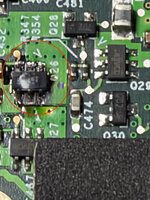
I dug out my old PowerBook G4 - Aluminum (FW800) and tried to revive it. The drive was dead, so I purchased an IDE->SSD adapter. As soon as I connected it and turned it on, I smelled smoke. After lifting the keyboard I saw this poor little component glowing red and emitting smoke. I don't know if the adapter drew too much power or if it was defective, but now my poor PB is dead. (see attached photo with bulbous component) The PB was working before because I could boot it off of an external FW drive.

I guess my question is is there any hope to source that component (labeled Q26 on the board) or would I be better off trying to find an entire motherboard. I wasn't able to find out what component it was so I don't know if a replacement exists. If anyone has suggestions, I'd appreciate it. Thanks, everyone!
 

Attachments

  • IMG_7252.jpeg
    IMG_7252.jpeg
    147.2 KB · Views: 13

Knife Cult

New Tinkerer
Feb 7, 2025
5
0
1
Most 2.5" IDE drives are powered by 5v. Most of the mSata type SSDs use 3.3v, so those adapters are supposed to have a regulator on them to reduce the voltage. Some of them do not. So it could be that the adapter fed 5v to a 3.3v device. In this case the drive is also probably damaged. Or, the adapter could be defective and has a short. In either case, you could remove the drive and check that dead FET with a multi-meter. If it failed open you can try to boot the computer on a an external (or DVD) drive. If the computer is alive, then you could probably replace that dead FET. Another option would be to connect the SSD to the 3.3v source in the PowerBook. This would have the advantage of not wasting power (and generating heat) with the regulator on the adapter.
 

hayesk

New Tinkerer
Sep 28, 2026
2
0
1
Is this the 15" A1046 (Powerbook5,2), A1095 (PowerBook5,4), or A1138 (Powerbook5,8 DLSD)?

It is the A1046.

Most 2.5" IDE drives are powered by 5v. Most of the mSata type SSDs use 3.3v, so those adapters are supposed to have a regulator on them to reduce the voltage. Some of them do not. So it could be that the adapter fed 5v to a 3.3v device. In this case the drive is also probably damaged. Or, the adapter could be defective and has a short. In either case, you could remove the drive and check that dead FET with a multi-meter. If it failed open you can try to boot the computer on a an external (or DVD) drive. If the computer is alive, then you could probably replace that dead FET. Another option would be to connect the SSD to the 3.3v source in the PowerBook. This would have the advantage of not wasting power (and generating heat) with the regulator on the adapter.

Interesting. The FET is likely dead, as I watched it glow red and smoke came out of it. I'll try to boot it from an external drive when I get back to it, and report back here. Thanks.