Backlit Portable 5126 — Is your backlight this dim?

JDW

Administrator
Staff member
Founder
Sep 2, 2021
2,460
1,932
113
54
Japan
youtube.com
Hi, folks.

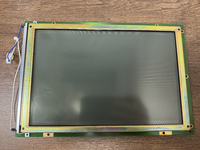
I know the Portable's backlight is rated at a meager 53 nits, but if any of you own a 5126 Backlit Portable, could you please tell me if your backlight is as dim as mine?

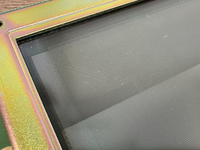
I filmed the short video below under standard room lighting with a rather strong LED room light, and then an LED desk light at right of the Portable. The light isn't so bright to have blown out the light colored plastics or anything. You can see how dim the LCD is normally without backlight, and while the backlight helps, it's not that great at all.

I'm just curious if the backlight strength was this weak originally. Do these CCFL tubes slowly dim over time?

Another thing that has me confused is why all the photos of the 5126 I've seen tend to show a more blue backlight, rather than the slightly yellowish backlight I see (which is what you see below). The video below is perfectly white balanced.

Thanks.


Tagging: @nottomhanks , @Paolo B , @techknight , @Stephen
 

nottomhanks

Tinkerer
Oct 31, 2021
142
77
28
Hey @JDW , I have been having serious issues with my Portable over the last six months. My Backlight flickers with any disk activity, and I think I may have burned out my MacEffects 8Mb ram card, so I am hurting. I might need to send it to @techknight to get things back to normal, but I'm afraid I'm not really able to do any reliable troubleshooting at this time unfortunately... :-(
 
  • Sad
Reactions: JDW

JDW

Administrator
Staff member
Founder
Sep 2, 2021
2,460
1,932
113
54
Japan
youtube.com
Hey @JDW , I have been having serious issues with my Portable over the last six months. My Backlight flickers with any disk activity, and I think I may have burned out my MacEffects 8Mb ram card, so I am hurting. I might need to send it to @techknight to get things back to normal, but I'm afraid I'm not really able to do any reliable troubleshooting at this time unfortunately... :-(
Very sorry to hear that. I do hope your RAM card is OK.

I've heard that CCFL backlight tubes can flicker when dying, so hopefully it's nothing more than that. But as to why your RAM card doesn't work, well, can you run the Portable without the card installed at all, just using the onboard 1MB? If so, can you try only using 4MB on the card rather than the full RAM (no jumper)?

I have the same MacEffects RAM card and I've been using only 4MB on it because of the 25% slowdown associated with using all the RAM on the card.

If you ultimately do get a hold of TechKnight, please tell him that I've been desperately trying to get replies from him for over a month now. He needs to only check his PMs from me.
 

JDW

Administrator
Staff member
Founder
Sep 2, 2021
2,460
1,932
113
54
Japan
youtube.com
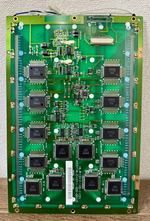
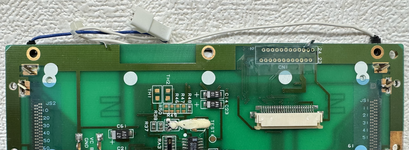
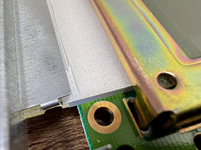
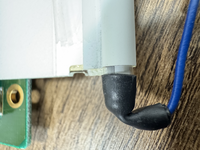
I found a YouTube video from a fellow opening his 5126 LCD housing, and took the following still images from it...

1764393641200.png

1764393657131.png


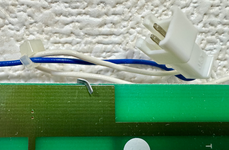
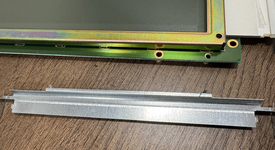
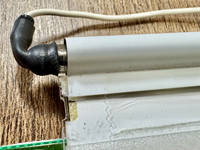
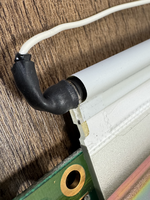
As you can see from the above, two wires lead from the INVERTER UNIT to each end of what should be a single CCFL tube inside that metal shield.

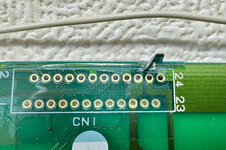
The metal shield appears to be mounted in place using a black rivet topped with glue on either side.

1764393756036.png


I've never tried to break the glue and remove the rivet on mine.

But on this 5126 LCD shown in this video by @techknight , his rivets don't seem to be glued...

1764395597525.png


When watching one of TechKnights videos, I see that he retrofitted an EL backlight, which leads me to wonder if the CCFL used in the 5126 isn't replaceable. If it is replaceable, why go with an EL?
 
Last edited:

Paolo B

Tinkerer
Nov 27, 2021
303
182
43
Switzerland
Hi, folks.

I know the Portable's backlight is rated at a meager 53 nits, but if any of you own a 5126 Backlit Portable, could you please tell me if your backlight is as dim as mine?
I don’t have a backlit, but surely it does look quite dim. For example, the Pb100 I have looks much brighter. Replacing the tubes is very easy, but sourcing the exact specs might be tricky.
This company may help, though…
 

JDW

Administrator
Staff member
Founder
Sep 2, 2021
2,460
1,932
113
54
Japan
youtube.com
Problem now is that I cannot for the life of me get the LCD housing open. SOMEHOW I was able to do it in the past because I recapped the INVERTER board. But no matter what I try now, it simply will not come open.

WHAT I'VE TRIED (AFTER REMOVING THE 2 SCREWS):

1. SERVICE SOURCE says to insert tiny screwdriver, push, maybe even rock it left and right, and then you should be able to move half of the housing. Well, NOPE!

1764408451054.png


2. Apple's Official Disassembly Video basically says the same thing starting at 26:36 here:

NOPE!

3. Then tried this guy's prying technique at the ribbon cable side of the display housing. I can get that part to open a couple millimeters, but it's latched hared on the opposite end of the housing and unlike that guy, I simply CANNOT GET IT OPEN!


4. I then read another guy who basically said the same thing as the guy in #3 above, but this guy suggesting prying out 360° all around, but I simply cannot get a tiny screwdriver on the sides where the handle is, nor can I do so at the top part where the screws were.

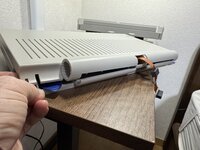
The photo below shows as far as I can get it open, and if I try to open it more, I fear something inside gonna break…

IMG_7619.jpeg

😭


Kai Robinson

TinkerDifferent Board President 2023
Staff member
Founder
Sep 2, 2021
1,315
1
1,307
113
43
Worthing, UK
Have you thought about doing an LED CCFL replacement mod, rather than messing with old CCFL's?

I know this is the wrong size, but they do make them for smaller screens: https://www.ebay.co.uk/itm/295196267562

For further watching, oh look, its a Sharp LQ series LCD used on powerbooks:

 
Last edited:
  • Like
Reactions: JDW

JDW

Administrator
Staff member
Founder
Sep 2, 2021
2,460
1,932
113
54
Japan
youtube.com
@Kai Robinson
Thank you so much for your reply!

In answer to your question, I’ve been desperate over the past month to get in touch with @techknight because he has the most experience repairing these machines and he also decided NOT to use a replacement CCFL tube or even LEDs, and he instead opted for an EL backlight, for reasons I don’t fully understand. That’s one of the many reasons I’m trying to get in touch with him.

TechKnight obviously found some issue with using LEDs (and maybe even CCFL), which is why he went with EL. But he was unable to fit the EL’s driver circuitry inside the machine because it’s so big, and that’s a deal breaker for anyone trying to mimic his solution.

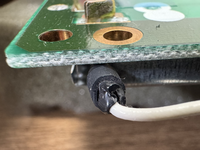
So because I am unable to consult with the expert on this topic (TechKnight), my thinking is that if I can buy an exact CCFL tube replacement and also figure out how to get these black end caps off without breaking anything (see my video), then that will at least make the screen more readable for me for now. That will restore my sanity, Kai, and allow me to plan a for a possible LED backlight replacement without a need to rush. In other words, a replacement CCFL tube would be an interim solution for me.

A few minutes ago, I fired off an email to the following CCFL company, asking them their thoughts:

https://www.ccflwarehouse.com/cclawiwi.html

I made a short video specifically for them, showing them some measurements that I made and asking specifically how to get those heat shrink in caps off without harming anything. Because if I remove them and break something and then they tell me they can’t offer me a replacement CCFL tube, then I won’t have any back light at all, and that’s a big problem because I’m making a formal video about my Portable now. I need people to see the LCD screen when they watch my video.

The black end caps on the CCFL tube are really hard when I try to squish them with my fingers. It’s more than just two layers of heat shrink. I think Apple even used glue inside the heat shrink to make sure the heat shrink wouldn’t come off.
 

techknight

Moderator
Staff member
Dec 2, 2021
89
88
18
North Carolina
That backlight level is normal from what I have seen. Mine is like that, all of the ones I have worked on are like that.

Flickering is also normal on some of them I noticed, it depends on the severity. the inverter design is an odd duck but its early for the time period.