Hacking the Kodak Reels 8mm Film Digitizer (New Thread)

Eradicator

New Tinkerer
May 27, 2026
8
5
3
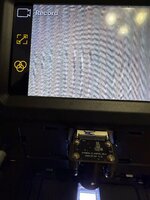
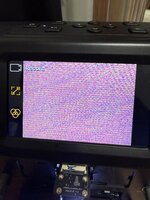
New issue now. When I switch to 8mm from Super 8mm, the screen corrupts and will not show anything in the capture section of the menu in the preview mode or in capture mode. If I back out of capture mode, the screen returns to normal and all menu options work as they should. Have flashed back to the stock D firmware, but no change. I flashed back to the WIP D firmware mod with no change.
I have done the lens replacement and even scanned a regular 8mm film with no issues. I started a new reel of regular 8mm and the screen froze with the image on of the frame on it and would not change.
The frame image from the flim stayed even after removing the film in capture mode. Once I backed out of capture mode, the menu showed up and worked as it should. Back in capture mode, the frame image shows up again. I powered down and then backup, and that is when the corupt screen image shows in any part of capture mode. That is when I tried flashing the stock firmware back.
So currently I can scan Super 8mm, but not regular 8mm. Any ideas?

Has anyone experienced this issue before?
 

Attachments

  • IMG_5660.JPG
    IMG_5660.JPG
    2.3 MB · Views: 23
  • IMG_5661.JPG
    IMG_5661.JPG
    2.1 MB · Views: 26

Eradicator

New Tinkerer
May 27, 2026
8
5
3
This is what my model D records now on regular 8mm. It does Super 8mm just fine.
Any ideas? I have already done the lens mod, but it was working about a week before this happened.
It shows this, or some other type of corruption even if there is no SD card in the scanner.
 

Attachments

  • Movie0001.MP4
    2.4 MB · Views: 0

Hook Line and Tinker

New Tinkerer
Mar 17, 2026
11
6
3
This is what my model D records now on regular 8mm. It does Super 8mm just fine.
Any ideas? I have already done the lens mod, but it was working about a week before this happened.
It shows this, or some other type of corruption even if there is no SD card in the scanner.
Could you have unknowingly caused some minor damage while the unit was opened up for the mod that got worse after some use? I'd open it back up and inspect for loose wires, cracked solder joints, missing components, etc. I doubt this is related to firmware if it's behaving the same way with stock firmware.

Beyond that, how invasive is the lens mod and can it be reverted back to stock? Could be a latent defect from the factory and if so, try reaching out to Amazon for a refund since it's less than a month old.
 

Eradicator

New Tinkerer
May 27, 2026
8
5
3
Could you have unknowingly caused some minor damage while the unit was opened up for the mod that got worse after some use? I'd open it back up and inspect for loose wires, cracked solder joints, missing components, etc. I doubt this is related to firmware if it's behaving the same way with stock firmware.

Beyond that, how invasive is the lens mod and can it be reverted back to stock? Could be a latent defect from the factory and if so, try reaching out to Amazon for a refund since it's less than a month old.
I did not open up the unit for the lens mod. I removed the old lens and sercured the ribbon cable out of the way. Then used a hobby knife to very carefully score the plastic until I could work it back and forth to "snap" the plastic I needed to remove. The knife never went all the way through the plastic. The ribbon cable we never hit by the knife. I did reseat the calble on the sensor side, but no change.
I might see if I can order a new ribbon cable to see if that resolves the issue.
I can assure you, the cable was not touched by the knife.
The screen will corrupt, or hold a image if it manages to see the image briefly. Just barely moving the switch from Super 8 to regular 8 messes up the screen, long before any of the other parts move.
For now, I will convert all my Super 8, then see what I can do on the regular 8 side. This way I can at least capture all my super 8.
I can switch back to super 8 and the screen and caputre is just fine without turning the unit off. I can slide the switch back and forth, screen always corupts on regular 8 and returns to normal on super.

I can't do a refund through since I cut the plastic for the lens mod. Although I guess I could order a new one and swapt the guts of it and return the old parts. I'll try checking all the wires on the inside first though. Maybe something came lose during the mod.

As for the lens swap iteself, it was not hard. I first got the parts in the lens swap guide. I ended up with a ton of extra screws, the case of them was like $9. The different lens holders as like 10 different sizes, but it was like $12. I did have a friend 3D print the spacer from the file in the guide. It works perfect.
I had to play around with the threaded holder in different sizes to get it to focus correctly but I had all the parts to make it work.
The only bummer is the D model mod does not have all the features of the earlier mods do to different hardware. But it does scan better, and the new firmware has the frame rate at 18fps instead of 20fps like the stock version.
 

Boojakascha

New Tinkerer
Jun 20, 2026
3
1
3
First of all:

Big thanks to 0dan0, Mac84 and videodoctor!

I write a suggestion:

I think it would be of help to newcomers to state in the first post that the Letter in the serial number doesn't do much and that the first three numbers are more important. Also I would argue to stop linking to the Firmware suggest tool, as it spits out B too frequently.

Finally, I would suggest to link 0dan0 edit of videodoctor' D dump to the list of original firmware. Also maybe to the repository the serial number check tool is linking too.

There is currently no real stock D, right? Just the stock D 0dan0 did minor changes on during boot screen?

For the records: my K2225148BK00947 units wants Firmware D.
 

Eradicator

New Tinkerer
May 27, 2026
8
5
3
First of all:

Big thanks to 0dan0, Mac84 and videodoctor!

I write a suggestion:

I think it would be of help to newcomers to state in the first post that the Letter in the serial number doesn't do much and that the first three numbers are more important. Also I would argue to stop linking to the Firmware suggest tool, as it spits out B too frequently.

Finally, I would suggest to link 0dan0 edit of videodoctor' D dump to the list of original firmware. Also maybe to the repository the serial number check tool is linking too.

There is currently no real stock D, right? Just the stock D 0dan0 did minor changes on during boot screen?

For the records: my K2225148BK00947 units wants Firmware D.
I believe the stock "D" firmware is downloadable in post 143.
 
  • Like
Reactions: Boojakascha

Boojakascha

New Tinkerer
Jun 20, 2026
3
1
3
I believe the stock "D" firmware is downloadable in post 143.
Thanks a ton Sir! :"

I did not find it, because when skimming through the 30 pages, I thought 143 is just about a Version 7.7 release post.

I think though the importance of pinning such a post and Mac84 updating the instructions on his page (https://mac84.net/8mmlookup/#installfirmwareinstructions) is raising as time passes, because the Reels Scanners are still being produced and are all going to be D (or later lower letters maybe?)
 
  • Like
Reactions: Eradicator

JayAech

New Tinkerer
Jun 2, 2026
4
0
1
Still curious if anyone else has a 100% confirmation on this stock number firmware version to use: J2925148BK00696

The J prefix seems extremely rare at this point, I havent seen anyone else mention having one with that prefix.
 

Boojakascha

New Tinkerer
Jun 20, 2026
3
1
3
Still curious if anyone else has a 100% confirmation on this stock number firmware version to use: J2925148BK00696

The J prefix seems extremely rare at this point, I havent seen anyone else mention having one with that prefix.
From my limited insight you toss the letter. You go for the first three digits instead.

There are dumps of all four stock firmwares anyways. You can't screw up.
 

Hook Line and Tinker

New Tinkerer
Mar 17, 2026
11
6
3
From my limited insight you toss the letter. You go for the first three digits instead.

There are dumps of all four stock firmwares anyways. You can't screw up.
I think the concern here is that it was suggested that since this is an unknown serial number, there is a possibility that it could be a 5th variant and if he flashes to "D" and it's really "E" (assuming that exists), he would brick his unit. If you go back to post 215 and prior posts, you can read about how some of the experts are using hardware and soldering skills to grab the stock firmware. Without knowing for sure, if I had the J2925 unit, I probably wouldn't risk flashing to the modified "D" firmware not knowing whether I could go back to stock but that's me.

If you're new here and thinking of getting a reels unit, they are on sale again for Prime day. Not sure how long the sale will be active but they are 17% off right now:


1782349457304.png
 

melw

New Tinkerer
Jun 23, 2026
1
0
1
Hello all! New to the forum and tinkering.

I recently purchased a Kodak Reels (type D) device, started capturing and was immediately disappointed by the quality of the video - very grainy, ton of compression artifacts, low bitrate. Then I found this forum and thread, read through all the posts - so much info, my brain hurts! :D Started patching existing firmwares and testing what works, what doesn't work, and in what way. Then set up the toolchain and started reverse-engineering and modifying the firmware myself. Now after a few days, I think I'm getting somewhere with all the tinkering.

First, credit where it's due: none of this would exist without 0dan0's repo and reverse-engineering groundwork (the build/pack toolchain, the A/B/C hooks, the histogram/OSD approach, and the original D WIP) and videodoctor's working D firmware (1600×1200 / ~18 fps base, plus his notes on D's display/frame-buffer differences). All of the below is on videodoctor's D build as the base; the changes are single-instruction static patches on the decompressed image (no new toolchain needed).

1. Image quality — bitrate control

Compression quality (or lack of it) was my biggest gripe, and it turns out the record bitrate is a soft target, not a hard buffer cap. The active bits/sec for the record encoder = config[24] << 3, set by one instruction:
  • 0x80240588: sll v1,v1,3 (×8, word 0x000318c0). Patch to sll v1,v1,4 (0x00031900) → ×2 (~16 Mbps); sll v1,v1,5 (0x00031940) → ×4 (~31 Mbps).
  • The rate-control limits are proportional to the target (RC+156 = 0.8×budget, RC+148 = 6×budget), so raising the target raises the overflow threshold too — the encoder simply picks a lower QP instead. Tested 8 → 16 → 32 Mbps, all stable, visibly less blocky.

2. On-screen HUD on D

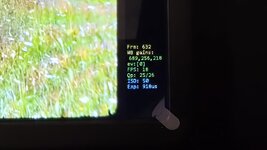
I was able to hook up rendering through previously existing hook: The stock white-balance function fires already every frame in capture. Redirect the call at 0x2b7c90 to custom routine and call the original (0x802b7b7c) so WB still runs.
  • Drawing into the V1 video buffer (0xA3CF65B0, pitch 656) shows immediately but flickers
  • The steady surface is the IDE O1 OSD layer: handle = *(u32*)0x80e08df0 (a handle ID, not a pointer), base = resolve(handle) via 0x80006500, pixels at base + 0x65400 (864×480, 8-bit palette). Drawing here is steady in non-capture mode.
  • In capture the firmware recomposes the whole O1 layer on its UI updates (record-icon blink etc.), so draw blinks as well. I traced the GUI present path (OSD_Compose @ 0x8010bc38: the canvas→O1 blit 0x8010c164 @ 0x8010bc70, src canvas ptr *0x80e09aa8, flush 0x8010b0e8 @ 0x8010bd14) and tried hooking it three ways (draw O1 after the blit; draw O1 before the flush; draw the source canvas before the blit) — all run but never appear on screen. The capture compositor shows a buffer I can't pin down by static RE alone, and I have no live observability (no serial console / RAM dump) to find it.
    This is where I'd love input: which buffer the capture path actually scans out, the correct per-recompose draw point during capture, or simply a RAM dump from a D unit so the live pointers can be read.

3. Why 0dan0's D build locks up on device startup

Inline hooks at motor-timing entries (0x2b6a3c, 0x2b7c98, crop cluster) stall motor init; plus a WB register bug (the inserted jal select_wb doesn't reload caller-saved a1 → WB gains written to garbage).


Will share more progress as I go. Bit busy right now but should have time to continue tinkering over the weekend. Thanks again to 0dan0 and videodoctor — this wouldn't be possible without you!