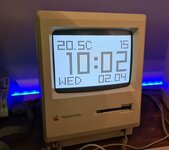
Since I posted the source code on github, I thought Id make this new post

I made a program with Retro68 cross compiler with a strange likeness to the like clock Maclock. Watch out for the clock bug, where DAY does not match date. I find 1998 works for this year. @This Does Not Compute gave me the idea when he converted the clock into a vintage Mac, I wanted to see if I could do the opposite. I'm sure this will run on his tiny 'Mac' and restore Maclock function Source code added.

 github.com
Features:
github.com
Features:
Keyboard Shortcuts:

I made a program with Retro68 cross compiler with a strange likeness to the like clock Maclock. Watch out for the clock bug, where DAY does not match date. I find 1998 works for this year. @This Does Not Compute gave me the idea when he converted the clock into a vintage Mac, I wanted to see if I could do the opposite. I'm sure this will run on his tiny 'Mac' and restore Maclock function
Source code added.GitHub - retrotheory/BigMaclock: A desk clock for the Macintosh
A desk clock for the Macintosh. Contribute to retrotheory/BigMaclock development by creating an account on GitHub.
github.com
- Large digitized time display with blinking colon.
- Date and Day of the week in a custom small font.
- Double-buffered rendering for a flicker-free experience.
- Inversion and Gray Background modes for different lighting conditions.
- Alarm system with customizable time and multiple alert sounds.
- Face mode (Happy Mac) toggle.
- Dynamic Resolution Scaling: Automatically detects screen size (Compact Mac 512x342 vs. Hi-Res 640x480) and scales the digits and layout to fit.
Keyboard Shortcuts:
- 'H': Toggle Happy Mac mode.
- 'I': Toggle Inverted display (Black background).
- 'G': Toggle Gray background.
- 'Q': Quit the program.