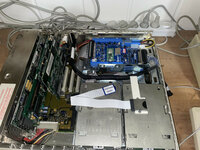
This problem is already solved. What I did not mentioned was that I used a USB extender, because of the way the two BlueSCSIs are mounted (see photo). To make the BlueSCSI UW better reacheble, I added an extender, but since I left it out, the log file does not show the errors:Your log shows a SD error in the bootloader (I can address that, but thats not your issue, can ignore for now)
| Platform: BlueSCSI Ultra (Wide) FW Version: 2026.08.17-rel Aug 17 2026 16:08:59 Flash chip size: 16384 kB === Bootloader Log === [0ms] Bootloader version: Aug 17 2026 16:08:45 BlueSCSI Ultra [0ms] Looking for firmware: BlueSCSI_Ultra_Wide*.bin [132ms] Bootloader continuing to main firmware === End Bootloader Log === Clocking to standard I2S-compatible base speed Reclocking with these settings are compatible with CD audio playback Initial Clock set to 150MHz Reclocking the MCU to 155MHz Setting the SDIO clock to 26MHz After reclocking, system reports clock set to 155MHz BlueSCSI CD Audio enabled - requires DAC SD Config Result: 0xFF SDIO 1.8v High Speed, Mode D === SD Card Info === SD card detected, FAT32 volume size: 15185 MB SD Name: SU16G, MID: 0x03 (SanDisk), OID: "SD" (0x53 0x44) === Global Config === bluescsi.ini not found, using defaults === Finding images === === Finding images in / === == Opening /HD10_512 Data 1.dsk for ID:1 LUN:0 ---- Configuring as disk drive == Opening /HD00_512 IIfx 1.dsk for ID:0 LUN:0 ---- Configuring as disk drive == Opening /HD20_512 Data 2.dsk for ID:2 LUN:0 ---- Configuring as disk drive == Platform supports ROM drive up to 12284 kB === Configured SCSI Devices === ID: 0, BlockSize: 512, Type: Fixed, Quirks: Apple, Size: 1843264kB ID: 1, BlockSize: 512, Type: Fixed, Quirks: Apple, Size: 1843264kB ID: 2, BlockSize: 512, Type: Fixed, Quirks: Apple, Size: 2048096kB Clock set to: 155MHz Initialization complete! INFO: Pico Voltage: 3.280V. SCSI ID 2 negotiated synchronous mode 10 MB/s (period 4x25 ns, offset 8 bytes) INFO: You may get a boost from overclocking as your system supports synchronous SCSI speeds. https://bluescsi.com/docs/Ultra-SCSI-Fast20-OverClock SCSI ID 1 negotiated synchronous mode 10 MB/s (period 4x25 ns, offset 8 bytes) SCSI ID 2 negotiated synchronous mode 10 MB/s (period 4x25 ns, offset 8 bytes) SCSI ID 1 negotiated synchronous mode 10 MB/s (period 4x25 ns, offset 8 bytes) |
The only "problem" with that is that I have to screw the BlueSCSI UW lose to reach the SD card. With switching the both cards, the internal SCSI cable is too short to reach the BlueSCSI V2W. To fit both cards in the IIfx, I clued two Heavy-Duty Trays together in a way it fits nice in a slightly modified drive rack.
I do use a USB extender in my SE/30, but that one is shorter (30 cm) and connected to a BlueSCSI V2W. No problems with that. But a longer one on the BlueSCSI UW is not a recommendation.