
Colour Classic Display Issues After 84v Mod + Recap

Doctorkillbydeath87

New Tinkerer
Sep 30, 2026
10
1
3
Hi Everyone, I recently attempted the 84v mod including the "beefy" upgrade as outlined by @JDW in his excellent youtube tutorials (thank you so much!). I also recapped a good portion of the analog board (the logic board was done by the previous owner). My CC was running flawlessly before my tinkering; it still boots fine, but I'm experiencing some major wonk on the display:
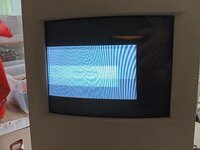
CCdisplaywoes.jpg

So far I have:
-Tested voltage @ J66 (84v)
-Replaced the new zener @ DL21/22 with the originals as I was worried installing heatsinks to the new one may have damaged it (no change).
-Tested for contact between new solder points and adjacent pads
-Reflowed a good portion of the board
-Checked for shorts caused by new soldering work

I am also looking for some advice on a small component that's detached on an LC 575 board. It is labeled L1 and need a replacement recommendation if possible:
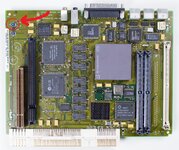
mysticboardcomponentl1.jpg

Hopefully I can get some direction from someone more knowledgeable than I, thanks in advance.
 

Attachments

  • CCdisplaywoes.jpg
    CCdisplaywoes.jpg
    1.9 MB · Views: 62

jonschultz

Tinkerer
May 16, 2026
41
30
18
USA
github.com
For IP7 pin 6 on my system, with hard-power on but soft-power off, I measure -55V relative to chassis ground and 0V relative to the bridge rectifier's (DP1) negative terminal. With soft-power on and the system booted, I measure about -32V relative to chassis ground and +10V relative to the bridge rectifier's negative terminal.
 

jonschultz

Tinkerer
May 16, 2026
41
30
18
USA
github.com
Just a word of warning though: I just killed my QP7 MOSFET (the one with the small heatsink, just north of IP7) while probing around at IP7. This immediately also took out the fuse on the AC side. I was lucky to have a more modern acceptable replacement, a STP10NK70ZFP. This is probably not the same root cause as in your case, as nothing is blowing the fuse and your AC and CRT power are working. But it might be worthwhile to pull QP7 from the board and check it out-of-circuit. If you measure just a few ohms between any two pins then it's dead.
 

Doctorkillbydeath87

New Tinkerer
Sep 30, 2026
10
1
3
Wow, I'm sorry you lost a component probing around on my behalf! If I can make it up to you in any way please let me know, I'd happily send some replacements. Out of curiosity, did the MOSFET get fried while booted or at idle?

I'll give that a try tomorrow. Parts @Mark_W recommended are on order.
 

jonschultz

Tinkerer
May 16, 2026
41
30
18
USA
github.com
Wow, I'm sorry you lost a component probing around on my behalf! If I can make it up to you in any way please let me know, I'd happily send some replacements. Out of curiosity, did the MOSFET get fried while booted or at idle?

I'll give that a try tomorrow. Parts @Mark_W recommended are on order.
No big deal, I found the problem really quickly and I have plenty of random replacement parts. It was a good lesson anyway, to be really careful in that area, especially when measuring relative to the rectified AC.

It was fried while booted, so the logic board supply side was running.
 

Mark_W

Tinkerer
Feb 2, 2026
54
41
18
I measured pin six with my meter set to DCv & ground lead contacting the shroud surrounding the main supply plug socket. Attached a picture just to make sure I'm contacting the correct locations. Double checked and I'm receiving 53.8v still.
Yes basically what @jonschultz said, you are measuring the voltage regards to cold ground which is floating, you need to measure voltage across pin 6 and pin 4 on TDA4605.

Like I said, you need to verify whether QP11 turns off after receiving power on signal from logic board, and whether TDA4605 at IP7 receives power. If IP7 doesn't receive power at all you need to fix soft power circuit first.