Dell System 310

RetroViator

Tinkerer
Oct 30, 2021
138
160
43
retroviator.com

Righting a Wrong​

My company was cleaning out an old telecom closet when they decided to get rid of the "door stop" they had been using to prop open the door when working in the tight space. It was a Dell System 310, or so it seemed. The IT guys knew of my interest in old computers, and I was delighted when one day I walked into my office and found it sitting on my desk.

IMG_2370.jpeg


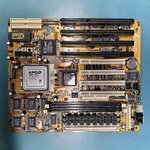
My excitement held until I got it home and discovered that its motherboard had been replaced. The original 1989 Dell motherboard with its 386DX was gone, replaced by an Amptron PM-8600 with a 233MHz AMD K6. I should have known something was up when I saw a 36x CD-ROM had replaced the original 5.25 floppy.
IMG_2386.jpeg

I thought about making it into a sleeper system, but instead I set out to find the original motherboard. A year later, I was blessed with a fruitful eBay alert, and the original board was mine.

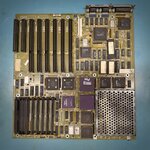
Now, I'm going to restore the computer to its proper configuration. The original motherboard looks good, though with plenty of tantalum caps waiting to pop. Its RAM is missing, but it should use standard 30-pin SIMMs — a real plus, considering many systems of this era used custom memory cards (it also has a custom memory expansion connector). One wrinkle is that the system lacks an onboard keyboard jack. The jack is supposed to be mounted in the case above the motherboard and connected using a 4-pin header. I'll have to figure that out.
IMG_2389.jpeg

This will be my first 386DX system. I longed for a 386DX system back in the day, but I could only swing an SX. And thus far, all the 386s in my collection are of the SX variety.

I've been looking forward to working on this one for a while.
 

RetroViator

Tinkerer
Oct 30, 2021
138
160
43
retroviator.com
I did more research on the motherboard, and realized that I won't be restoring the System 310 to its original condition because I have the motherboard for its big sibling, the Dell System 325. The 310 is a 20MHz 386DX and the 325 runs at 25MHz. When released, the System 325 was Dell's flagship computer.

Luckily, I was able to find the original installation and troubleshooting manual on Archive.org. After uploading a high-resolution photo and other information to The Retro Web Discord, I sat down and studied the motherboard. It looks good, but when checking the AT power supply connector, I see the following:


JPS1 ConnectorPower SignalOhms to Ground
Pin 1Ground0 Ω
Pin 2Ground0 Ω
Pin 3-5 V+ MΩ
Pin 4+5 V+ MΩ
Pin 5+5 V0 Ω
Pin 6+5 V+ MΩ


JPS2 ConnectorPower SignalOhms to Ground
Pin 1Power Good0 Ω
Pin 2+5 V0 Ω
Pin 3+12 V0 Ω
Pin 4-12 V+ MΩ
Pin 5Ground0 Ω
Pin 6Ground0 Ω

So, I have shorts on two of the +5V lines and the +12V line. I count more than 50 dipped tantalum caps and even more axial ceramic caps. Any cap I check is a dead short back to the power connector, so I don't have a good place to start. I tried removing a few of the caps nearest the power connector, and I found the ground plane makes it very challenging to get caps off the board, but when I lifted the positive leg, nothing changed.

Unless someone has a better idea, I may start with removing all the socketed chips, and see if that makes a difference.
 
Last edited:

RetroViator

Tinkerer
Oct 30, 2021
138
160
43
retroviator.com
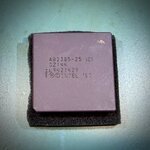
I found the culprit, and I was very lucky. I started pulling ICs, and I started with the 386DX, the Cyrix FastMath co-processor, and the Intel 82385 cache controller. I then tested for shorts before pulling more, and the resistance was up to 400 ohms on the previously shorted rails. So I reinstalled the ICs one at a time, and found that the dead short returned when I inserted the 82385. (With all the other ICs installed, the resistance was around 370 ohms.)

IMG_2409.jpeg

I tested the board by injecting current from my bench power supply on each of the previously shorted rails. Nothing popped or got hot at either 500ma or 1 amp.

I've now ordered a replacement 82385 from eBay, and I'm starting to think this board might boot.
 
  • Like
Reactions: Kai Robinson

RetroViator

Tinkerer
Oct 30, 2021
138
160
43
retroviator.com
I opened the power supply and found it to be dusty and in otherwise good shape. I cleaned everything, oiled the fan, and tested the PSU. It ran just fine.

So I decided to plug it into the motherboard and see what happened--and nothing happened. The power protection kicked in. That got me thinking about something that had been nagging me. While removing the cache controller cleared the short to ground, how could removing the cache controller clear a short on the +12V line? And why do I have the same resistance between the +5V and +12V rails? Is it possible to have a short between +5V and +12V? What could bridge those power rails?

Here is an updated table showing the resistance measured at the AT power supply connector:


JPS1 ConnectorPower SignalOhms to Ground
Pin 1Ground0 Ω
Pin 2Ground0 Ω
Pin 3-5 V500 KΩ
Pin 4+5 V575 KΩ
Pin 5+5 V375 Ω
Pin 6+5 V60 MΩ


JPS2 ConnectorPower SignalOhms to Ground
Pin 1Power Good375 Ω
Pin 2+5 V375 Ω
Pin 3+12 V375 Ω
Pin 4-12 V38 MΩ
Pin 5Ground0 Ω
Pin 6Ground0 Ω

So, I checked pin 3 on JPS2 and confirmed its a dead short to pin 1 and 2 on JPS2 and pin 5 on JPS1. That is not right!

Now I'm really glad that when I injected current from my bench power supply earlier, I only tested the +5V rails. I was going to throw +12V at pin 3, but I think I only used +5V--at least I think I did. 😨

I'm open to suggestions on where to start hunting for components or ICs that could bridge the +5V and +12V lines.
 
Last edited:

RetroViator

Tinkerer
Oct 30, 2021
138
160
43
retroviator.com
Wait a minute... I have been thinking of the AT power supply connector backwards. I've been going at this all wrong. When I plugged in the PSU, I should have noticed my mistake, but I did realized the problem when I started checking resistance between the power supply connector pins and the ISA bus connectors. The connections weren't lining up.

It really lays out as follows:

JPS1 ConnectorPower SignalOhms to Ground
Pin 1Power GoodOpen
Pin 2+5 V375 Ω
Pin 3+12 V10 MΩ
Pin 4-12 V25 MΩ
Pin 5GroundΩ
Pin 6GroundΩ


JPS2 ConnectorPower SignalOhms to Ground
Pin 1GroundΩ
Pin 2GroundΩ
Pin 3-5 V61 MΩ
Pin 4+5 V375 Ω
Pin 5+5 V375 Ω
Pin 6+5 V375 Ω

Pin 1 is toward the outside of the board not the inside. I can be really dense sometimes. 🥴

There is no short between +5V and +12V, but now I don't know why the board won't power up. (I wonder if I messed up the Power Good signal with all my messing around thinking it was a standard +5V source.)
 
Last edited:

Trash80toG4

Active Tinkerer
Apr 1, 2022
1,275
421
83
Bermuda Triangle, NC USA
Very cool stuff, gotta make an encouraging post, hate it when my projects never get them. Likes suck.
Best of luck with this great project, have at it and keep us updated.

I could only swing building an SX/25 system with FPU (SCSI card/HDD too) back in the day for graphics when CorelDraw and WIN 3.0 were released.
Finally got a nice 386DX/33 Tower when doing a development project! Didn't make any money, but very nice toys collected in the effort. :)
 
  • Love
Reactions: RetroViator

RetroViator

Tinkerer
Oct 30, 2021
138
160
43
retroviator.com
Thank you!

I have been using this as a project log, which may not be how some would like to see the forum used. I figure this information might help someone else if they get a similar machine or face similar problems.

I appreciate you reaching out and providing some encouragement! I'm a bit stuck at the moment, but I'll take a break and see what comes to me.
 

Trash80toG4

Active Tinkerer
Apr 1, 2022
1,275
421
83
Bermuda Triangle, NC USA
Not to worry, I've used every forum that's been around for my project logs for all manner of stuff! I always ask for help and many times members will pitch in to do the stuff that's way above my pay grade. Besides, this place needs all the real interaction it can get in the fora.;)
 
  • Like
Reactions: RetroViator