Hi!
This is my first time posting on the forum as one of the molar macs I own is having issues.
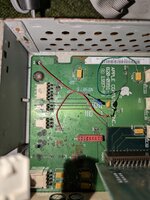
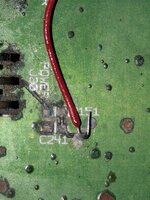
I bought six of them, all of them were battery bombed. So far, I fixed at least two molar macs. For the third molar mac, I did the same procedure as the other ones, recapped it and put deoxit on the sockets. That caused the machine to boot, although without a picture. I attempted to replace the CPU but accidentally broke the tab that holds the metal clip of the heatsink. I decided to place a small amount of super glue gel and placed it back on. Does a good job of holding the clip, but also breaks when trying to take the metal clip out. It happened multiple times. Anyway, I placed the other CPU and it booted up just fine and there was now a picture. After a while, the screen turned off, no pop or anything, and it started to boot loop while chiming. Eventually it stopped chiming but it was still boot looping. At the time, I didn't know what the issue was so I turned it off and just left it. I eventually figured out that the boot looping was most likely caused by a shorted capacitor (C241), which was corroded at the battery area. It also likely affected the resistor (R151) as well. I tried to remove the capacitor and it took out two pads underneath. The good news was that the Mac no longer boot loops, bad news is that the fan only turns on, a dim green led appears at the front of the Mac and nothing more. I then decided to rebuild the trace. I tried to de solder the resistor as well and it took its pads and I successfully rebuilt the trace of the front power switch. It has a new resistor, new capacitor, and connected to the original via by multiple wires. That rebuilt trace did nothing.
I noticed that the CPU seems to be still getting power as I felt the heat sink getting warm so as the CPU.
So far, I tried cleaning the sockets like the ROM and the CPU socket, reseating the parts and even trying another CPU that was a part of the working Molar Macs I fixed and still nothing. I know that the voltage regulator, ROM, RAM, CPU, and the personality card were all good as it booted up just fine in the other Molar Macs.
One time, the green led was gone after reseating the personality card until I cleaned up the board with rubbing alcohol and it came back.
I feel like this logic board has a good chance to work but I just don't know what to do.
The schematics I read was the one hosted at MacDat website which is the Power Macintosh G3 "Gossamer."
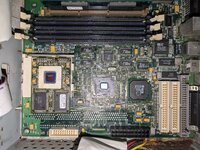
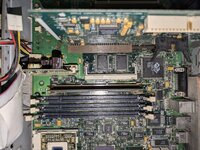
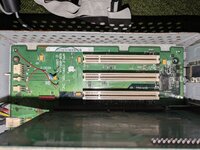
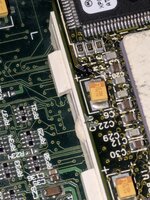
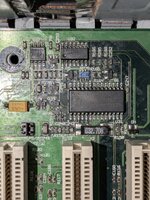
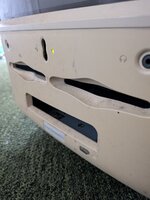
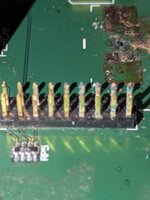
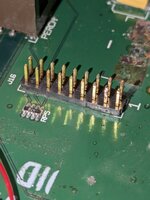
I also attached some photos which shows my soldering that I'm afraid to show, and the logic board.
This is my first time posting on the forum as one of the molar macs I own is having issues.
I bought six of them, all of them were battery bombed. So far, I fixed at least two molar macs. For the third molar mac, I did the same procedure as the other ones, recapped it and put deoxit on the sockets. That caused the machine to boot, although without a picture. I attempted to replace the CPU but accidentally broke the tab that holds the metal clip of the heatsink. I decided to place a small amount of super glue gel and placed it back on. Does a good job of holding the clip, but also breaks when trying to take the metal clip out. It happened multiple times. Anyway, I placed the other CPU and it booted up just fine and there was now a picture. After a while, the screen turned off, no pop or anything, and it started to boot loop while chiming. Eventually it stopped chiming but it was still boot looping. At the time, I didn't know what the issue was so I turned it off and just left it. I eventually figured out that the boot looping was most likely caused by a shorted capacitor (C241), which was corroded at the battery area. It also likely affected the resistor (R151) as well. I tried to remove the capacitor and it took out two pads underneath. The good news was that the Mac no longer boot loops, bad news is that the fan only turns on, a dim green led appears at the front of the Mac and nothing more. I then decided to rebuild the trace. I tried to de solder the resistor as well and it took its pads and I successfully rebuilt the trace of the front power switch. It has a new resistor, new capacitor, and connected to the original via by multiple wires. That rebuilt trace did nothing.
I noticed that the CPU seems to be still getting power as I felt the heat sink getting warm so as the CPU.
So far, I tried cleaning the sockets like the ROM and the CPU socket, reseating the parts and even trying another CPU that was a part of the working Molar Macs I fixed and still nothing. I know that the voltage regulator, ROM, RAM, CPU, and the personality card were all good as it booted up just fine in the other Molar Macs.
One time, the green led was gone after reseating the personality card until I cleaned up the board with rubbing alcohol and it came back.
I feel like this logic board has a good chance to work but I just don't know what to do.
The schematics I read was the one hosted at MacDat website which is the Power Macintosh G3 "Gossamer."
I also attached some photos which shows my soldering that I'm afraid to show, and the logic board.