Hacking the Reflecta DigitDia Evolution (Novatek NT96660) Slide Scanner

melw

Tinkerer
Jun 23, 2026
47
71
18
Hello all!

After the Kodak Reels tinkering I got back to my other digitizing device: a Reflecta DigitDia Evolution magazine slide scanner. It works fine, but I've never been fully happy with the image quality: visible JPEG artifacts and a soft "watercolor" look. It turns out to be the same Novatek family as the Kodak Reels, so I started digging. Sharing what I have so far.

1. Hardware
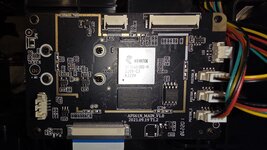
  • Main board AFS61N_MAIN_V1.0 (2021.09.19)
  • SoC Novatek NT96660BG-H (MIPS, same family as the Kodak Reels' NT96658)
  • Flash Winbond 25Q64JVSIQ: 8 MB SPI NOR, the wide 208-mil SOIC-8 package
  • RAM: NANYA DDR3, 2 Gbit
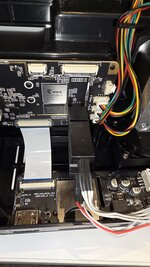
  • Unpopulated GND / TX / RX UART pads (flat SMD pads, not tried yet), plus empty speaker/mic footprints (the board looks like a cut-down camera design)
  • Three slide-position sensor connectors (POSITION_A/B/C), stepper motor, LED light board
  • Sensor: 16 MP. The "16M" menu setting is the native 4920×3280. "24M" (6000×4000) is upscaled from it.
2. Dumping the flash (no soldering)

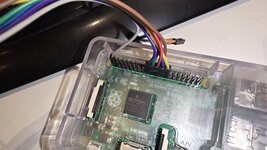
I read the 8 MB chip in-circuit with an SOIC-8 test clip + a Raspberry Pi 2 + flashrom (scanner unplugged; the Pi's 3.3 V powers the chip):
  • Wiring (flash pin → Pi header pin): 1 CS → 24, 2 DO → 21, 3 WP → not connected, 4 GND → 25, 5 DI → 19, 6 CLK → 23, 7 HOLD → 17 (3.3 V), 8 VCC → 1 (3.3 V)
  • flashrom -p linux_spi:dev=/dev/spidev0.0,spispeed=500 -c W25Q64JV-.Q -r dump.bin.
3. Firmware layout (firmware version 2.0)
  • 0x000000: bootloader (its body is compressed at 0xB1C and runs at 0x8FF09000)
  • 0x008000: main firmware, BCL1 FullComp: 3.4 MB → 22.6 MB, load address 0x80000000 (uITRON + eCos)
  • A second, older-looking compressed block further up, with a bad checksum. I think it's leftover data, but I haven't confirmed that.
  • Compression is the LZ77 from the "Basic Compression Library" (BCL1, algorithm 9). The checksums work with Tobi@s' ntkcalc. bfc4ntk -c refuses this 22.6 MB image (size limit), so I had to write my own compressor.
  • Loader rules: back-references <= 99 999 bytes, no overlapping copies, and the file size must be a multiple of 4, or the loader hangs.
4. Run-from-SD test mode

The loader recognises several files on the card. Its board-init code renames the generic Novatek names, so on this scanner they are:
  • FWFS601T.BIN: load the firmware from the card into RAM and run it. Remove the file and power-cycle, and you're back to stock firmware. This makes testing almost risk-free.
  • FWFS601A.BIN = flash the firmware, LDFS601A.BIN = flash the bootloader — don't put these on a card unless you know exactly what you're doing!
  • The loader reads FAT32, no exFAT.
5. JPEG quality findings
  • Stock photos are Q95, 4:2:2. The bigger visual issue is strong noise reduction, which makes even small block steps visible. Chroma blocking is the worst artifact.
  • Still capture (ImgCap_EncBS 0x80344874): if the finished JPEG doesn't fit its buffer, the firmware re-encodes 5 points lower (95 → 90 → …). The buffer is whatever is left in the capture memory pool: about 6 MB at 24M and ~4.5 MB at 16M. Detailed slides drop to Q90.
  • Encoder: standard IJG quality formula (0x801C1D40); Q100 = all-ones tables. The capture parameter table is at 0x815938C0 (quality is entry 0, plus the rate-control targets 4/5/6 MiB, which are unused by default).
Looking for other DigitDia Evolution owners! It would help a lot to know your firmware version (the EXIF "Software" field of any scan) and board revision. Later, once things are stable, I'd love some testers. I'm not sharing firmware binaries at this point, but I plan to share the patch recipe and tools.

Thanks to everyone who has been tinkering with the Kodak Reels devices — the knowledge from there transferred surprisingly well!

Attaching a few pictures of the board and from the flash dumping process.
 

Attachments

  • 20260929_140214.jpg
    20260929_140214.jpg
    772.7 KB · Views: 93
  • 20261007_202423.jpg
    20261007_202423.jpg
    958.6 KB · Views: 68
  • 20261007_201800.jpg
    20261007_201800.jpg
    982.5 KB · Views: 69

melw

Tinkerer
Jun 23, 2026
47
71
18
6. JPEG quality: Q95 → Q100
  • Correction to my first post: the JPEG buffer is not "what is left in the memory pool". The stock app sets it as a fixed budget of 0.25 bytes per pixel (+ header) at 0x801E4588. That's 6.4 MB at 24M and 4.4 MB at 16M. Detailed slides that don't fit drop to Q90.
  • The capture memory pool is ~180 MB, and over 100 MB of it is unused. The small buffer is a setting, not a memory limit.
  • Patches: start at Q100 and step down 1 instead of 5 (0x803449BC, 0x80344B10), and raise the buffer budget to ~0.97 bytes/pixel (shift constants at 0x801E4604/46E8/46F8).
  • Firmware has three hidden quality levels (0.30 / 0.25 / 0.20 bytes/px). The scanner uses the middle one.
7. Sharpening and noise reduction - first findings
  • Sensor is a Sony IMX206. The firmware has Novatek's full IQ framework: IFE (raw NR), IFE2 (Y/UV NR), IPE (edge enhancement), IME (chroma NR, film grain), DRE.
  • Sharpness is a 0–100 value (50 = default) that scales the edge enhancement linearly. 0 switches it off.
  • The first NR stage (IFE bilateral filter) has an enable bit (0x803317A4, ori 0x3e; bit 0x04 = filter).
 
  • Like
Reactions: Bas

melw

Tinkerer
Jun 23, 2026
47
71
18
Another update. I found the controls for both noise reduction and sharpening. The scans now come out at Q100, with much less smoothing and no sharpening halos, at the same scan speed. Everything runs from the SD card (FWFS601T.BIN); nothing has been flashed.

8. Corrections to my previous posts
  • IFE enable bit 0x04 is colour gain / white balance, not the noise filter. The firmware's own NR-off branch clears bits 0x22 instead.
  • The UI sharpness value (0–100, IPL setting 0x43210002) doesn't reach still capture.
9. Noise reduction
  • The "watercolor" look is the IFE range (bilateral) filter. Forcing the firmware's NR-off branch in IFE_IQparam (0x8033183C, beqz → b) removes the plastic look, but dark slides show coloured sensor noise.
  • The strength lives in RangeA/B thresholds[6] + LUTs[17] at 0x8179D350 / D380 / D3B0 / D438. They are filled per ISO by 0x803368A0 through an interpolation helper (0x8030CB7C).
  • A small wrapper on those four interpolation calls scales the result by K/256. Measured texture: full 1.64, 3/4 2.42, 1/2 2.59, off 2.96. The stock values are tiny integers, so the first step down has the biggest effect.
  • My pick: 3/4 strength. It keeps the film grain and still stops the coloured speckle in dark slides.
10. Sharpening
  • The IPE edge gains live at 0x8179D5A8 / D5AC (stock 80). They are interpolated in 0x803368A0 (0x803371DC, 0x80337214). Setting them to 0 removes the halos completely.
  • My pick: half gain (40). The white outlines on high-contrast edges are gone, fine detail stays crisp.
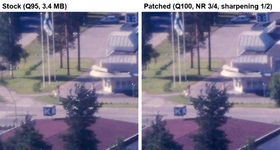
11. Result: stock vs patched (same 20 slides)
  • JPEG: Q95 → Q100, 3.4 → 11.6 MB per scan (16M)
  • Blockiness (luma / chroma): 1.36 / 2.48 → 1.01 / 1.10 (1.0 = none)
  • Measured texture/detail: 1.27 → 2.05 (+61 %)
  • Scan time: Same in all versions
  • Visually: never worse, often clearly better. Slides that are soft to begin with look about the same.
  • The whole patch is 183 bytes different from stock firmware 2.0.
Attaching a 1:1 crop: stock vs patched, same slide.
 

Attachments

  • forum3_stock_vs_patched.png
    forum3_stock_vs_patched.png
    266.8 KB · Views: 24
  • Like
Reactions: Bas and fishgee

Bas

New Tinkerer
Nov 13, 2026
1
1
1
Thanks for your work, the result is already very impressive! I have a family archive of about 20,000 slides and am considering using this scanner to digitize it, so I am following this topic with great interest. Dreaming a little bit: would it be possible to save raw camera image data and do all further processing on a PC, thus skipping on-device jpeg at all?
 
  • Like
Reactions: melw

graceanderson

New Tinkerer
Nov 12, 2026
6
1
3
Possible in principle, but not as a menu option: you’d need to patch the still-capture path to bypass the JPEG encoder and write the IMX206’s raw Bayer frame, before IFE/IPE processing, to the card. The existing IQ controls suggest raw data is present early in the pipeline, but stock firmware probably only keeps processed/encoded output. Main practical issues are SD write speed and storage: ~16 MP at 10–12 bit is roughly 20–24 MB per slide before packing, so 20k slides means several hundred GB; scan time may also become I/O-bound. PC-side demosaic, denoise and sharpening then makes sense.
 
  • Like
Reactions: melw

melw

Tinkerer
Jun 23, 2026
47
71
18
Thanks! Raw is on my list too, and the estimate above matches what I've found so far.
  • The raw frame is already in memory. The capture code allocates a raw buffer for every shot before the image pipeline (IFE/IPE) runs, so the data is there. It just never gets written to the card.
  • The firmware also has a debug snapshot command on the serial console (getimgnor) that seems to handle raw as well as JPEG. The code to write a raw frame may already be there, and I'd only need to trigger it from the normal capture path instead of writing my own.
  • Size: "16M" on this scanner is the sensor's native 4920×3280. That's about 24 MB per slide at 12 bits packed, or ~500 GB for 20,000 slides. Today's Q100 JPEGs are ~11 MB at the same 5 s/slide, so roughly double that might still fit, but I haven't measured the SD write speed yet.
  • On the PC side it's more work than it sounds. A raw frame comes without white balance, color matrix and lens-shading correction, so you'd need a converter to DNG with a colour profile for this sensor. A blank frame scanned for flat-field correction would be a nice bonus.
  • Would it be worth it? The biggest gains would be 12-bit headroom and full-resolution color, plus doing noise reduction on the PC with better tools.
No promises, but it's the next thing I'd also like to try.
 

melw

Tinkerer
Jun 23, 2026
47
71
18
Hello all!

Another update and first test build ready for sharing!

12. The patch-loader approach
  • It uses the same run-from-SD trick as before: the bootloader loads FWFS601T.BIN from the card into RAM and runs it.
  • Instead of being a firmware, the file is a small program (~1 KB of C and assembly) that:
    1. reads the scanner's own firmware from its flash chip, using the bootloader's read routine (read only)
    2. decompresses it into RAM, using the bootloader's own decompressor
    3. checks that it is exactly stock firmware 2.0 (size + checksum of the whole image). If anything differs, it starts the firmware unpatched
    4. writes the 58 patch words (Q100, bigger JPEG buffer, noise reduction 3/4, sharpening 1/2)
    5. starts the firmware as if it had booted normally from flash
  • Bonus: because it reports a normal flash boot, the extra patch for card boot (settings and file numbering) isn't needed any more.
  • To go back to stock, delete the file or remove the card. Power-cycle.
13. Bootloader findings updated
  • Stage 1 runs at 0x8FF00000 and copies its decompressor and cache routines to 0x8FF08000. They stay in RAM when the card file runs: decompressor 0x8FF0815C, D-cache flush 0x8FF08110, I-cache invalidate 0x8FF080B4.
  • The main loader's flash read routine 0x8FF0D408 (4 KB blocks; the firmware starts at block 8 = 0x8000) is separate from the erase/program routine, which the patch-loader never calls.
  • After loading, the loader writes a handoff block at 0x80000080. The boot flags at +0x94 are 4 = card boot, 8 = normal flash boot. The loader then jumps to the address stored at 0x80000000 (stock: 0x80000400).
  • Image check: the sum of all 16-bit words + n(n-1)/2 must be 0 mod 65536 (what ntkcalc -cw fixes).
14. Want to try it?
  • Check first: the EXIF "Software" field of any of your scans should say FIRMWARE VERSION 2.0. (On other versions it should simply start stock, but that's untested.)
  • Copy FWFS601T.BIN to the root of a FAT32 card, insert it with the scanner off, and power on.
  • Scans made with it show FIRMWARE V2.0 PLREL2 in the EXIF "Software" field.
  • As always: use at your own risk. In my tests it has never touched the flash, and removing the card always gives you the stock scanner back.
Attaching the patch-loader (FWFS601T.BIN, 1,152 bytes, SHA256 beff09e2c583827724234b6a2c44e49d4850ae693e67e4e7de5da23851b6a364).
 

Attachments

  • FWFS601T.BIN
    1.1 KB · Views: 0