
Help choosing accelerator/booster for Beige G3 266

  • Nominations will close March 25th. If you'd like to join the board and influence how TinkerDifferent runs in the next year, put your name in now!
  • Hey Guest, MARCHintosh 2026 is upon us. Check out community projects, join GlobalTalk, and have fun!

sunvalleylaw

Tinkerer
Jan 7, 2026
27
35
13
I think I want my beige G3 desktop to be one of my flagship vintage machines. I just love the ugly old form factor, and the incorporation (first time for me) of color and CD-ROM. And that era was when I committed as a solo lawyer, to the Mac environment for my office, though I was using a '95 Performa, rather than a '98 PowerMac. I played around with Launch magazines, switched off Word to WordPerfect (and stayed there for years until Corel killed the Mac version later on) and played around with Myst on CD-Rom, though I never really solved the puzzle. (Going back to that now). And now, I want to incorporate early DAW and music production/recording with some vintage gear, and perhaps even use some of the work playing out, with a Powerbook 3400c I have (my next machine after my Performa). Will be looking for an accelerator or replacement motherboard for that 3400c also. I also will have a period correct Performa color CRT monitor to use as well.

Anyhow, I ran across a BUFFALO 500MHz G3 ZIF Upgrade 1MB Cache for Apple Power Macintosh, on the online auction site (please don't snipe me) and am considering it for my 266 MHz Beige G3. Anyone have any experience with this model or similar? It looks to be compatible. I will plan on also replacing/upgrading the fan and etc. Thanks in advance for your thoughts.
 

sunvalleylaw

Tinkerer
Jan 7, 2026
27
35
13
I see there is also a 500 MHz Powerleap which seems pretty much identical in terms of performance, but may run cooler. Hmm.
 

V.Yakob

Tinkerer
Sep 6, 2023
138
52
28
Syktyvkar
I have such a car with a native G3 333 Mhz, previously used 266, and it's noticeably slower.
500MHz G3 ZIF -- great.
You can also install a more productive G4 ZIF here, from Yikes, it works great, but you will have to install an extension, for example, from XLR8T, otherwise the OS will not know anything about the cache and it will be super slow.
If you don't plan to run OS X and Rhapsody here, you can use SIL3112 and SSD, it will work perfectly, ~20 mbps.
for faster network operation, you can use separate network adapters, but the speed will also be limited by the bus speed, ~20 mbps.
You can install a more powerful graphics card, but I noticed that radeon 7000 and sil3112 can create strange floating problems on this particular computer.
You can install a USB card, but the connected devices will not work until the USB drivers are booted.

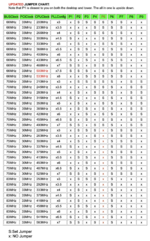
Just in case, I attach the positions of jumpers.
 

Attachments

  • G3-MT-CPU-Speed.png
    G3-MT-CPU-Speed.png
    144 KB · Views: 7

sunvalleylaw

Tinkerer
Jan 7, 2026
27
35
13
I have such a car with a native G3 333 Mhz, previously used 266, and it's noticeably slower.
500MHz G3 ZIF -- great.
You can also install a more productive G4 ZIF here, from Yikes, it works great, but you will have to install an extension, for example, from XLR8T, otherwise the OS will not know anything about the cache and it will be super slow.
If you don't plan to run OS X and Rhapsody here, you can use SIL3112 and SSD, it will work perfectly, ~20 mbps.
for faster network operation, you can use separate network adapters, but the speed will also be limited by the bus speed, ~20 mbps.
You can install a more powerful graphics card, but I noticed that radeon 7000 and sil3112 can create strange floating problems on this particular computer.
You can install a USB card, but the connected devices will not work until the USB drivers are booted.

Just in case, I attach the positions of jumpers.
So just making sure I understand your response. The 500MHz upgrade was great, vs the native G3 333, previously used 266? I believe I will mostly use 9.2 so will also look at those other options. I also plan on installing a BlueSCSI v.2, and I should have mentioned that this machine already has a Rage ATI 128 from a B/W G3 installed as well.
 

V.Yakob

Tinkerer
Sep 6, 2023
138
52
28
Syktyvkar
Previously, I used a 266 Mhz processor in this machine, and it wasn't very fast.
Then I managed to get 333 Mhz, I noticed a serious increase in performance, it was noticeable even without benchmarks. Only +67 Mhz.
I think that the difference in performance between 400 and 500 Mhz may be more significant in this machine than it may seem at first glance. Therefore, if possible, you should first of all look at 500.

P.S. maybe this increase in performance that I noticed was associated with an increased cache of up to 1 MB.
 
  • Love
Reactions: sunvalleylaw

sunvalleylaw

Tinkerer
Jan 7, 2026
27
35
13
Previously, I used a 266 Mhz processor in this machine, and it wasn't very fast.
Then I managed to get 333 Mhz, I noticed a serious increase in performance, it was noticeable even without benchmarks. Only +67 Mhz.
I think that the difference in performance between 400 and 500 Mhz may be more significant in this machine than it may seem at first glance. Therefore, if possible, you should first of all look at 500.

P.S. maybe this increase in performance that I noticed was associated with an increased cache of up to 1 MB.
Ok, the 500 I am looking at has also the increased cache, so should be good. Thank you!