

I'll start the thread by providing my method in Windows 11, some other people will have to chime in to provide similar methods for MacOS and Linux, which I don't run in any of my machines.
Link to Snow emulator: https://snowemu.com/
Goal: have your emulated Macintosh environment be able to receive MIDI signals from, or send MIDI signals to, any serial port (modem or printer). be able to use MIDI hardware connected the normal way on your modern computer acting as host to the emulator Snow. Typically in modern computers, you'd connect MIDI gear directly using USB cables, or using old style DIN5 MIDI cables plugging into an interface box that's connected via USB.
Reward: Good for MIDI playback. Good for MIDI playing with a piano/instrument controller in real time as well! This allows to use legacy Sequencer programs like Cubase, Master Tracks Pro, OpCode software. Or, Firejam from yours truly that I'm developping for a System 6, Mac Plus first and foremost. You're not FORCED to use a hardware MIDI out device, you can use your host's machine software MIDI renderer, ie Microsoft GS Wavetable synth!
Methodology:
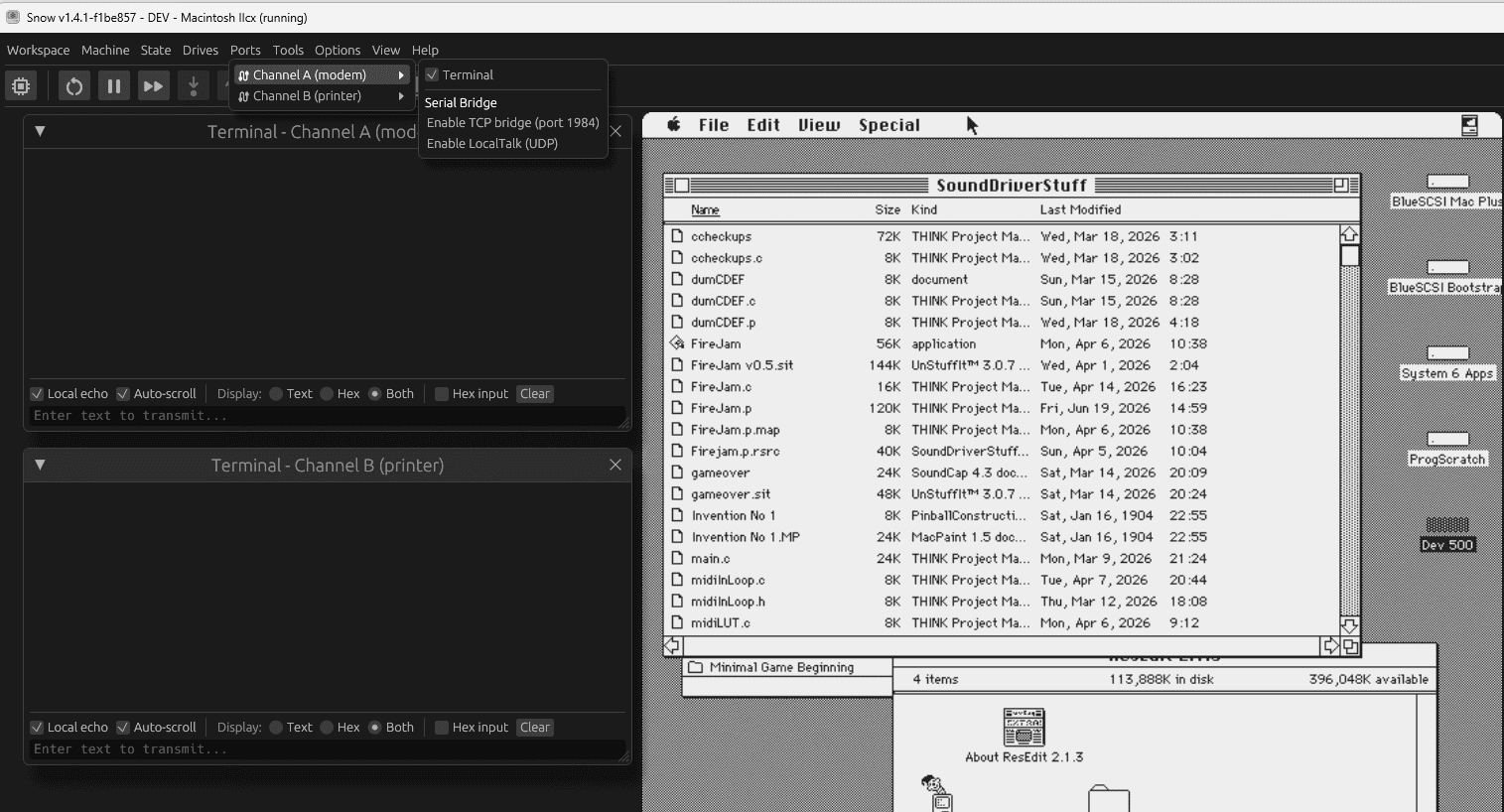
Step 1: In snow, make sure you have an emulation environment running (ie you booted in Finder or similar). Go to Ports menu, pick Channel A or B, and 'Enable TCP bridge port 1984'
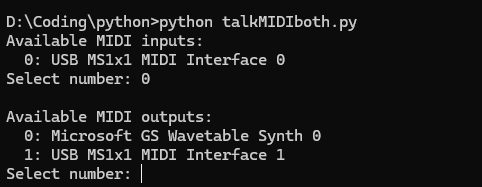
Step 2: Run a python script (adapt to your needs) down below this post in a cmd window to get your machine to listen/talk to TCP port 1984 and interface with the USB port where your MIDI or interface gear is connected. A menu selection in the python script lets you confirm to which MIDI device connected on the host machine you're sending to.
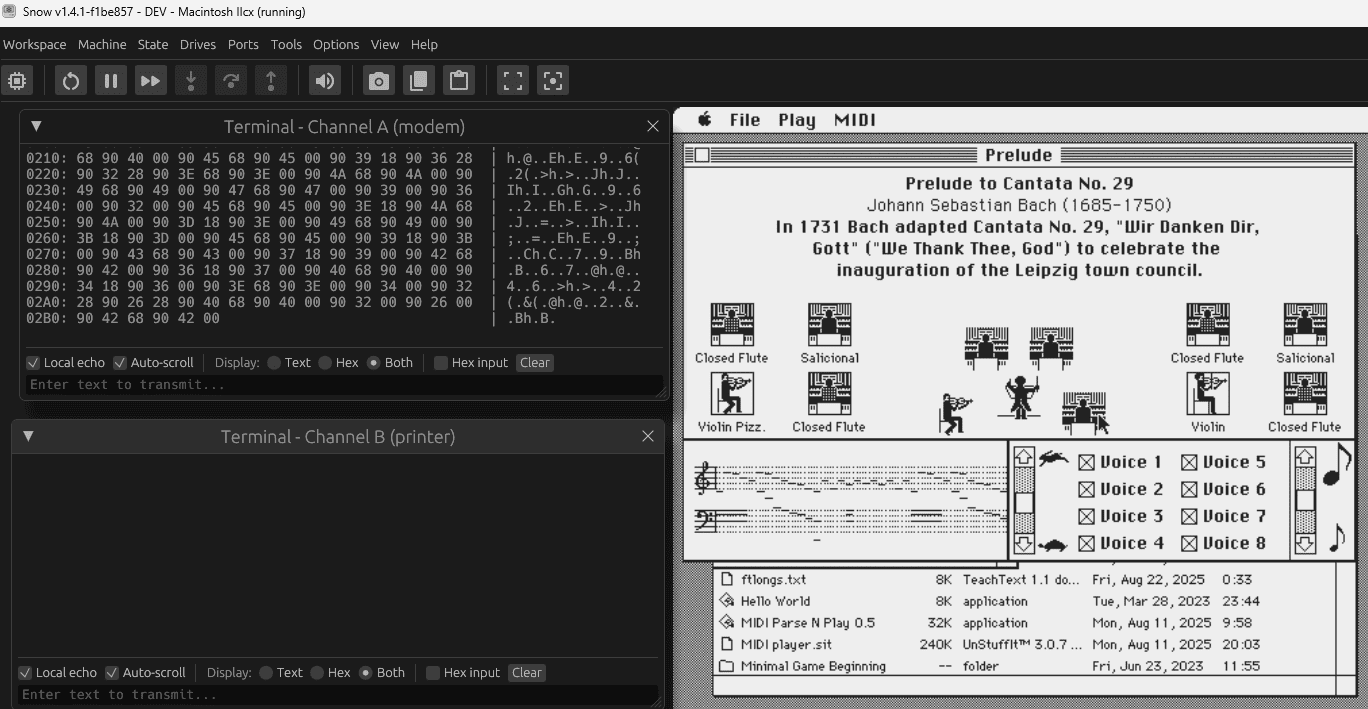
Proof of it working in Concertware+MIDI:
Proof of it working in Firejam, sending MIDI to my external Roland MT-32 module:
Link to Snow emulator: https://snowemu.com/
Goal: have your emulated Macintosh environment be able to receive MIDI signals from, or send MIDI signals to, any serial port (modem or printer). be able to use MIDI hardware connected the normal way on your modern computer acting as host to the emulator Snow. Typically in modern computers, you'd connect MIDI gear directly using USB cables, or using old style DIN5 MIDI cables plugging into an interface box that's connected via USB.
Reward: Good for MIDI playback. Good for MIDI playing with a piano/instrument controller in real time as well! This allows to use legacy Sequencer programs like Cubase, Master Tracks Pro, OpCode software. Or, Firejam from yours truly that I'm developping for a System 6, Mac Plus first and foremost. You're not FORCED to use a hardware MIDI out device, you can use your host's machine software MIDI renderer, ie Microsoft GS Wavetable synth!
Methodology:
Step 1: In snow, make sure you have an emulation environment running (ie you booted in Finder or similar). Go to Ports menu, pick Channel A or B, and 'Enable TCP bridge port 1984'
Step 2: Run a python script (adapt to your needs) down below this post in a cmd window to get your machine to listen/talk to TCP port 1984 and interface with the USB port where your MIDI or interface gear is connected. A menu selection in the python script lets you confirm to which MIDI device connected on the host machine you're sending to.
Proof of it working in Concertware+MIDI:
Proof of it working in Firejam, sending MIDI to my external Roland MT-32 module:
Python:
import socket
import mido
import time

TCP_HOST = "127.0.0.1"
TCP_PORT = 1984

def choose_from_list(title, items):
    print(title)
    for i, name in enumerate(items):
        print(f"  {i}: {name}")

    while True:
        choice = input("Select number: ").strip()
        if choice.isdigit():
            idx = int(choice)
            if 0 <= idx < len(items):
                return items[idx]
        print("Invalid selection. Try again.\n")

def parse_midi_stream(buffer):
    """
    Parse a raw MIDI byte stream into complete mido.Message objects.
    Supports:
      - Channel Voice (0x80–0xEF)
      - System Common (0xF0–0xF7)
      - System Real-Time (0xF8–0xFF)
      - SysEx messages
    """
    messages = []
    i = 0

    while i < len(buffer):
        status = buffer[i]

        # -----------------------------
        # System Real-Time (single byte)
        # -----------------------------
        if 0xF8 <= status <= 0xFF:
            try:
                msg = mido.Message.from_bytes([status])
                messages.append(msg)
            except:
                pass
            i += 1
            continue

        # -----------------------------
        # SysEx (variable length)
        # -----------------------------
        if status == 0xF0:
            end_index = buffer.find(b'\xF7', i + 1)
            if end_index == -1:
                # Incomplete SysEx, wait for more data
                break
            sysex_bytes = buffer[i:end_index + 1]
            try:
                msg = mido.Message.from_bytes(sysex_bytes)
                messages.append(msg)
            except:
                pass
            i = end_index + 1
            continue

        # -----------------------------
        # System Common (0xF1–0xF6)
        # -----------------------------
        system_common_lengths = {
            0xF1: 2,  # MTC Quarter Frame
            0xF2: 3,  # Song Position Pointer
            0xF3: 2,  # Song Select
            0xF4: 1,  # Undefined
            0xF5: 1,  # Undefined
            0xF6: 1,  # Tune Request
        }

        if status in system_common_lengths:
            length = system_common_lengths[status]
            if i + length > len(buffer):
                break
            msg_bytes = buffer[i:i + length]
            try:
                msg = mido.Message.from_bytes(msg_bytes)
                messages.append(msg)
            except:
                pass
            i += length
            continue

        # -----------------------------
        # Channel Voice (0x80–0xEF)
        # -----------------------------
        if 0x80 <= status <= 0xEF:
            # Determine message length
            if 0xC0 <= status <= 0xDF:
                length = 2  # Program Change, Channel Pressure
            else:
                length = 3  # Note On/Off, CC, Pitch Bend, etc.

            if i + length > len(buffer):
                break

            msg_bytes = buffer[i:i + length]
            try:
                msg = mido.Message.from_bytes(msg_bytes)
                if msg.type == "note_on":
                    msg.velocity = min(127, int(msg.velocity * 1.5))
                messages.append(msg)
            except:
                pass

            i += length
            continue

        # Unknown byte — skip it
        i += 1

    # Return parsed messages and leftover buffer
    return messages, buffer[i:]


def main():
    # ---- MIDI INPUT SELECTION ----
    input_names = mido.get_input_names()
    midi_in_name = choose_from_list("Available MIDI inputs:", input_names)

    # ---- MIDI OUTPUT SELECTION ----
    output_names = mido.get_output_names()
    midi_out_name = choose_from_list("\nAvailable MIDI outputs:", output_names)

    # TCP socket
    sock = socket.socket(socket.AF_INET, socket.SOCK_STREAM)
    sock.setsockopt(socket.IPPROTO_TCP, socket.TCP_NODELAY, 1)
    sock.connect((TCP_HOST, TCP_PORT))
    sock.setblocking(False)
    print(f"\nConnected to {TCP_HOST}:{TCP_PORT}")

    recv_buffer = bytearray()

    try:
        with mido.open_input(midi_in_name) as midi_in, \
             mido.open_output(midi_out_name) as midi_out:

            print("Bridging:")
            print("  MIDI IN  → Snow")
            print("  Snow     → MIDI OUT")
            print("Press Ctrl-C to quit.\n")

            last_send = time.time()

            while True:
                # ---- MIDI IN → Snow ----
                msg = midi_in.poll()
                if msg:
                    data = msg.bytes()
                    sock.send(bytes(data))
                    # print(f"{time.time():.6f}  Sent to Snow: {data}")

                # ---- Snow → MIDI OUT ----
                try:
                    chunk = sock.recv(1024)
                    if chunk:
                        recv_buffer.extend(chunk)
                        messages, recv_buffer = parse_midi_stream(recv_buffer)
                        for m in messages:
                            midi_out.send(m)
                            # print(f"{time.time():.6f}  From Snow: {m}")
                except BlockingIOError:
                    pass

                time.sleep(0.0005)

    except KeyboardInterrupt:
        print("\nStopping…")

    finally:
        try:
            sock.close()
        except:
            pass
        print("Closed cleanly.")


if __name__ == "__main__":
    main()
Attachments
Last edited:
