

(spoiler alert: it's way easier to do with the snow emulator and you get more functionality, so I did a similar thread on that emulator instead: https://tinkerdifferent.com/threads/how-to-use-serial-midi-both-ways-from-snow-emulator.5392/ )
I'll start the thread by providing my method in Windows 11, some other people will have to chime in to provide similar methods for MacOS and Linux, which I don't run in any of my machines.
Link to Basilisk II emulator for Windows: https://www.emaculation.com/forum/viewtopic.php?t=5282
Link to Basilisk II emulator for Linux: https://www.emaculation.com/forum/viewtopic.php?t=6580
Link to Basilisk II emulator for MacOS: https://www.emaculation.com/forum/viewtopic.php?t=7361
Goal: have your emulated Macintosh environment be able to send MIDI signals to, any serial port (modem or printer). be able to use MIDI hardware connected the normal way on your modern computer acting as host to the emulator Basilisk II. Typically in modern computers, you'd connect MIDI gear directly using USB cables, or using old style DIN5 MIDI cables plugging into an interface box that's connected via USB.
Unrealized Goal: make a piano controller send MIDI bytes into Basilisk II. I couldn't make this work.
Reward: Good for MIDI playback. This allows to use legacy Sequencer programs like Cubase, Master Tracks Pro, OpCode software. Or, Firejam from yours truly that I'm developping for a System 6, Mac Plus first and foremost but can at least partially work in System 7 as of now.
Step 1:
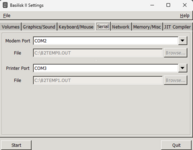
Before you launch Basilisk II, go to the Serials tab in BasiliskII GUI launcher, and pick somehting like COM1 for the modem port, assuming your host computer isn't using it. You should set the Printer port to COM3 to put it out of the way since we're not going to use it, but we'll need COM2 outside of Basilisk II.
You can then launch your Basilisk II emulated mac environment and go to Finder (or whatever else)
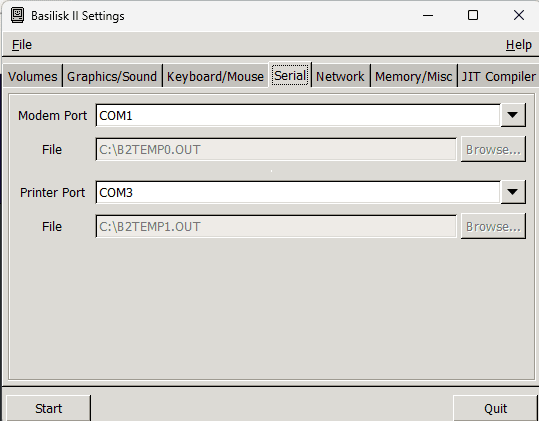
Step 2: Download and install the Virtual COM port serial driver com0com here: https://www.virtual-serial-port.org/
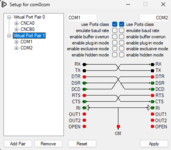
Set Virtual a Virtual Port Pair as such -
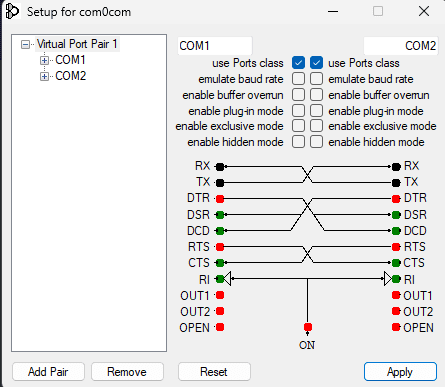
COM1 is the host PC's virtual com port that will be talked to from Basilisk II
COM2 is the host PC's virtual com port that will be the last step between your host PC and your physical hardware MIDI device
Click Apply
Step 3: Download and install hairless MIDI: https://projectgus.github.io/hairless-midiserial/
Set the Serial port (on the left side) to use com0com's COM2 port
Set the MIDI Out to whatever host PC midi interface or gear you have connected physically
Warning: I couldn't make 'MIDI In' work with this set up, so no piano controller joining the party, sadly. Let me know if you're able to do it!
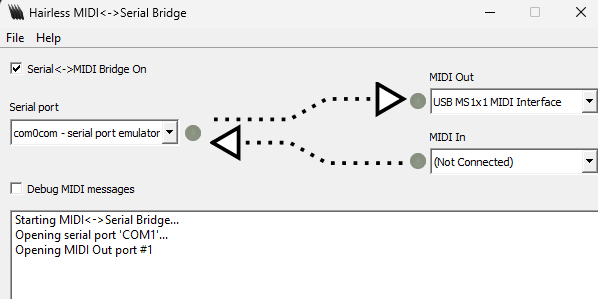
Step 4: MIDI out should now work in your emulated mac applications of your choice.
Here, I'm running firejam in basilisk II, in System 7.5.3.
Warning: if things seem to be stuck and not working, trying re-clicking on the 'Apply' button of com0com.
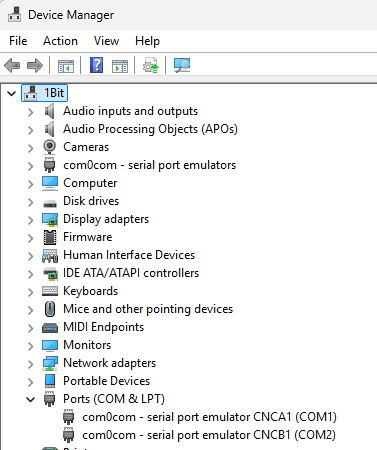
Step 5 (maybe?): Make sure com1 and com2's virtual ports are enabled under Windows' Device Manager:
I'll start the thread by providing my method in Windows 11, some other people will have to chime in to provide similar methods for MacOS and Linux, which I don't run in any of my machines.
Link to Basilisk II emulator for Windows: https://www.emaculation.com/forum/viewtopic.php?t=5282
Link to Basilisk II emulator for Linux: https://www.emaculation.com/forum/viewtopic.php?t=6580
Link to Basilisk II emulator for MacOS: https://www.emaculation.com/forum/viewtopic.php?t=7361
Goal: have your emulated Macintosh environment be able to send MIDI signals to, any serial port (modem or printer). be able to use MIDI hardware connected the normal way on your modern computer acting as host to the emulator Basilisk II. Typically in modern computers, you'd connect MIDI gear directly using USB cables, or using old style DIN5 MIDI cables plugging into an interface box that's connected via USB.
Unrealized Goal: make a piano controller send MIDI bytes into Basilisk II. I couldn't make this work.
Reward: Good for MIDI playback. This allows to use legacy Sequencer programs like Cubase, Master Tracks Pro, OpCode software. Or, Firejam from yours truly that I'm developping for a System 6, Mac Plus first and foremost but can at least partially work in System 7 as of now.
Step 1:
Before you launch Basilisk II, go to the Serials tab in BasiliskII GUI launcher, and pick somehting like COM1 for the modem port, assuming your host computer isn't using it. You should set the Printer port to COM3 to put it out of the way since we're not going to use it, but we'll need COM2 outside of Basilisk II.
You can then launch your Basilisk II emulated mac environment and go to Finder (or whatever else)
Step 2: Download and install the Virtual COM port serial driver com0com here: https://www.virtual-serial-port.org/
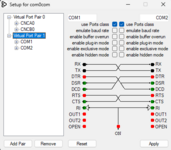
Set Virtual a Virtual Port Pair as such -
COM1 is the host PC's virtual com port that will be talked to from Basilisk II
COM2 is the host PC's virtual com port that will be the last step between your host PC and your physical hardware MIDI device
Click Apply
Step 3: Download and install hairless MIDI: https://projectgus.github.io/hairless-midiserial/
Set the Serial port (on the left side) to use com0com's COM2 port
Set the MIDI Out to whatever host PC midi interface or gear you have connected physically
Warning: I couldn't make 'MIDI In' work with this set up, so no piano controller joining the party, sadly. Let me know if you're able to do it!
Step 4: MIDI out should now work in your emulated mac applications of your choice.
Here, I'm running firejam in basilisk II, in System 7.5.3.
Warning: if things seem to be stuck and not working, trying re-clicking on the 'Apply' button of com0com.
Step 5 (maybe?): Make sure com1 and com2's virtual ports are enabled under Windows' Device Manager:
Attachments
Last edited:
