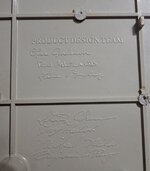
A seller offered this IIfx parts machine on eBay for $200. The seller was completely honest in the listing -- so all problems I describe in this post were risks I assumed. In the eBay image below, you can spot rust, missing CPU/FPU/ROM, and three RAM simms that differ from their mates. Rust on the battery holders is of particular concern as it suggests a potential battery bomb.
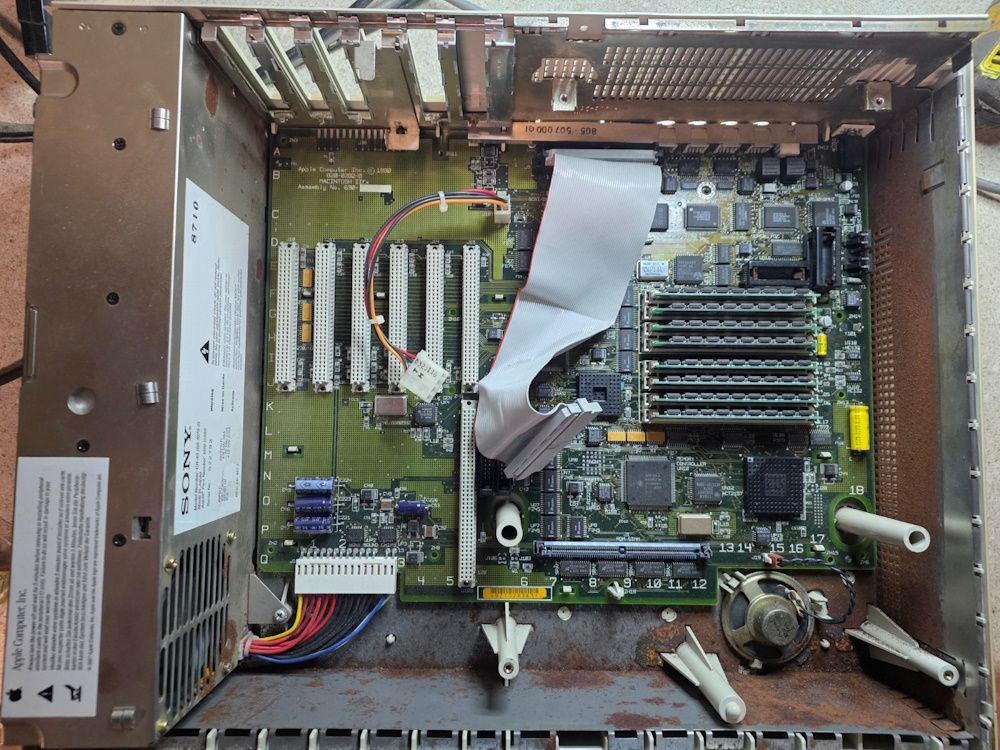
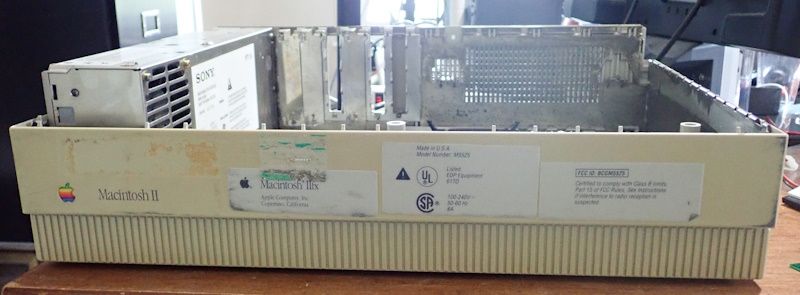
The power supply is from a Macintosh II, not IIfx. And, in fact, this was a user-upgraded Macintosh II to IIfx. The owner cut up the Apple-supplied sticker and applied it to the face of the machine instead of underneath. Frankly, that is part of the charm that made me buy this Mac. I mean, the labels aren't even applied straight.
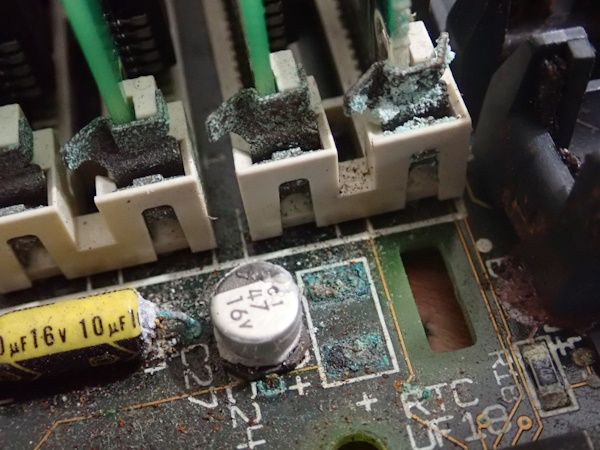
The battery holders are indeed rusted and needed replacement. However, this was not a full battery bomb, as the nearby components and traces are largely intact. Good!
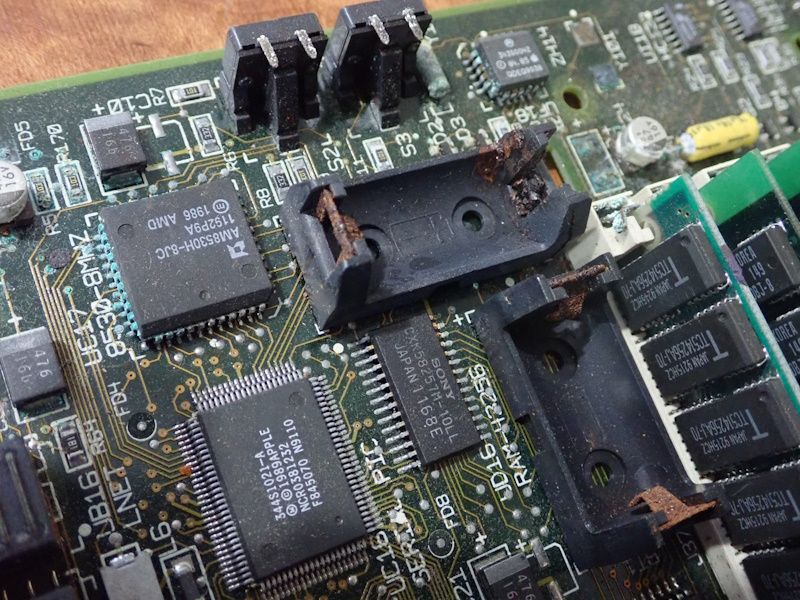
Whatever the source of corrosion, this area on the board was hit the most. When you encounter corrosion in this region, make a mental note that you must carefully inspect and the clean the RAM sockets as well. SIMM fit on the IIfx is finicky even under the best conditions.
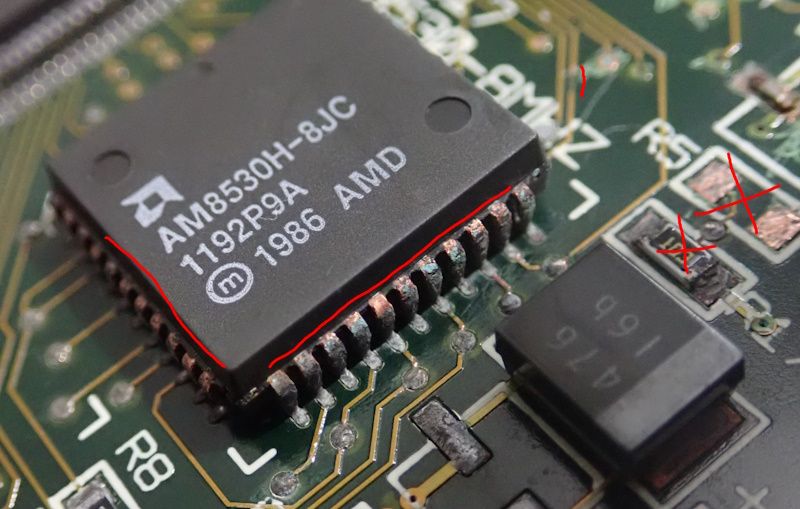
After local vinegar treatment and subsequent cleaning in an ultrasonic bath, a number of chip leads have exposed copper. The chip leads and nearby traces need cleaning/tinning with flux and solder. Colocated passive components, like R1 and R5 may have fallen off or look brittle enough that they should be proactively replaced. It is faster to do it now with a known good resistor than diagnosis it later.
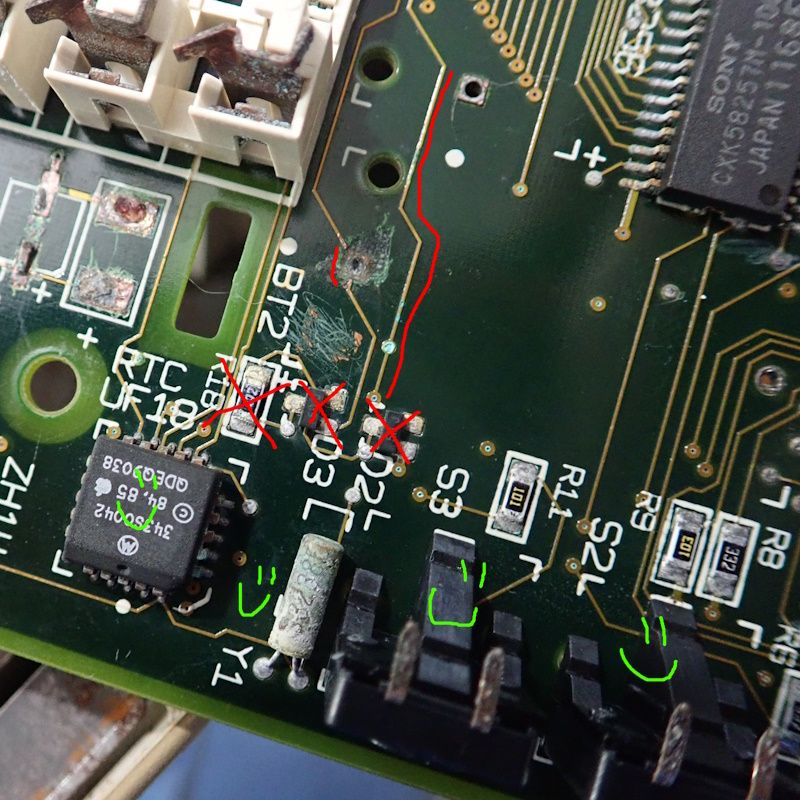
After removing the battery holders, we see a similar story. R18, D2, and D3 are off the shelf parts. Might as well replace them while it is easy to access the area. The RTC chip needs tinning, but otherwise works. Surprisingly, Y1, the interrupt switch, and reset switch are tested as working! There are two traces damaged: the one that connects to the battery and the one that connects to the power switch (worse than it appears).
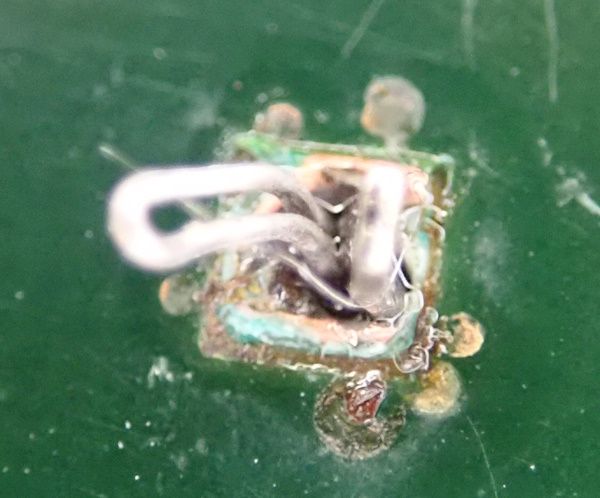
I ran a wire along the broken battery trace and looped it midway under the board. The new battery holder pin is soldered to the wire.
POWER ON/OFF WOES
Skipping ahead for a moment, after all the cleaning, repairs, and replacements were complete the computer had problems with turning on, turning off via the switch, and turning off via the Shutdown menu item.
When testing power control problems on a Macintosh II, IIx, or IIfx, it is helpful to start on the underside of the power switch.
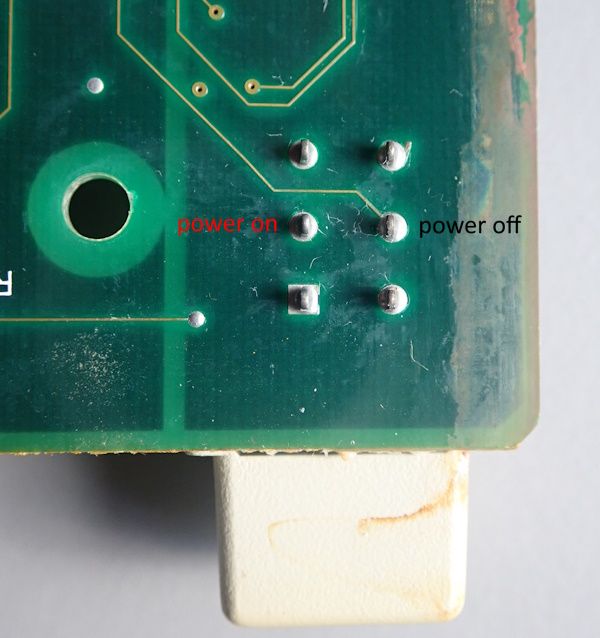
The middle power on pin is supposed to connect to R4 on the IIfx. But, capacitor C9 often leaks and breaks that trace. This is a common problem and simple repair. In this case, all three usual trace breaks occurred (three red lines in the image below). Little bare wire and excessive solder does the trick. At this point, the Macintosh IIfx powered on.
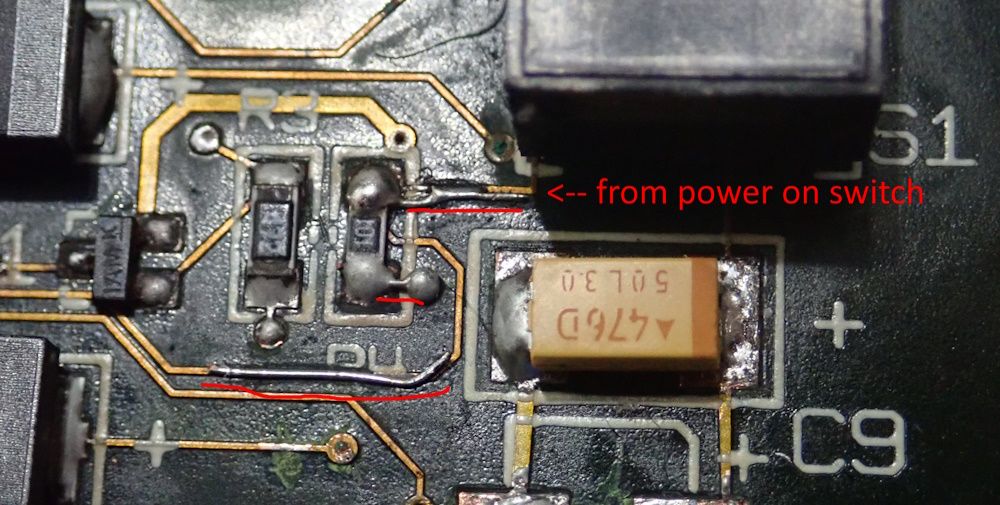
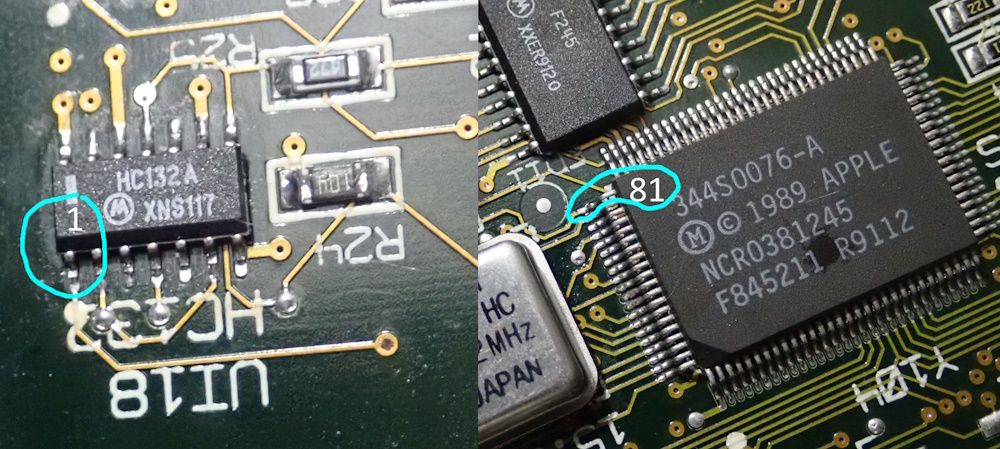
However, the Mac would not power off. The middle power off pin on the switch should have continuity to pin 1 of UI18 and pin 81 of UE8. If it doesn't reach UI18, then the Mac power switch will not turn it off. If it doesn't reach UE8, then Shutdown won't turn it off.
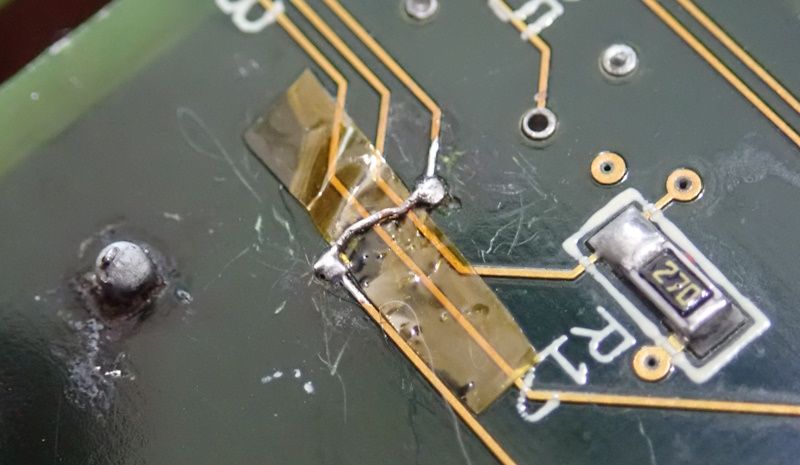
Both of these failures occurred due to the corrosion underneath the battery, which I thought I had fixed prior to soldering on the battery holder. My first attempt was to bridge the trace under the board (image below), which fixed half the problem. However, to reach UE8, I had to desolder the battery holder and redo the trace over a longer length and through the via.
(continued)
The power supply is from a Macintosh II, not IIfx. And, in fact, this was a user-upgraded Macintosh II to IIfx. The owner cut up the Apple-supplied sticker and applied it to the face of the machine instead of underneath. Frankly, that is part of the charm that made me buy this Mac. I mean, the labels aren't even applied straight.
The battery holders are indeed rusted and needed replacement. However, this was not a full battery bomb, as the nearby components and traces are largely intact. Good!
Whatever the source of corrosion, this area on the board was hit the most. When you encounter corrosion in this region, make a mental note that you must carefully inspect and the clean the RAM sockets as well. SIMM fit on the IIfx is finicky even under the best conditions.
After local vinegar treatment and subsequent cleaning in an ultrasonic bath, a number of chip leads have exposed copper. The chip leads and nearby traces need cleaning/tinning with flux and solder. Colocated passive components, like R1 and R5 may have fallen off or look brittle enough that they should be proactively replaced. It is faster to do it now with a known good resistor than diagnosis it later.
After removing the battery holders, we see a similar story. R18, D2, and D3 are off the shelf parts. Might as well replace them while it is easy to access the area. The RTC chip needs tinning, but otherwise works. Surprisingly, Y1, the interrupt switch, and reset switch are tested as working! There are two traces damaged: the one that connects to the battery and the one that connects to the power switch (worse than it appears).
I ran a wire along the broken battery trace and looped it midway under the board. The new battery holder pin is soldered to the wire.
POWER ON/OFF WOES
Skipping ahead for a moment, after all the cleaning, repairs, and replacements were complete the computer had problems with turning on, turning off via the switch, and turning off via the Shutdown menu item.
When testing power control problems on a Macintosh II, IIx, or IIfx, it is helpful to start on the underside of the power switch.
The middle power on pin is supposed to connect to R4 on the IIfx. But, capacitor C9 often leaks and breaks that trace. This is a common problem and simple repair. In this case, all three usual trace breaks occurred (three red lines in the image below). Little bare wire and excessive solder does the trick. At this point, the Macintosh IIfx powered on.
However, the Mac would not power off. The middle power off pin on the switch should have continuity to pin 1 of UI18 and pin 81 of UE8. If it doesn't reach UI18, then the Mac power switch will not turn it off. If it doesn't reach UE8, then Shutdown won't turn it off.
Both of these failures occurred due to the corrosion underneath the battery, which I thought I had fixed prior to soldering on the battery holder. My first attempt was to bridge the trace under the board (image below), which fixed half the problem. However, to reach UE8, I had to desolder the battery holder and redo the trace over a longer length and through the via.
(continued)
Last edited: