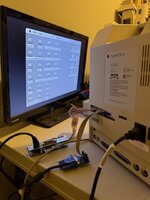
Hi, I'm back and looking for some help with something out of my wheelhouse. First, my SE/30 works fine and is doing well. In case you don't know, I added a Booster 2.0 accelerator card via the PDS slot and then plugged in on top of that a Tri-Data Systems ethernet card. I had to get a longer 16-pin IDC cable to bring the ethernet connector I/F out the back of the SE/30 as there is also mounted on the back of the SE-30 a BlueSCSI v2 with SD card. Finally, I just added a MacPicoVid - extender (from Ron's Computer) to bring VGA video out of the SE/30 to an external monitor. It all works well except for one thing, there is a lot of congestion in the back of my Mac portable between two ribbon cables with I/F cards for VGA and ethernet connections along with my BlueSCSI. I've included a picture.
To clarify, the BlueSCSI is mounted on the metal frame behind the rectangular hole on the back of te SE/30. I originally ordered it from a one-person company with a 3-D printer and it has worked just fine. Instead of having the ribbon cables flopping around, I'd like to mount everything inside where the spinning HD use to be. So, I need two things, a custom carrier to fit inside the HD carrier that will hold the VGA Raspberry PI, as well as the ethernet I/F card securely. Then move the BlueSCSI over to the right to make room to mount the RJ-45 and VGA connectors to the left, right next to the SD card slot so I can connect everything up cleanly.
I don't have a 3-D printer to make this custom back panel and brackets or even if what I'm thinking will even work. How do I go about finding someone to help me design and build a bracket and shelves to hold the I/F panels. I would pay a reasonable sum for the labor to design, build and test and donate the final results to the Apple Community as I'm sure I'm not the only one who needs a solution like this.
Thank you in advance for your time,
Gerry
To clarify, the BlueSCSI is mounted on the metal frame behind the rectangular hole on the back of te SE/30. I originally ordered it from a one-person company with a 3-D printer and it has worked just fine. Instead of having the ribbon cables flopping around, I'd like to mount everything inside where the spinning HD use to be. So, I need two things, a custom carrier to fit inside the HD carrier that will hold the VGA Raspberry PI, as well as the ethernet I/F card securely. Then move the BlueSCSI over to the right to make room to mount the RJ-45 and VGA connectors to the left, right next to the SD card slot so I can connect everything up cleanly.
I don't have a 3-D printer to make this custom back panel and brackets or even if what I'm thinking will even work. How do I go about finding someone to help me design and build a bracket and shelves to hold the I/F panels. I would pay a reasonable sum for the labor to design, build and test and donate the final results to the Apple Community as I'm sure I'm not the only one who needs a solution like this.
Thank you in advance for your time,
Gerry