LC 630 and BlueSCSI

indibil

New Tinkerer
Hi! I recently got an LC 630, the basic model without a CD-ROM drive. I didn't know the HDD is IDE, and I already had a BlueSCSI ready for it, but instead I'll use a 250MB CF drive I have. I haven't finished opening it completely, but I don't know how to connect the SCSI cable to the proprietary CD-ROM connector. Is there a standard 50-pin connector where I can connect the BlueSCSI and have it working at the same time as the IDE CF drive?

I don't know where I could find a guide showing me how to wire it.

Thanks.
 

indibil

New Tinkerer
You will need the CD-ROM Drive SCSI Adapter. The SCSI bus isn’t accessible anywhere else internally. Check out Apple’s Service Source for a complete take apart guide.
Thank you for the response.

So there is no internal connector, I see...

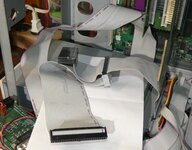
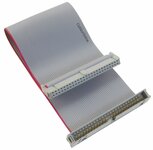
Do you think it would be possible to add a connector like this to the 50-pin ribbon?

I'm not sure if the order of the wires is the same.

images.jpg
 

indibil

New Tinkerer
Hello.

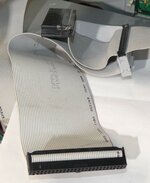
Well, I've tried it, and it seems to work, BUT with a catch. I added a 50-pin connector to the ribbon cable, and if I connect the BlueSCSI without an SD card, it works; it powers on and lights up, blinking due to the missing SD card, and the Mac boots from the IDE HDD. But if I insert an SD card with several .hda files, it gets stuck during the boot process, when the progress bar starts.

I suspect that this SCSI port is locked with a specific ID, and when I add the SD card with multiple IDs, it doesn't fully synchronize. I could try adding only one .hda file with the original SCSI ID and see.

Can anyone tell me if the original CD-ROM drive has an ID00? Or what ID it has?

Thanks.
 

robin-fo

Tinkerer
Feb 17, 2022
159
76
28
Switzerland
I suspect that this SCSI port is locked with a specific ID, and when I add the SD card with multiple IDs, it doesn't fully synchronize. I could try adding only one .hda file with the original SCSI ID and see.
This is unlikely.. Have you tried booting with System Extensions disabled (by holding the Shift key during startup)?
 

Trash80toG4

Active Tinkerer
Apr 1, 2022
1,175
347
83
Bermuda Triangle, NC USA
I suspect that this SCSI port is locked with a specific ID, and when I add the SD card with multiple IDs, it doesn't fully synchronize. I could try adding only one .hda file with the original SCSI ID and see.

Can anyone tell me if the original CD-ROM drive has an ID00? Or what ID it has?
Most, if not all Mac CD drives are assigned as SCSI ID 3, but that's on the drive jumpers. ISTR, SCSI ID 0 is assigned to the boot drive.

The 6400/6500 harnesses have an extension of the SCSI portion of that CD Adapter socket setup with connector and cable end termination for the optional ZIP drive on those fugly towers. Can't recall the SCSI ID assigned onthe Zip Drives, but the harness is almost surely a pure, SCSI implementation without ID complications?

PM6400-6500-Zip_Extension.JPG

Interesting the CD adapter strip isn't defined as a specific part number/illustration in the exploded diagram of the 630 or 6400/6500 Service Sources.
 

Trash80toG4

Active Tinkerer
Apr 1, 2022
1,175
347
83
Bermuda Triangle, NC USA
IIRC I added this SCSI extension cable to the connector for the Zip drive. Checked my other harness which doesn't have one.

PM6400-6500-Zip_Extension-c.JPG

SCSI-Tibbon_Cable_Extension.jpg

I see no reason why you can't crimp an IDC female to the harness just below the CD Connector Bar, facing aft. The connectors don't care on which side of the cable they're installed so long as the keying is correct. Crimp the female connector in a vise just so and then run the extension up overtop the CD bar, installing your BlueSCSI in the CD cubic.

If it has wireless, make sure the antennae are as far forward in the bay as possible. The front bezel has no RFI shielding to interfere with the signal.


edit: forgot you'd posted the connector upthread, that's exactly what you need to do the mod as I've suggested. BTW, does your front bezel have provision for an optical drive to be installed or is it a blank surface like the IIsi or Q605? I've never heard of one without the CD?
 
Last edited:

Oelmuvun

New Tinkerer
Oct 23, 2024
9
5
3
Back in the day I added an extra connector to the ribbon of my 6500. It worked just fine with the HDD mounted upside down in the top of the case. The key is just the usual SCSI termination voodoo.
I've noticed my Performa 631CD board on a 6500 harness can be finicky with a BlueSCSI v1 involved, sometimes it hasn't played nice unless I attach a CD drive as well, sometimes it's fine without. Play with your termination and see what you can come up with.