Macintosh Mini - (yet another) Maclock conversion project

wells

New Tinkerer
Oct 27, 2021
8
11
2
youtube.com
I noticed a trim pot on the Adafruit sound module. I think it’s a gain adjustment but I wonder if adjusting it would have any effect on the digital noise it’s picking up and amplifying.
If the gain is too high, you'll likely hear noise. If lowering the gain solves the problem (and sound is still audible) then you should be set.

I was having trouble finding the description of what the buttons are supposed to do. The left one for me chimes and resets the emu. I can’t get it to do more than that. I thought a long press or a double tap exits to command prompt. Maybe that’s the right button which does nothing for me. Are these commands editable?
Buttons are configurable, see here in the docs.
 

caver01

Tinkerer
Oct 30, 2021
243
168
43
Perfect! Thanks!

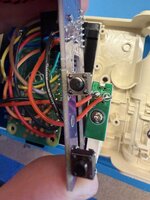
I was finally able to get in there with a multimeter and probe my button 1 and sure enough, it was non functional. Maybe the heat from desoldering or part of the pin was left behind. . . in any case this switch was DOA so I replaced it with a traditional tactile. After flattening out the curved leads of the new switch it sits nicely on your board. I scraped back some of the solder mask to give the switch leads more to grab onto, as my switch doesn’t have any strain relief—the pins themselves are designed to grab the holes you normally solder them into.

The tac switch worked so much better than the originals that I pulled the other one off too.
IMG_1957.jpeg

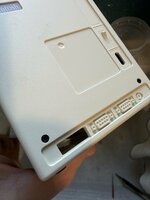
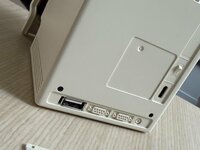
Today I am taking a tiny drill and files to the back of the case to add a USB port! I am aiming for the back right corner to replace one of the existing fakes. The rectangle there is perfect.
 
  • Wow
Reactions: wells

caver01

Tinkerer
Oct 30, 2021
243
168
43
Also, I WAS able to tweak the gain on the audio using the trim pot. I think for now I will be satisfied with a compromise between audible emu value and dropping the noise to a less-noticeable level.
 
  • Like
Reactions: wells

caver01

Tinkerer
Oct 30, 2021
243
168
43
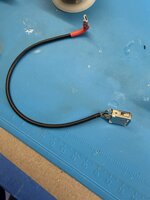
Two steps forward one step back: Having constructed a working Micro-to-USB-A adapter cord that I will mount in the back, I wanted to test it first. No mouse control. No keyboard control! In fact, if I SSH into the running system and check run 'lsusb' I only get the root hub device.

However, if I opt to ingore the little floppy switch power input and run power directly into one of the USB Micro ports, the other USB port works just fine, even into the emulator. Upshot: USB is not working properly when powered from the 5V input via the USB-C/Battery input. Now, that power works fine, and in fact I can run off battery alone (no USBC plugged in) which is great. My optical mouse even gets power to the red LED imager--but the OS doesn't recognize anything. What gives? Is the image configured to ignore USB ports at low voltage? I am at a loss.

Also, I can't get a double-press <EDIT: I can, it's just hard to get the timing just right!> of button 2 to trigger an emu exit. Only the restart. My timing may be off--I see 500ms is the delay, but pretty sure I am hitting that and I only ever get restarts.

 
Last edited:

caver01

Tinkerer
Oct 30, 2021
243
168
43
Ok, I made a new observation. The audio noise is coming from the use of the USB-C battery connection. I think I am going to try to bypass it. I want to keep the connector, but since this will be a desk accessory, battery power is just a novelty to show someone for a few moments. It will be powered normally. When I use a Micro USB power connection to the Pi Zero directly, the static goes away. So maybe it's not the battery necessarily, but running the power through the mini board? Who knows. In any case, I'd like to turn the gain back up and get more volume even if it means I don't get to use the battery. I am OK with that tradeoff.
 

caver01

Tinkerer
Oct 30, 2021
243
168
43
I think you showed that in the video with a short mouse/kbd dongle attached.
I am tempted to add a second one now that I removed the battery.

Today I set it up on my desk having tweaked the image to randomize the most recognizable After Dark modules. A few people have noticed and everyone got a kick out of it.

Thanks for making the board and enabling so many features. It's a flexible platform now and a nice desk accessory and more to my liking than the well-intentioned LCD clock. I am happy!