

I bought a backlit Macintosh Portable (M5126) that needed a recap and minor cleanup. Upon powering up, everything initially worked. However, within 30 seconds I could smell burning and quickly switched it off. I removed as many accessories (cards, hard drive, floppy etc) and tried again. Eventually, I realized that backlight was not working and the smell was coming from the display.
Don't mess around with CCFL backlight boards. The high voltage can harm or kill you.
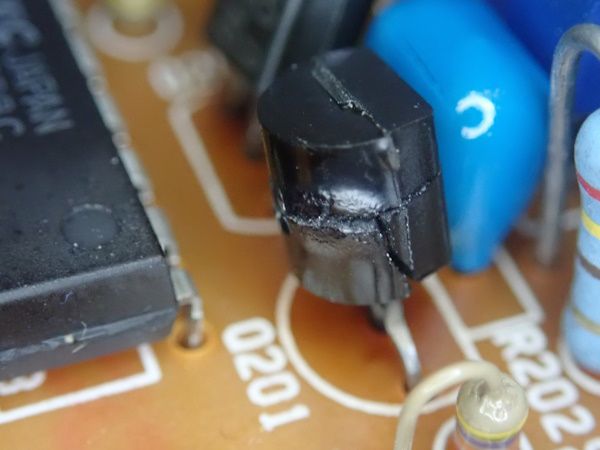
Thanks to @JDW's fine video, I was able to open the display bezel without breaking the plastic. The inverter board showed two damaged components. Transistor Q201 2SC1645 NPN Darlington was broken and melted.
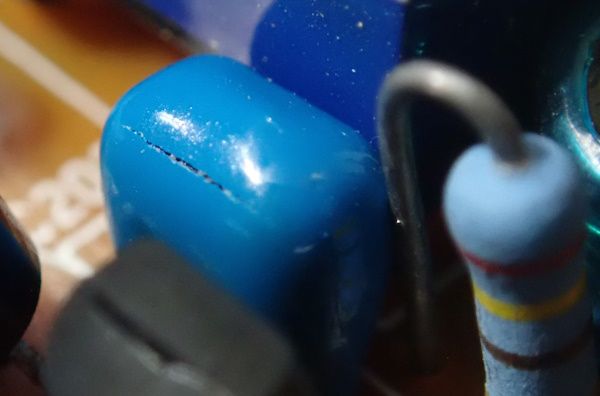
And capacitor C203 MLCC(?) 330 nF is cracked.
Replacing these components resulted in about 30 seconds of backlight, followed by Q201 being destroyed again. There is a distinct buzzing noise that suggests the transformer insulation has failed. Yet, measuring the transformer leads does not indicate any shorts or high resistances.
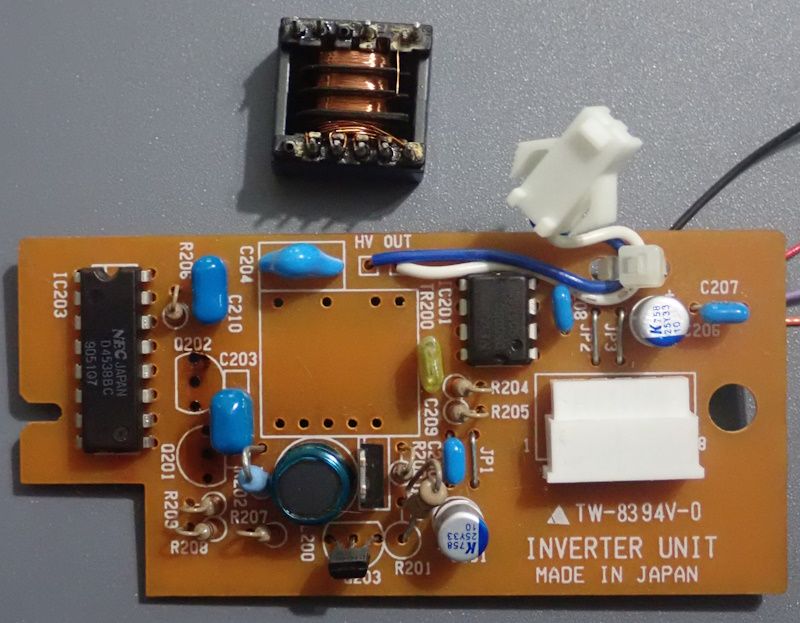
I reverse engineered the inverter circuitry in hopes of locating other potential sources of failure.
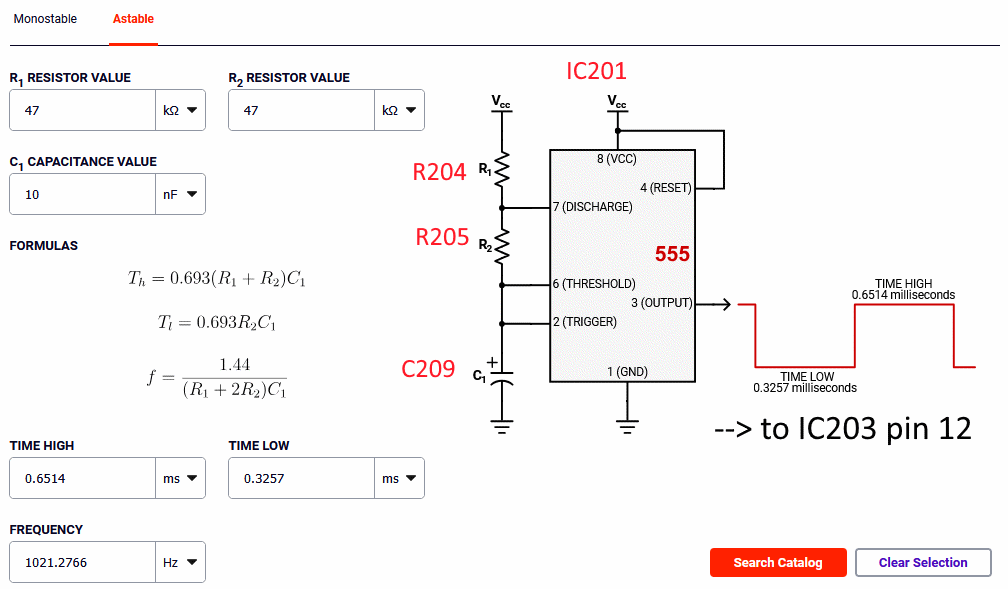
The portion of the board around IC201 is just a standard 555 astable pulse generator. It creates a 1 kHz pulse width wave form with a 66% duty cycle whenever the Portable enables the backlight.
This waveform is sent to the portion of the circuit around IC203, which combines the Portable's dimming signal (a brightness level where 5V is the lowest brightness and 3.5V is the highest brightness). The IC203 CD4538BC Dual Precision Monostable Multivibrator combines those signals together to turn on/off the power (via Q203 and then to Q200) to the high voltage section of the circuit. When the enable signal from the Portable is high and the dim signal is 5V, then the CCFL is turned on about 1/3 of the time. When the dim signal is 3.3V, then the CCFL is turned on all the time. When the enable signal is low, the CCFL is turned off regardless of the dim signal.
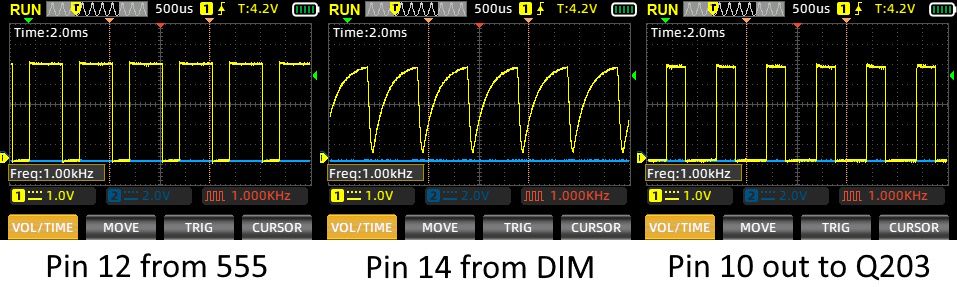
The DIM signal from the Portable is not actually a sawtooth like shown in the middle of the above image. That's just the RC circuit within the IC203 chip giving it that look.
The high voltage section of the inverter board almost matches the classic Royer/Baxandall oscillator. Here is the schmatic that I marked up with the Portable's parts.
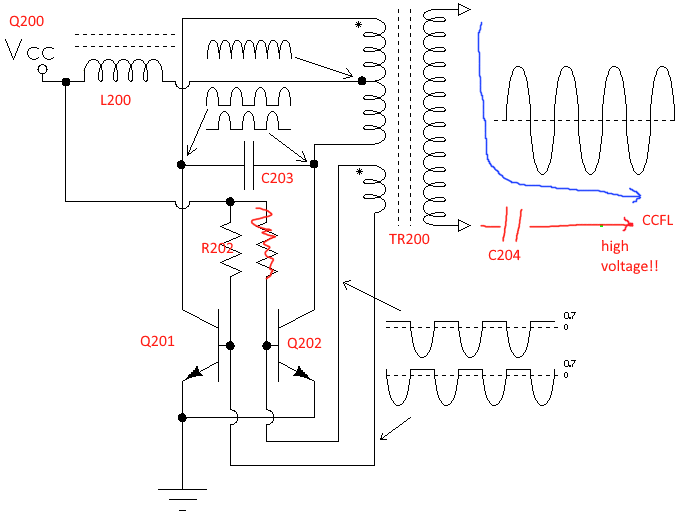
The thing is, there isn't much that can go wrong on the inverter board besides the transformer that would result in component damage. Removing the transformer and testing the inverter modules reveals the rest of the inverter board works fine. Therefore, I conclude that the secondary coil of the transformer must be arcing into the primary coil (where Q201 attaches) when the secondary coil is charged to high voltage. Unfortunately, a replacement transformer does not appear easy to source.
LED Replacement
I ordered a CCFL backlight replacement kit from Amazon. https://amzn.to/4xiZktr
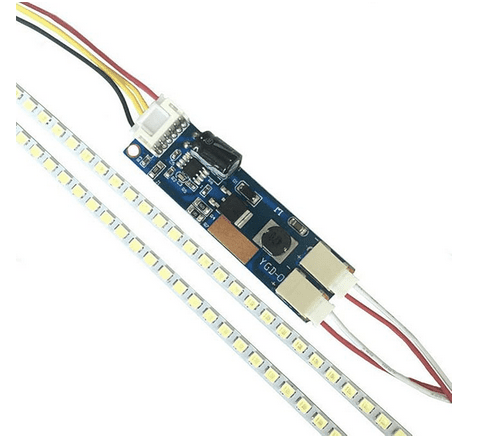
It includes an LED strip that you can snip off to the desired length. Due to crappy packaging, my strip arrived broken. However, the strip was still more than long enough for the Portable's screen. I snipped mine after LED #27. Note that the LEDs are in groups of three (marked in blue below -- look carefully and you can see the thick traces in the groups). You must cut between the groups.

The only concern I have is that the LED strip has been cut so short that the LED driver may provide too much current to the LEDs when at maximum brightness. Officially, it lists the minimum length as 7 inches.
This LED backlight driver is based around the popular DF6113 LED driver chip. The circuit itself is NOT based on the example from the datasheet, because this board emulates the inputs expected for a CCFL driver board. This is critical, because this matches the inputs that the Portable provide. Below is the schematic which seems to more closely match the CCFL replacement board. In other words, don't buy a generic LED backlight driver board. Buy one that is intended to replace a CCFL.
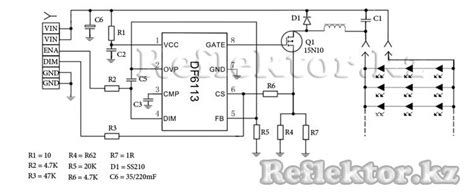
There's a problem. This driver board needs 10V minimum to the Vin (but not the enable and dim inputs) and the Portable only supplies 5V. Buy a cheap MT3608 to provide the boost. https://amzn.to/4xiroNB
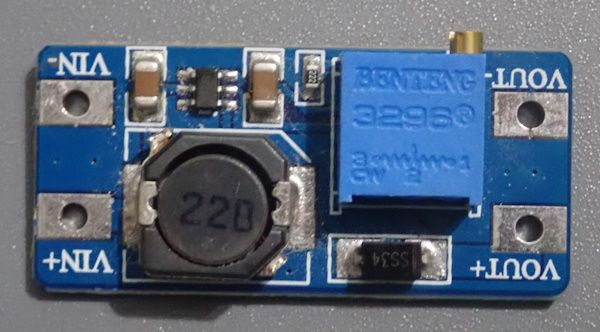
You will need to use a multimeter (and maybe a dummy load?) to adjust the trimpot to output 10V before attaching it to the LED driver board. The wiring is easy. GND to VIN-. +5V from the Portable to VIN+. VOUT+ to LED driver Vin. VOUT- to LED driver GND.
One thing I do not like about this cheap booster is the coil whine. I can hear it when the backlight is turned on. Perhaps I could have snuck a 12V wire up from the Portable to avoid using the MT3608 all together.
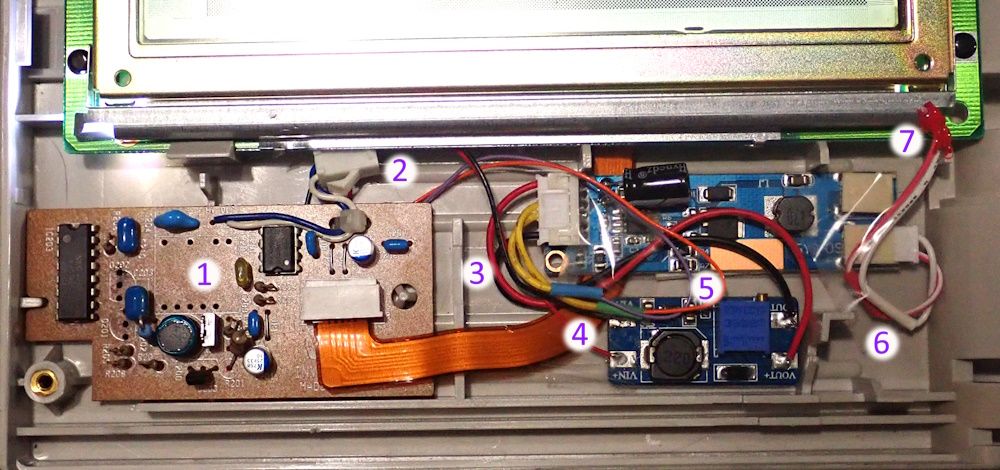
Here's everything installed.
1. Original inverter board with the transformer removed to prevent high voltages. This board is only being used for the ribbon connector. If someone wants to create a replacement board, they could eliminate all this other stuff.
2. The original CCFL connector is disconnected. Without the transformer, this isn't doing anything.
3. Leave space here. A plastic latch from the front bezel goes here.
4. Power from the Portable ribbon cable goes into the MT3608. Nearby, notice wires have been shortened, spliced, and covered with heatshrink tubing.
5. Both boards are attached to the back of the display case with double-sided tape.
6. The LED strip cable has also been shortened.
7. The LED strip goes where the CCFL bulb used to be.
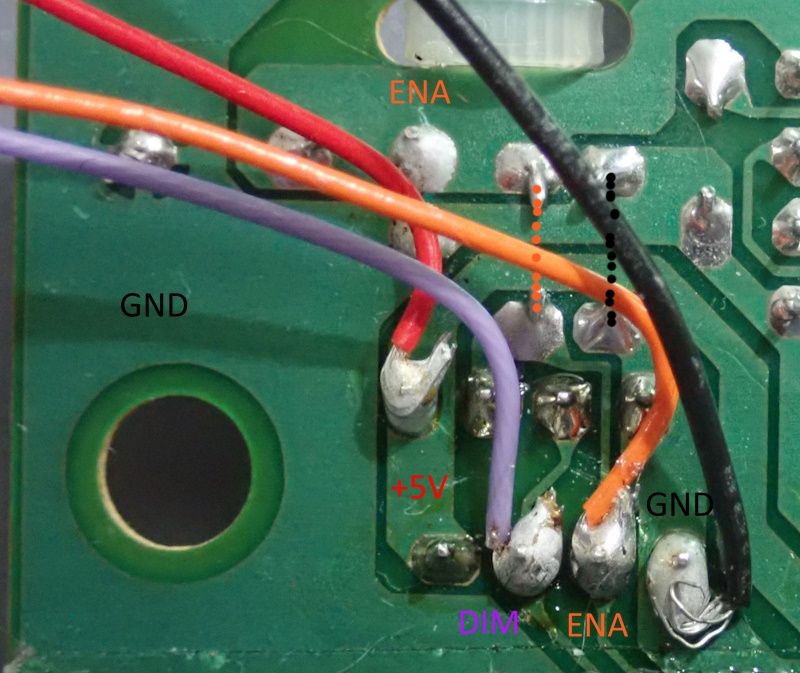
I soldered wires on the back side of the original inverter board. +5V and GND goes to the MT3608 voltage booster. DIM goes directly to the DIM input on the LED driver board. ENA goes directly to the Enable input on the LED driver board. How fortunate that they match!
To remove the old CCFL bulb, snip off one of the bulb wires and trim away the heat shrink on that end of the bulb. Then bend back the nearby metal tab (and on the other side as well -- see a later picture). Then you can simply pull the bulb through. You don't need to remove the metal bracket or undo any tape or anything. Just allow the tube to slide out.
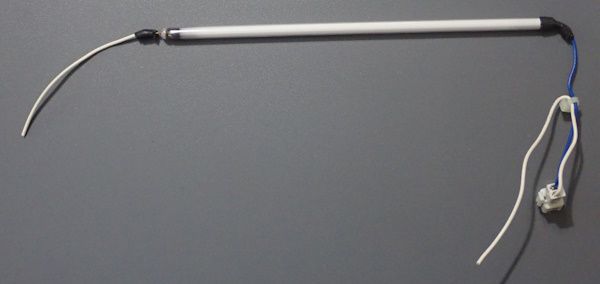
Important, don't reuse this tube without adding heatshrink back. This is high voltage.
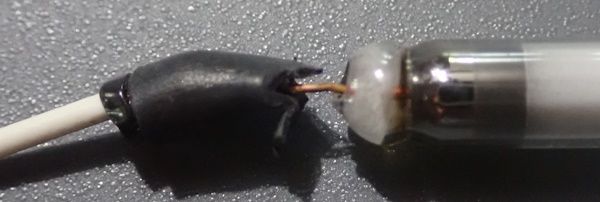
After inserting the LED strip, angle it about 45 degrees to provide the most brightness. This image also shows the metal tab that I had to bend up to allow the CCFL bulb to be removed.
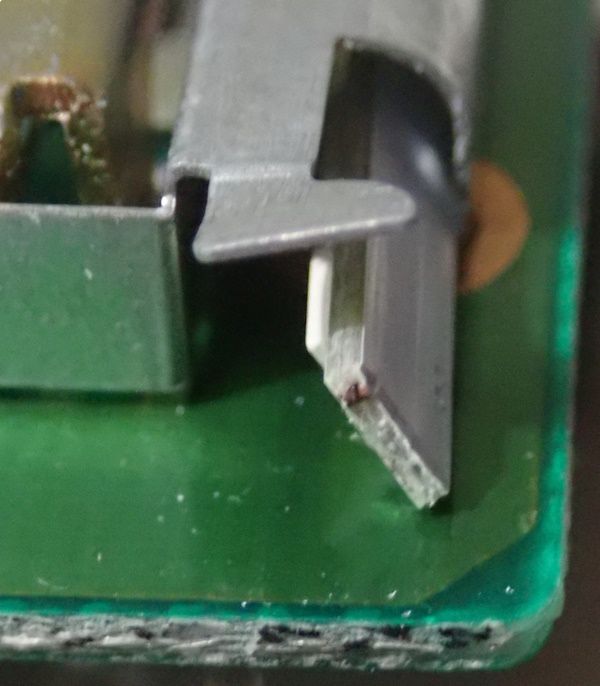
Afterwards, bend down the metal tabs. Hot glue can secure the LED strip in place at the desired angle. (Isopropyl alcohol can remove the hot glue in the future if needed.)
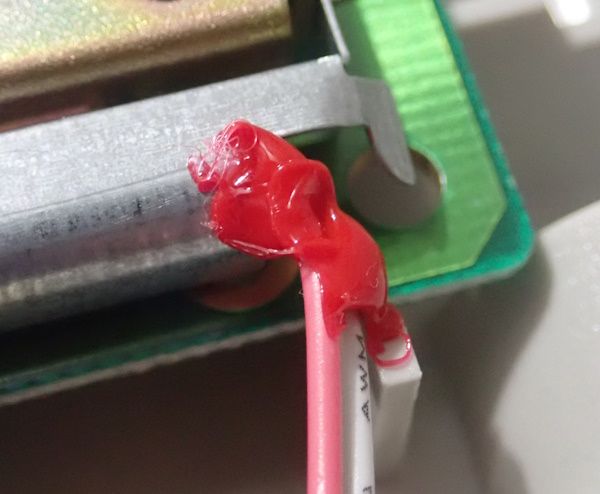
Wow! What do you think? Bright enough for you?
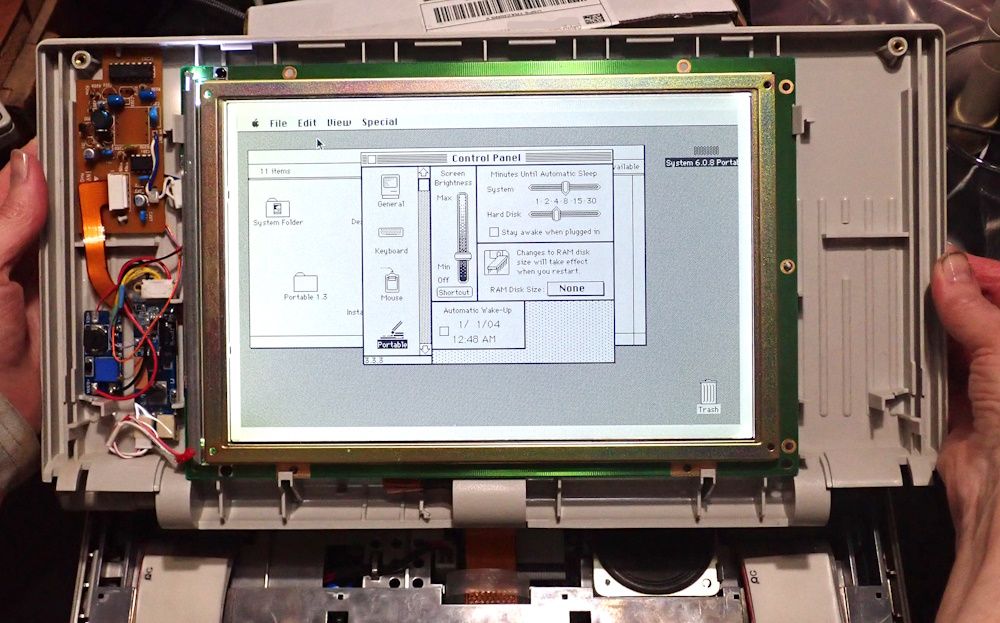
The control panel continues to work perfectly. You can still dim or turn off the backlight as usual.
One thing that I considered, but ran out of time, was to connect a diode-pullup-resistor to the enable signal to have it turn on by default when the Portable cold boots. Perhaps something to add if someone makes a custom board.
- David
Don't mess around with CCFL backlight boards. The high voltage can harm or kill you.
Thanks to @JDW's fine video, I was able to open the display bezel without breaking the plastic. The inverter board showed two damaged components. Transistor Q201 2SC1645 NPN Darlington was broken and melted.
And capacitor C203 MLCC(?) 330 nF is cracked.
Replacing these components resulted in about 30 seconds of backlight, followed by Q201 being destroyed again. There is a distinct buzzing noise that suggests the transformer insulation has failed. Yet, measuring the transformer leads does not indicate any shorts or high resistances.
I reverse engineered the inverter circuitry in hopes of locating other potential sources of failure.
The portion of the board around IC201 is just a standard 555 astable pulse generator. It creates a 1 kHz pulse width wave form with a 66% duty cycle whenever the Portable enables the backlight.
This waveform is sent to the portion of the circuit around IC203, which combines the Portable's dimming signal (a brightness level where 5V is the lowest brightness and 3.5V is the highest brightness). The IC203 CD4538BC Dual Precision Monostable Multivibrator combines those signals together to turn on/off the power (via Q203 and then to Q200) to the high voltage section of the circuit. When the enable signal from the Portable is high and the dim signal is 5V, then the CCFL is turned on about 1/3 of the time. When the dim signal is 3.3V, then the CCFL is turned on all the time. When the enable signal is low, the CCFL is turned off regardless of the dim signal.
The DIM signal from the Portable is not actually a sawtooth like shown in the middle of the above image. That's just the RC circuit within the IC203 chip giving it that look.
The high voltage section of the inverter board almost matches the classic Royer/Baxandall oscillator. Here is the schmatic that I marked up with the Portable's parts.
The thing is, there isn't much that can go wrong on the inverter board besides the transformer that would result in component damage. Removing the transformer and testing the inverter modules reveals the rest of the inverter board works fine. Therefore, I conclude that the secondary coil of the transformer must be arcing into the primary coil (where Q201 attaches) when the secondary coil is charged to high voltage. Unfortunately, a replacement transformer does not appear easy to source.
LED Replacement
I ordered a CCFL backlight replacement kit from Amazon. https://amzn.to/4xiZktr
It includes an LED strip that you can snip off to the desired length. Due to crappy packaging, my strip arrived broken. However, the strip was still more than long enough for the Portable's screen. I snipped mine after LED #27. Note that the LEDs are in groups of three (marked in blue below -- look carefully and you can see the thick traces in the groups). You must cut between the groups.
The only concern I have is that the LED strip has been cut so short that the LED driver may provide too much current to the LEDs when at maximum brightness. Officially, it lists the minimum length as 7 inches.
This LED backlight driver is based around the popular DF6113 LED driver chip. The circuit itself is NOT based on the example from the datasheet, because this board emulates the inputs expected for a CCFL driver board. This is critical, because this matches the inputs that the Portable provide. Below is the schematic which seems to more closely match the CCFL replacement board. In other words, don't buy a generic LED backlight driver board. Buy one that is intended to replace a CCFL.
There's a problem. This driver board needs 10V minimum to the Vin (but not the enable and dim inputs) and the Portable only supplies 5V. Buy a cheap MT3608 to provide the boost. https://amzn.to/4xiroNB
You will need to use a multimeter (and maybe a dummy load?) to adjust the trimpot to output 10V before attaching it to the LED driver board. The wiring is easy. GND to VIN-. +5V from the Portable to VIN+. VOUT+ to LED driver Vin. VOUT- to LED driver GND.
One thing I do not like about this cheap booster is the coil whine. I can hear it when the backlight is turned on. Perhaps I could have snuck a 12V wire up from the Portable to avoid using the MT3608 all together.
Here's everything installed.
1. Original inverter board with the transformer removed to prevent high voltages. This board is only being used for the ribbon connector. If someone wants to create a replacement board, they could eliminate all this other stuff.
2. The original CCFL connector is disconnected. Without the transformer, this isn't doing anything.
3. Leave space here. A plastic latch from the front bezel goes here.
4. Power from the Portable ribbon cable goes into the MT3608. Nearby, notice wires have been shortened, spliced, and covered with heatshrink tubing.
5. Both boards are attached to the back of the display case with double-sided tape.
6. The LED strip cable has also been shortened.
7. The LED strip goes where the CCFL bulb used to be.
I soldered wires on the back side of the original inverter board. +5V and GND goes to the MT3608 voltage booster. DIM goes directly to the DIM input on the LED driver board. ENA goes directly to the Enable input on the LED driver board. How fortunate that they match!
To remove the old CCFL bulb, snip off one of the bulb wires and trim away the heat shrink on that end of the bulb. Then bend back the nearby metal tab (and on the other side as well -- see a later picture). Then you can simply pull the bulb through. You don't need to remove the metal bracket or undo any tape or anything. Just allow the tube to slide out.
Important, don't reuse this tube without adding heatshrink back. This is high voltage.
After inserting the LED strip, angle it about 45 degrees to provide the most brightness. This image also shows the metal tab that I had to bend up to allow the CCFL bulb to be removed.
Afterwards, bend down the metal tabs. Hot glue can secure the LED strip in place at the desired angle. (Isopropyl alcohol can remove the hot glue in the future if needed.)
Wow! What do you think? Bright enough for you?
The control panel continues to work perfectly. You can still dim or turn off the backlight as usual.
One thing that I considered, but ran out of time, was to connect a diode-pullup-resistor to the enable signal to have it turn on by default when the Portable cold boots. Perhaps something to add if someone makes a custom board.
- David


