

I recently picked up an 8600/300. I ran across a couple of interesting tidbits while playing with the computer.
This is the enhanced model of the 8600 (Kansas motherboard) and stock 604ev @ 300 MHz CPU. For my tests, I'm using System 8.1 with the default extensions.
RAM
The computer came with 64 MB of RAM in 16 MB matching modules installed in B4, A4, B3, and A3. I scoured my RAM collection to add a pair of 64 MB DIMMs in slots B2 & A2, along with two 32 MB DIMMs in slots B1 and A1. This resulted in a total of 256 MB. This should have resulted in all the memory being interleaved for faster performance. However, TattleTech 2.84 indicated the two 64 MB DIMMs were not interleaved (even though they were the same size and in a pair of slots). I did not know that TattleTech had this capability.
I stepped down to matching 32 MB sticks that did interleave for a total of 192 MB of RAM. It made a mild difference (1%) in the CPU set of scores for Norton. If these data points are accurate, this suggests that either Norton tests a wide set of memory locations (unlikely) or that having any non-interleaved memory causes an overall performance penalty. That's something to look out for.
SCSI IDs
The Power Macintosh 8600 has two different physical SCSI buses, one internal and one external, serviced by two different chips. The computer includes SCSI Manager 4.3 in ROM. This software manages both buses independently.
This 8600 has a CD-ROM drive, which is set to SCSI ID 3 on the internal bus. This 8600 also has a ZIP drive, which is set to SCSI ID 5 on the internal bus. I often use SCSI ID 5 on my ZuluSCSI, which explains why this can lead to conflicts on 8600/9600/G3 machines with ZIP drives.
However, I can confirm that you can have two devices, each with the same SCSI ID, as long as they are on physically separate buses and the OS is running SCSI Manager 4.3 or better. Some sites have suggested otherwise, but I've tested it and it works.
Nevertheless, try to use different SCSI IDs if possible, as you can move drives around to different computers without worrying about whether it is a shared or independent bus.
TERMINATOR
If you don't have an internal hard drive (for example, because the seller removed it), then you need to add an internal device with termination or add an internal terminator. I found that the CD and Zip seemed to actually work without the terminator. However, the CD stopped working with a passive terminator on the end of the cable. The CD and Zip worked fine with an active terminator on the end of the cable.
Because the internal bus is 'fast' SCSI, it is recommended that an active terminator or device with an active terminator be installed at the end of the cable.
SPEED
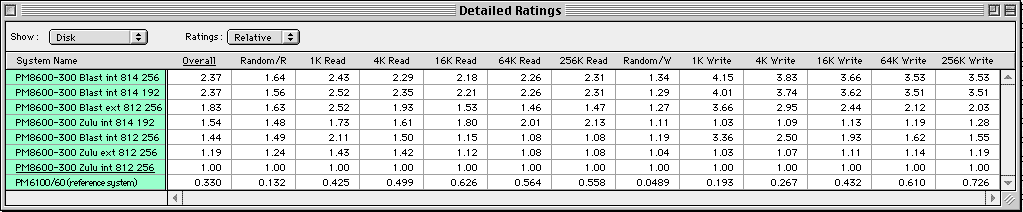
For SCSI speed tests, I used ZuluSCSI and ZuluSCSI Blaster. On average, Blaster was 50% faster.
Initially I was running the ZuluSCSI firmware that came with the drives. I upgraded both the ZuluSCSI and Blaster to 2026-05-12 firmware with no noticable difference.
I assumed that the internal 'fast' SCSI bus would be faster than the external bus. Initially, the opposite proved true. The initial SCSI driver on the SD card was Apple's 8.1.2 from Drive Setup 1.7.3. Upgrading to driver 8.1.4 via Drive Setup 1.9.2 made a significant difference. After upgrading the driver, the internal ("fast") bus was much faster. If you care about performance, the driver definitely matters, particularly for Macs with 'fast' SCSI buses.
KEY
Mac: Power Macintosh 8600 300 MHz for all but Norton's reference system
Blast/Zulu: Rows marked Blast are using the Blaster hardware. Blaster is faster.
Int/Ext: Internal ('fast') SCSI bus vs external. Internal is faster when using the updated driver.
812/814: Apple driver version. v8.1.4 is faster.
192/256: Installed memory. The 192 MB rows have full interleave. The 256 MB rows have mostly interleave. It doesn't matter for the disk results.
- David
This is the enhanced model of the 8600 (Kansas motherboard) and stock 604ev @ 300 MHz CPU. For my tests, I'm using System 8.1 with the default extensions.
RAM
The computer came with 64 MB of RAM in 16 MB matching modules installed in B4, A4, B3, and A3. I scoured my RAM collection to add a pair of 64 MB DIMMs in slots B2 & A2, along with two 32 MB DIMMs in slots B1 and A1. This resulted in a total of 256 MB. This should have resulted in all the memory being interleaved for faster performance. However, TattleTech 2.84 indicated the two 64 MB DIMMs were not interleaved (even though they were the same size and in a pair of slots). I did not know that TattleTech had this capability.
I stepped down to matching 32 MB sticks that did interleave for a total of 192 MB of RAM. It made a mild difference (1%) in the CPU set of scores for Norton. If these data points are accurate, this suggests that either Norton tests a wide set of memory locations (unlikely) or that having any non-interleaved memory causes an overall performance penalty. That's something to look out for.
SCSI IDs
The Power Macintosh 8600 has two different physical SCSI buses, one internal and one external, serviced by two different chips. The computer includes SCSI Manager 4.3 in ROM. This software manages both buses independently.
This 8600 has a CD-ROM drive, which is set to SCSI ID 3 on the internal bus. This 8600 also has a ZIP drive, which is set to SCSI ID 5 on the internal bus. I often use SCSI ID 5 on my ZuluSCSI, which explains why this can lead to conflicts on 8600/9600/G3 machines with ZIP drives.
However, I can confirm that you can have two devices, each with the same SCSI ID, as long as they are on physically separate buses and the OS is running SCSI Manager 4.3 or better. Some sites have suggested otherwise, but I've tested it and it works.
Nevertheless, try to use different SCSI IDs if possible, as you can move drives around to different computers without worrying about whether it is a shared or independent bus.
TERMINATOR
If you don't have an internal hard drive (for example, because the seller removed it), then you need to add an internal device with termination or add an internal terminator. I found that the CD and Zip seemed to actually work without the terminator. However, the CD stopped working with a passive terminator on the end of the cable. The CD and Zip worked fine with an active terminator on the end of the cable.
Because the internal bus is 'fast' SCSI, it is recommended that an active terminator or device with an active terminator be installed at the end of the cable.
SPEED
For SCSI speed tests, I used ZuluSCSI and ZuluSCSI Blaster. On average, Blaster was 50% faster.
Initially I was running the ZuluSCSI firmware that came with the drives. I upgraded both the ZuluSCSI and Blaster to 2026-05-12 firmware with no noticable difference.
I assumed that the internal 'fast' SCSI bus would be faster than the external bus. Initially, the opposite proved true. The initial SCSI driver on the SD card was Apple's 8.1.2 from Drive Setup 1.7.3. Upgrading to driver 8.1.4 via Drive Setup 1.9.2 made a significant difference. After upgrading the driver, the internal ("fast") bus was much faster. If you care about performance, the driver definitely matters, particularly for Macs with 'fast' SCSI buses.
KEY
Mac: Power Macintosh 8600 300 MHz for all but Norton's reference system
Blast/Zulu: Rows marked Blast are using the Blaster hardware. Blaster is faster.
Int/Ext: Internal ('fast') SCSI bus vs external. Internal is faster when using the updated driver.
812/814: Apple driver version. v8.1.4 is faster.
192/256: Installed memory. The 192 MB rows have full interleave. The 256 MB rows have mostly interleave. It doesn't matter for the disk results.
- David
