PowerBook 180c -- Vertical White Column Lines

BajaTym

New Tinkerer
Aug 25, 2026
3
0
1
Greetings,

I’m new to the forum, but I’ve been tinkering with older Macs for several years, mostly compact Macs like the Plus, SE/30, and Classic.

I’m currently working on a recently acquired PowerBook 180c with a bad display and could use some advice on a stubborn issue.

History so far:
  • The original display had severe vertical banding consistent with leaking capacitors.
  • I replaced it with a recapped Sharp LQ9D01 panel.
  • The heavy banding is now gone, but now I’m seeing a different display problem.
Current symptoms:
  • During initial power-on, the screen is solid/lit with no visible degradation.
  • Once the system begins booting, there’s a visible shift and vertical white lines appear.
  • The far-left section of the panel displays perfectly.
  • Across the remainder of the screen, the pattern appears to repeat: one correct pixel column followed by one solid white column.
  • The pattern remains stable once it appears.
So far I’ve:
  • Reseated every cable, including the main display flex and interconnect connections.
  • Checked continuity through the display flex cable; it appears good.
  • Thoroughly cleaned under the accessible driver flex ribbons with IPA.
  • Tried the black multi-position switches on the driver board and returned them to their original positions.
  • Inspected the boards and connectors for obvious damage.
  • Pressed gently on the driver board/flex connections while the machine was running; this had no effect.
The driver board itself looks clean, and the replacement capacitors are all installed properly.

Has anyone encountered this? At this point I’m wondering whether I’m looking at a panel/column-driver problem, a flex issue, or a problem farther upstream in the 180c’s video circuitry?

I’m happy to post detailed photos of the panel, driver board, interconnect board, flex cable, or the actual screen behavior if they’d help.

Thanks in advance!

James
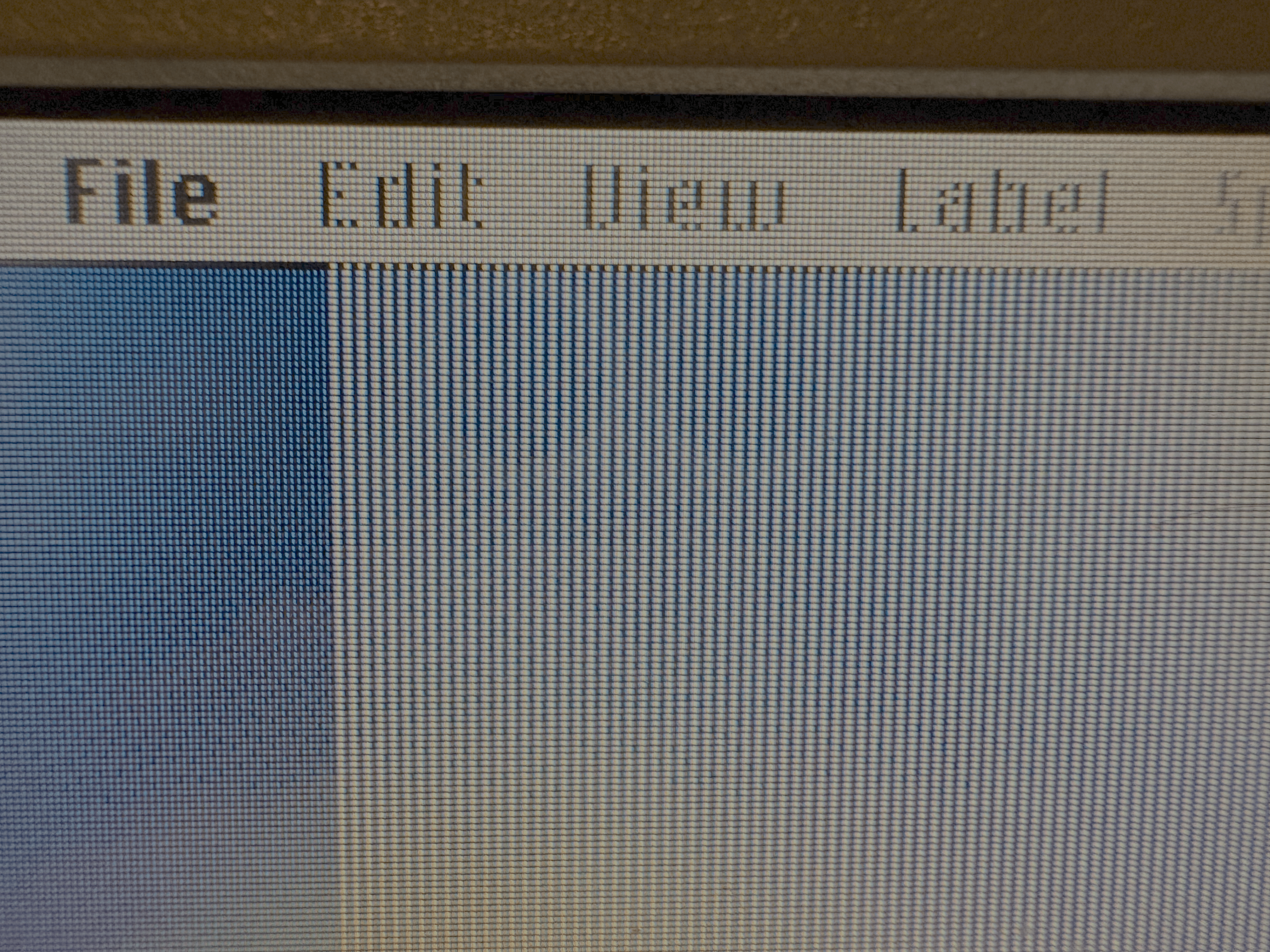
IMG_2089.png
IMG_2088.png
 

Yoda

Tinkerer
Jan 22, 2023
177
118
43
I'm far from an expert, and not at all for the 180c, but I've had that display issue with a 180. In my case, the problem turned out to be the main interconnect cable. These are a pretty notorious failure point on the 100-series PowerBooks, and tend to go brittle over time. Not only that, but since they're so short, they also tend to be stressed each time the PB is opened up, particularly if they're folded the 'wrong' way when reassembled.

A faulty interconnect cable can also cause partial keyboard issues, audio problems, failure to boot and a few other display problems. On my 180, the system alternated between totally dead screen and uniform grey at initial power up, then this same 'broken' vertical lines as it began booting. Occasionally, also flickering white vertical lines when running. All resolved when transplanting a replacement interconnect - which if I recall came from a 165.
 
Last edited:

BajaTym

New Tinkerer
Aug 25, 2026
3
0
1
I'm far from an expert, and not at all for the 180c, but I've had that display issue with a 180. In my case, the problem turned out to be the main interconnect cable. These are a pretty notorious failure point on the 100-series PowerBooks, and tend to go brittle over time. Not only that, but since they're so short, they also tend to be stressed each time the PB is opened up, particularly if they're folded the 'wrong' way when reassembled.

A faulty interconnect cable can also cause partial keyboard issues, audio problems, failure to boot and a few other display problems. On my 180, the system alternated between totally dead screen and uniform grey at initial power up, then this same 'broken' vertical lines as it began booting. Occasionally, also flickering white vertical lines when running. All resolved when transplanting a replacement interconnect - which if I recall came from a 165.

Thank you for the suggestion. Unfortunately, I don't think that's the problem in this case. I originally suspected the interconnect cable as well, but flexing and moving it has no effect on the display/image. In fact, the cable in this machine appears to be in pristine condition (oddly enough).

Thank you! (y)
 

BajaTym

New Tinkerer
Aug 25, 2026
3
0
1
I do have an update, I believe I've narrowed the issue down to the upper flex-to-PCB connections that run across the top portion of the LCD. I removed the shielding around the display to expose the PCB and flex connections. When I gently run a Q-tip across those connections, the display noticeably changes and, in most areas, temporarily clears up. Flexing or slightly rocking the PCB produces the same effect, which pretty much confirmed the location of the problem for me.

From what I can tell, the distorted sections of the display also correspond almost exactly with the individual flex cables along the top edge of the panel.

At this point, I'm fairly convinced that one or more of those flex-to-PCB connections have deteriorated with age. There also appears to be some dark, gooey residue around several of the connections, so I'm investigating whether these can be cleaned and rebonded/repaired or whether replacing the LCD is ultimately going to be the better option.

Of course, any help would be greatly appreciated.

--James

Photo Examples:
Banding 2.png
banding.png


Video Examples: