jack 68k

Tinkerer
Oct 30, 2021
20
34
13
Madison, Wisconsin
#MARCHintosh 2026 is here and I'm excited to share a project I've been working on.


You may know that many Classic Mac models have a diagnostics mode built into the ROM that you can access over a serial connection. But it's extremely cumbersome, limited, and there are a lot of sharp edges that make it difficult to do much practical with it.

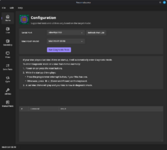
Reconnaissance is a new diagnostics app that runs on your modern machine that makes it easy to run the ROM's built-in diagnostics as well as quite a few custom ones (some of which I have adapted from a certain diagnostic device that repair techs used to have access to...)

The first release supports the following models:
  • Macintosh SE/30
  • Macintosh IIsi
  • Macintosh Iicx
  • Macintosh II
  • Macintosh LC III
Support for more models (notably IIci) will be coming very soon, as well as a public release of full source code and SDK so others can develop custom diagnostic plugins in 68K assembly or C using modern development tools.

The app runs on macOS 14 Sonoma or later, Windows 10, and Windows 11. There's a lot of cool stuff to come and I can't wait to share the next update!

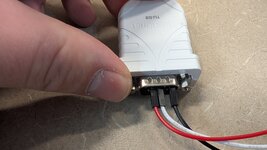
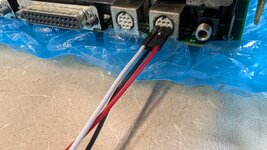
Check out this related thread about USB-serial adapters and cables

Happy #MARCHintosh, everyone!
mac_01_home@2x.png
 
Last edited:

Mac84

Administrator
Staff member
Founder
Sep 4, 2021
310
443
63
New Jersey, USA
www.mac84.net
This is simply amazing, well done! 👏

I see the list of future machines on the website, is the goal to try and support the same systems as the TechStep does (or beyond?). Something like this would be super helpful for Color Classics, LC 550/575, etc. (If possible for such machines).
 

joevt

Tinkerer
Mar 5, 2023
240
97
28
Old World Power Macs have a Serial Test Manager (STM)

On a Power Mac G3, it has a menu and prompt like this:
Code:
>
***************************************
*                                     *
*         Serial Test Manager         *
*                                     *
***************************************

T)  Execute a test, single test number follows command
T0) Run ROM Checksum Test
T1) Run Address Line Test
T2) Run Data Line Test
T3) Run Simple RAM Test
T4) Run Mod3 Forward Test
T5) Run Mod3 Reverse Test
T6) Run NVRAM Test
A)  Execute all ROM-based tests
Q)  Quick test
X)  Exit STM (Continue booting)
?)  Print this menu

>T0
=P
>;#
>T1
=P
>;#
>T2
=P
>T3
=P
>T4
=P
>T5
=P
>t6
=P
>A
=P
>Q
=P
>X
Bye...

The prompt character is >. =P means the test passed.

New World Power Macs have Serial Test Manager in the Mac OS ROM file (until 2001-02-07 New World 7.5.1). But I don't think it has a menu and prompt?

Booting iMac in DingusPPC with a 9.0.4 HD gets me stuck in a Serial Test Manager. Typing *V gives this output:
Code:
STM Version 2.2, Aaron Ludtke 
CTE Version 2.1 
ROM Version 7D 45F4
*V
My ROM Fiend template (using my Hex Fiend.app) says the Test Manager code (search for STM Version) is pointed to by the OS Trap 0x6B which the DispTable.a source file in the supermario repository says is TestManager.

CTE has commands that begin with ! (UTEChar) which are handled by UTECmd in USTEnvirons.a (instead of the STM commands that start with * and are handled in USTTestMgr.a).

The Serial Test Manager menu and the STM commands such as *V may be different things? The code for the serial Test Manager menu is in the Diagnostics.s file or the DiagnosticsGossamer.s file.

These are the versions I could find:
  • 1990/10 - STM Version 2.0, Scott Smyers
  • 1991/10 - STM Version 2.01, Scott Smyers & Aaron Ludtke
  • 1992/03 - STM Version 2.1, Scott Smyers
  • 1992/10 - STM Version 2.2, Aaron Ludtke
Macintosh II is 1987 and its ROM doesn't have a STM Version string. Does it have a *V command?

These are the CTE versions:
  • 1992/03 - CTE Version 1.5.1
  • 1992/10 - CTE Version 2.1
I think the Serial Test Manager menu exists in Old World PCI Power Macs, when Open Firmware was added, after the NuBus Power Macs and before the New World Power Macs.

The Yosemite bootrom ERS document says the STM is part of MiniNub, whatever that is. I don't think I tried activating this with the DingusPPC B&W G3 emulation.
 

Attachments

  • Serial Test Manager Notes.zip
    196.5 KB · Views: 6
  • Like
Reactions: jack 68k

jack 68k

Tinkerer
Oct 30, 2021
20
34
13
Madison, Wisconsin
This is simply amazing, well done! 👏

I see the list of future machines on the website, is the goal to try and support the same systems as the TechStep does (or beyond?). Something like this would be super helpful for Color Classics, LC 550/575, etc. (If possible for such machines).
Thank you thank you!

I intend to support all systems that the TechStep supports, and I would also like to support later machines that have a diagnostic monitor built into the ROM that's accessible by serial connection.

I haven't made a full list of what falls into what category, but this is something I'm actively working on getting organized now that I have the initial version released. I might need some help investigating some machines that I don't own, so I'll post an update here with any calls for information if people want to pitch in and do some investigation :)

I don't know about the 575 specifically but I have a logic board in my Mystic so I should have a better answer to that soon.

This sheet that Adrian Black started is a good start, but it's incomplete
 

eharmon

New Tinkerer
Dec 28, 2022
3
2
3
eharmon.net
Oh wow, I was working on exactly this for the Quadra machines (though just a CLI). It can run most of the STM diagnostics, and I was trying to figure out how to work with UTE as well. I can share my notes offline if you like.
 
  • Like
Reactions: jack 68k

jack 68k

Tinkerer
Oct 30, 2021
20
34
13
Madison, Wisconsin
Oh wow, I was working on exactly this for the Quadra machines (though just a CLI). It can run most of the STM diagnostics, and I was trying to figure out how to work with UTE as well. I can share my notes offline if you like.
Absolutely, I would love to see what you've figured out and hopefully incorporate it. I'll be sharing my source code soon too.
 

ClassicHasClass

Tinkerer
Aug 30, 2022
429
248
43
www.floodgap.com
Oh wow, I was working on exactly this for the Quadra machines (though just a CLI). It can run most of the STM diagnostics, and I was trying to figure out how to work with UTE as well. I can share my notes offline if you like.
Yup, so was I. I have a whole bunch of transcripts for this from my own TechStep but only had basic code working. Good to see someone got this over the finish line.
 
  • Like
Reactions: jack 68k

jack 68k

Tinkerer
Oct 30, 2021
20
34
13
Madison, Wisconsin
Yup, so was I. I have a whole bunch of transcripts for this from my own TechStep but only had basic code working. Good to see someone got this over the finish line.

Sounds like we had the same idea! The Universal ROM sources are helpful but some of the details of how the test commands vary on different machines are kind of hard to decipher from that with all the conditionals and codenames for stuff. So to get a better understanding and figure out some idiosyncrasies in different models, I grabbed serial captures from and processed them using a tool I wrote that decodes the command and responses and saves off the blobs of 68K code for disassembly. Some of the commonly used blobs of code just do little utility things like moving the stack pointer and disabling the MMU, but especially on the older machines there are many fewer ROM-resident tests and a lot of them are custom code. On newer machines a lot more of the test are built into ROM but custom code is still common.

The TechStep is a finicky thing and I've found quite a few bugs in the code it runs along the way 😅

I'm really excited about the possibility of people writing new diagnostics beyond just what's in ROM and what the TechStep did. I wrote these from scratch:

* ADB Device Query (68K assembly)
* Check Burn-in Jumpers (68K assembly)
* Query Logic Board (68K assembly)
* Scan NuBus Slots (C)

Many others are adapted and modified. I'm working on getting the SDK and toolchain ready for release so smart people who know a lot about hardware can do some magical things beyond what I know how to do.

For those who are curious for a peek behind the scenes, here's a portion of a TechStep capture snippet from the IIci RBV chip test, though this is very common setup that you see across a lot of tests.

Code:
000C:    <  2a 41                                               |  *A                |  ASCII Mode
000C: Mac>  2a 41 0d 0a                                         |  *A..              |  OK

000D:    <  2a 48                                               |  *H                |  Binary Mode
000D: Mac>  2a 48 0d 0a                                         |  *H..              |  OK

000E:    <  2a 34                                               |  *4                |  Clear Last Result
000E: Mac>  2a 34 0d 0a                                         |  *4..              |  OK

000F:    <  2a 4c                                               |  *L                |  LoadAddr = $00044000
000F:    <  00 04 40 00                                         |  ..@.              |
000F: Mac>  2a 4c 0d 0a                                         |  *L..              |  OK

0010:    <  2a 42                                               |  *B                |  Byte Count = $0008
0010:    <  00 08                                               |  ..                |
0010: Mac>  2a 42 0d 0a                                         |  *B..              |  OK

0011:    <  2a 44                                               |  *D                |  Set Memory
0011:    <  2e 7c 00 0e 00 00 4e d6                             |  .|....N.          |
0011: Mac>  2a 44 0d 0a                                         |  *D..              |  OK
      [m68kbin] util-set-sp-DC801C7D.m68kbin (SHA256:DC801C7D) 8 bytes (duplicate)
      $ hopper -e util-set-sp-DC801C7D.m68kbin -l RAW --base-address 0x44000 --entrypoint 0x44000 -P m68k -c M68K -v 68030

0012:    <  2a 47                                               |  *G                |  Execute $00044000
0012:    <  00 04 40 00                                         |  ..@.              |
0012: Mac>  2a 47 0d 0a 2a 47 0d 0a                             |  *G..*G..          |  Begin OK / End OK

0013:    <  2a 52                                               |  *R                |  Get Last Result
0013: Mac>  00 00 01 dc 00 00 2a 52 0d 0a                       |  ......*R..        |  $000001DC $0000

And that little blob of code at 011 is just making sure the stack pointer at known good memory:

Code:
EntryPoint:
00044000 2E7C000E0000           movea.l    #$000e0000, a7
00044006 4ED6                   jmp        (a6)

In Reconnaissance you can see the stream of communication in the log files (slightly different format since the goal isn't reverse engineering). There are commands in the File menu to reveal log files. I attached an example if you're curious.
 

Attachments

  • Reconnaissance_20260304_002606.txt
    33.6 KB · Views: 4
  • Like
Reactions: PL212