[SOLVED] No Dark Castle on Mac Portables?

JDW

Administrator
Staff member
Founder
Sep 2, 2021
2,511
1,963
113
54
Japan
youtube.com
So far, I've not been successful in running Dark Castle or Beyond Dark Castle on my M5126 Backlit Macintosh Portable. I've tried disk images on my FloppyEMU to no avail. I've tried (and failed)running it from my internal BlueSCSI, even versions of Dark Castle that otherwise work under System 7.5.5 in Basilisk II.

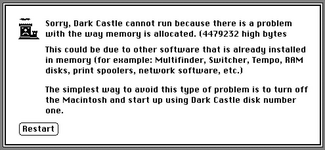
The problem that happens is that I either get memory error dialogs when launching, or it will launch but with the screen garbled. I've tried System 6.0.8 (both with and without MultiFinder loaded), and System 7.1.

Have any of your Mac Portable owners ever gotten Dark Castle to work, and if so, what version do I download to achieve that?

Thank you!
 

Mu0n

Active Tinkerer
Oct 29, 2021
649
606
93
Quebec
www.youtube.com
I tried it in 1989, excited to see if my dad's new Mac could run all of our Plus games, maybe smoother and soon found out the hard way to hold on to the Plus (still have after all these years) because backward game compatibility was very low on the list of priorities for Apple.
 
  • Wow
Reactions: JDW

JDW

Administrator
Staff member
Founder
Sep 2, 2021
2,511
1,963
113
54
Japan
youtube.com
@Mu0n
Thank you for conforming Dark Castle will NOT work on Portables. :cry:

But it's so terribly strange that it works flawlessly in Basilisk II on a 640x480 pixel display, emulating a IIci. One fellow on FaceBook told me today his real IIci runs Dark Castle just fine. Which raises the important question as to why the Portable cannot run it.


Note that I did the following testing in Mini vMac...

WORKS​

  • Standard Mac Plus edition of Mini vMac, booting from the *.dsk image for Dark Castle v1.2

  • Mac II version of Mini vMac. I cannot boot from the *.dsk image due to it complaining about the number of colors needing to be set to B&W, but I can boot from a S7.5.5 disk image, change Monitors to B&W, mount the Dark Castle *.dsk, then double-click to launch the game -- it works just fine, despite the 640x480 pixel resolution, just like in Basilisk II.

  • I tried a Mini vMac variant of the Mac Plus with a huge screen (much larger than 640x480), and Dark Castle launches just fine.

DOESN'T WORK!​

  • I built a custom Mini vMac "variation" app using the Mac SE as a base, 1MB RAM, and 640x400 resolution. I get the standard memory error when trying to boot from the Dark Castle *.dsk image using that app.

    1766387891620.png

    Same memory error occurs if I boot from a S6.0.8 *.dsk or MacPaint 1.5 floppy with even older OS. (Meaning, I later mount the Dark C. floppy on the Desktop and double-click the game, then get the memory error.)

  • Booting from a System 3.2 disk or a System 2.0 disk, then mounting Dark Castle separately at the Desktop, results in the same memory error.

  • I created a Mac Plus 1MB variant of Mini vMac with 640x400 resolution, but I get the same Memory related error.
 
Last edited:

JDW

Administrator
Staff member
Founder
Sep 2, 2021
2,511
1,963
113
54
Japan
youtube.com
Thanks to Ryan Schmidt's brilliant ResEdit hack given to me on FaceBook, I now have dark castle working on my Macintosh, portable, and this is perhaps the first version ever to work on that Mac!

Here is what Ryan told me...

Dark Castle contains code to decide whether to make a centered window and draw into it with QuickDraw e.g. on a Mac II, or whether to draw directly to the main (and possibly alternate) screen buffers e.g. on a compact B&W Mac. The criteria it uses to do so is evidently incorrect. It also contains sanity-check code to ensure it has enough RAM, which might also be incorrect on later Macs with different memory layouts like the Portable or with different screen sizes.

He read through the code with ResEdit's code disassembler. and found where it loads the machine's model number. By changing that to force it to believe it is on a Mac II, he gor it running fine in a Mini vMac SE set for 640x400.

THE HACK
Open the Data A file in ResEdit. Edit CODE resource ID 3, "InitSeg". At offset 636, change 302E FFF2 to 303C 0004.

Video of it working on my Portable…


JDW

Administrator
Staff member
Founder
Sep 2, 2021
2,511
1,963
113
54
Japan
youtube.com
The amusing thing is, v1.2 from Macintosh Garden includes this compatibility chart which mentions the Portable...

1766451839078.png


But I confirmed in System 6.0.8 that chart is wrong (at least for the M5126 Portable) because I get a garbled screen when Launching Dark Castle v1.2 without the hack. With Ryan Schmidt's excellent hack, it works fine.

@eric
The Hacked version that works on the Portable is now available as DL#9 on Macintosh Garden.
 
  • Like
  • Love
Reactions: wottle and eric

ryandesign

New Tinkerer
May 11, 2024
14
9
3
www.ryandesign.com
I'm glad I could help! Though it would be better to have a "proper" fix. The one above just bypasses the machine model check and always pretends to be a Mac II. The original game would display an incompatibility dialog and exit on a Macintosh 128K or XL; the patched one might crash. And it might use QuickDraw instead of direct screen drawing on compact Macs which might make it too slow on an 8MHz Mac. I might try for a "proper" fix later.
 
  • Love
  • Like
Reactions: wottle and JDW