CodeWarrior SquirrelEDIT, the 1Bit pixel editor for C developers

DW1992

New Tinkerer
Jul 19, 2026
10
20
3
Ontario, Canada.. eh!
www.dsbbs.ca
Hi Everyone,

Quite some time ago, I made this little helper tool while working on my 1Bit game, OPERATION : PewPew (a side scrolling space shooter) to make it easier to draw the game's sprites. 👾:alien:🛸

It's been added to (badly hacked together) over time with different features I found useful for developing my little games, etc..

After spending a lot of time working on Generic Block Game and my 68K BBStro, I wanted to get back to fixing up some of the bugs and adding / properly refining a few of the features in my ol' 1Bit pixel editor.


I'm happy to present... SquirrelEDIT Version 2.5
🥳

icon.png

A few exciting (to me at least... :p) changes and additions...

Version 2.5 has some exciting improvements and new features...

Dedicated EXPORT menu
- C Array
- QuickDraw bitmap
- QuickDraw PICT
- ICN# 32x32 resource

1 bit pattern palette
- 6 selectable patterns to use for fills, etc..
- A groovy little selection indicator arrow :sneaky:

Drastically improved accuracy for the 'rubber-band preview' tools.
- Circle
- Line
- Square

Export name validation (I'm actually quite proud of this part) :geek:
- A dialog window will open, unique to the export type, and ask for the name
you want to use for the sprite export.
- Validation on the name you type occurs to ensure the name meets valid C
formatting and character limits.
DISALLOW: Enter / Return, non-alpha-numeric characters, symbols.
ACTIVE REPLACEMENT: A 'space' is instantly replaced with an underscore.

MAX LENGTH: 63 characters is the MAX length of the entered name.
- The name previews and validates in real time, as you type.

Screenshots previewing the various functions, etc... are included below.

Grab the latest version (.SIT) directly from my Demozoo profile
HERE.

Runs great in the Basilisk II emulator and on real System 7.x machines.

As always,any comments, requests, suggestions, etc.. please shout!
Aaron/DW
Dark Systems BBS

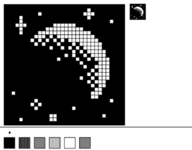
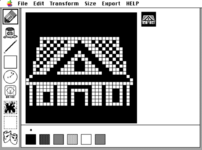
16x16.png32x32.pngExport_Naming.pngexport_QDbitmap.pngExports.pngTransforms.pngExample doodles.png
 
  • Like
Reactions: nilobject and Mu0n

Mu0n

Active Tinkerer
Oct 29, 2021
701
675
93
Quebec
www.youtube.com
@DW1992 I'm checking out your tool - nicely done! This is a good basis for graphics.

I'm wondering about the export to a bitmap structure. I'm guessing BitMap have more elements than in THINK C/Symantec C++, would you agree?

1789571367152.png


The last 2 elements aren't present in what I have over here.

Suggestions:
-I don't expect the rich selection rectangle + lasso functionality of Macpaint, but at least a simple displacement of the canvas in all 4 directions would go a long way
-custom sizes, but where a multiple of 32 (for width) is suggested
-sprite sheets
-animation tests with play forward once, loop, bounce
-automated mask graphic generation (I have source code on that if you want) that will detect the edges of your sprite and draw something 1 pixel larger in all directions
 
Last edited:
  • Like
Reactions: DW1992

nilobject

Tinkerer
Nov 21, 2023
57
37
18
great work.... what mu0n said... just 1 pixel to the right, just 1
- transparency when copying to clipboard so folder icons aren't square
- copy/paste/cut
1789581811194.png
1789582405313.png

1789582588340.png
 
Last edited:
  • Like
Reactions: DW1992

DW1992

New Tinkerer
Jul 19, 2026
10
20
3
Ontario, Canada.. eh!
www.dsbbs.ca
Hi Everyone,

Wow! I never expected so many people to fool around with SquirrelEDIT! 🥳
Awesome doodles!

Mu0n, I'm flattered you draw a portrait of me... 😜
Nilobject... I think I need to make the canvas height 12 pixels taller... poor guy! 🙈 Not a good time to loose your head... guess he'll never be the head of a major corporation... 😂

Mu0n, You're right! I didn't even notice the trailing 0,0 elements! No, they aren't suppose to be part of the structure!
Thanks for catching that type-o! I can't believe I missed it! Staring at the screen far too long. lol

C:
    sprintf(p,
            "static BitMap %s = {\r"
            "    %s,\r"
            "    %d,\r"
            "    {0, 0, %d, %d},\r"
            "    0,\r"
            "    0\r"
            "};\r",
            cName,
            bitsName,
            gSize / 8,
            gSize,
            gSize);

Should have been...

C:
sprintf(p,
        "static BitMap %s = {\r"
        "    %s,\r"
        "    %d,\r"
        "    {0, 0, %d, %d}\r"
        "};\r",
        cName,
        bitsName,
        gSize / 8,
        gSize,
        gSize);

All fixed. :giggle:

Screenshot 2026-09-17 at 2.20.59 PM.png

C:
static unsigned char MoonMespriteBits[] = {
  0xFF,   0xFF,   0xFF,   0xFF,
  0xFF,   0xFF,   0xFD,   0xFF,
  0xFF,   0xBF,   0xF8,   0xFF,
  0xF7,   0xFF,   0xFD,   0xFF,
  0xF7,   0xFF,   0xFF,   0xF7,
  0xE3,   0xF8,   0x1F,   0xFF,
  0xF7,   0xE0,   0x07,   0xFF,
  0xF7,   0x80,   0x01,   0xFF,
  0xFF,   0x14,   0x00,   0xFF,
  0xFE,   0xAA,   0x80,   0x7F,
  0xFF,   0x5D,   0xD0,   0x3F,
  0xFF,   0xF6,   0xA8,   0x3F,
  0xFF,   0xFF,   0xD4,   0x1F,
  0xFF,   0xFF,   0x5A,   0x1F,
  0xFF,   0xFD,   0xED,   0x0F,
  0xFF,   0xFF,   0xF7,   0x8F,
  0xFF,   0xFF,   0xFB,   0x0F,
  0xFF,   0xFF,   0xFE,   0x8F,
  0xFF,   0xFF,   0xFD,   0x0F,
  0xFF,   0xFF,   0xF6,   0x8F,
  0xFF,   0xFF,   0xFD,   0x1F,
  0xFF,   0xFF,   0xFE,   0x9F,
  0xFF,   0xFF,   0xFF,   0x3F,
  0xDF,   0xFF,   0xFE,   0x3F,
  0xFF,   0xFF,   0xFE,   0x7F,
  0xFF,   0x7F,   0xFF,   0xF7,
  0xFE,   0xBF,   0xFF,   0xFF,
  0xFF,   0x7F,   0xDF,   0xFF,
  0xFF,   0xFF,   0xFF,   0xFF,
  0xFF,   0xF3,   0xFF,   0xDF,
  0xF7,   0xF3,   0xFF,   0xFF,
  0xFF,   0xFF,   0xFF,   0xFF
};

static BitMap MoonMesprite = {
    MoonMespriteBits,
    4,
    {0, 0, 32, 32}
};


When you say, "a simple displacement of the canvas in all 4 directions", do you mean a nudge feature?
Using the arrow keys will nudge your canvas in the direction pushed, wrapping the image around to the opposite edge.
If you mean something else, please talk slowly and let me know, I'm happy to try and implement it! :)

Custom size would be pretty easy, especially is kept as a multiple of 32. Everything could just scale accordingly.
I'm picturing either a slider (16x16 at one end and 256x256 etc..) at the other?
Or a text box that does a validity check on the number entered, since it's square.

Copy / Cut / Paste would be useful.
Let me play with this... ;)

Animation sheets is ambitious... but I kinda have an idea about how to maybe do it...
Again, Let me play with this... ;)
It may become part of the colour version 3.0 (hint hint).. just need free time. ⏳🙈

Mu0n, if you don't mind sharing your mask generation code, I'd love to have a look at it!
That's a great idea I'd love to try and implement.

Thanks again for all the encouragement and trying out the program!
I'm excited to try and get some of these ideas implemented in the next version!

Aaron/DW
 

nilobject

Tinkerer
Nov 21, 2023
57
37
18
Yes! Masks! make sure you can invert the mask, some engines use white as transparent.
can you think about sprite sheets? like maybe a binary resource that records details about the order of sprites and the frame size. eg like an array of ICON ID's with delays between each frame. would help immensely with animation.
thanks again
 

Mu0n

Active Tinkerer
Oct 29, 2021
701
675
93
Quebec
www.youtube.com
When you say, "a simple displacement of the canvas in all 4 directions", do you mean a nudge feature?
Using the arrow keys will nudge your canvas in the direction pushed, wrapping the image around to the opposite edge.
If you mean something else, please talk slowly and let me know, I'm happy to try and implement it! :)

Yes, 4 direction nudges. 1 click = 1 pixel movement.

Custom size would be pretty easy, especially is kept as a multiple of 32. Everything could just scale accordingly.
I'm picturing either a slider (16x16 at one end and 256x256 etc..) at the other?
Or a text box that does a validity check on the number entered, since it's square.

It doesn't have to be a square. Many sprites are tall rectangles.
If you want to leverage the fastest CopyBits usage possible, use an integer multiple of 32 for the width. There's no special gain for height.
A smaller gain can be had if it's a multiple of 16, but some performance is left on the table.

Good:
32x32
32x48
64x50
16x14
etc

Bad:
30x30
20x64
100x60
9x16


Mu0n, if you don't mind sharing your mask generation code, I'd love to have a look at it!
That's a great idea I'd love to try and implement.

it's in MyCalcMask from this source file I have in my 1bitdreammachine repo https://raw.githubusercontent.com/Mu0n/1bitdreammachine/refs/heads/main/Graphics/Sprites.c

repo: https://github.com/Mu0n/1bitdreammachine
 

DW1992

New Tinkerer
Jul 19, 2026
10
20
3
Ontario, Canada.. eh!
www.dsbbs.ca
Mu0n, thank you so much for your mask code example, it was invaluable!
I'm still picking through it, but have the basic function working.

Still a (big) work in progress, but making ground! :)

SquirrelEDIT can now generate a mask from your doodle on either the 16x16 or 32x32 canvas.
If you generate from the 16x16 canvas, it will scale x2 so it fits the 32x32 mask ICN# ResEdit slot.

You can click the theatre mask icon 🎭 in the tool palette (yes, proud of that doodle) 😜 🎨
Which will generate JUST the 32x32 mask of whatever is on the canvas...
OR
If you choose ICN# export from the EXPORT menu:
Bytes 0-127 = 32x32 icon bitmap
Bytes 128-255 = 32x32 icon mask
You'll get both in one PASTE operation. 🥳

Right now, it generates a silhouette of your doodle for the mask and won't take into consideration 'holes' within the interior of your drawing.
Stay tuned.. working on it.. need more free time. 😂

Cut / Copy / Paste is also being worked on.
Cut and paste kinda work, but not really well yet... nowhere near something I'd want to release.. or even consider usable. 💥
Copy does nothing, haven't even played with function that yet.
Again... coming soon (I hope...)! Same SQUIRREL time... same SQUIRREL channel! 🦇

Preview screen shots.
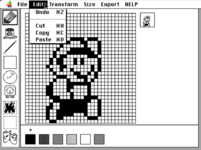
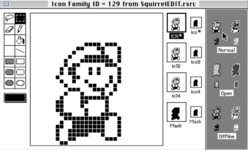
My 32x32 Mario doodle in SquirrelEDIT exported using EXPORT: ICN# Export, and the resulting paste into the ICN# resource in ResEdit, with automatically generated silhouette mask bits.
Screenshot 2026-09-22 at 6.18.11 PM.pngScreenshot 2026-09-22 at 6.18.48 PM.png


*** EDIT ***
Oh, and Sticky Select, the oil slick splat icon.. I'll explain that one next time.. ;)


Thanks again! :)
Aaron/DW
 
Last edited:

DW1992

New Tinkerer
Jul 19, 2026
10
20
3
Ontario, Canada.. eh!
www.dsbbs.ca
Hi Everyone,

OK, I think 🤔 I have SquirrelEDIT to a point where I'm comfortable releasing it with the new features.
It's still very much a Work In Progress, so lots of changes still to come (and even more bug fixes!) 🐛

I'm releasing a PRE-RELEASE version of 2.51 here.
I'm not posting it to the Garden or Repository yet.

Please feel free to play with this version and let me know what you like, don't like, could be different, etc..
Here's the new features...

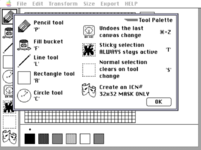
CUT / COPY / PASTE
Yay! 🥳 A working (mostly) cut / copy / paste system!
I tried to make to function similarly to the system in ResEdit's pixel editor.
You can select a portion of pixels, click inside and drag it to a new location, as well as traditional copy / cut.


Selection Marquee (NORMAL)
The NORMAL selection marquee is just what you think.
Use it to select pixels on your canvas by dragging a box around them, then copy, cut, etc...
If you have pixels selected and click on another tool, etc.. the selection will vanish.


Selection Marquee (STICKY)
The STICKY selection marquee is... well... sticky... 😜
Use it to select pixels on your canvas by dragging a box around them, then copy, cut, etc...
The difference between STICKY and NORMAL being, if you have pixels selected and click on another tool, etc.. the selection will NOT vanish.
You can continue to rotate, invert, draw, etc.. inside the sticky section marquee and then copy / cut.


MASK (the theatre guys icon)
In the tool palette, at the bottom, there are two theatre masks 🎭 (clever...) 🤪
Clicking the mask icon will upscale a 16x16 doodle to 32x32 and then generate a silhouette mask of the doodle, placing it onto the clipboard.
It does NOT alter your doodle, and it does NOT include the doodle itself.
Just the MASK silhouette that you can then independently paste into your ICN# MASK channel in ResEdit.


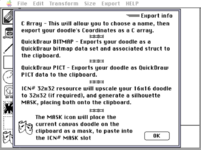
EXPORT MENU -> ICN# 32x32 Resource
ICN# 32x32 resource will now upscale your 16x16 doodle to 32x32 (if required), and generate a silhouette MASK of your doodle, placing both your doodle AND the generated MASK onto the clipboard.
You can then paste your fancy artwork and the included mask as an ICN# resource.
Bytes 0-127 = 32x32 icon bitmap
Bytes 128-255 = 32x32 icon mask


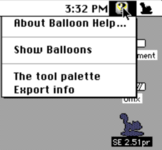
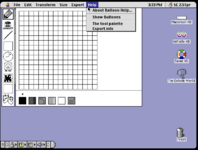
HELP menu
The HELP menu will give you helpful info... 🤪
I hope that helps. 😜


Screenshot 2026-09-24 at 8.50.50 PM.png

Screenshot 2026-09-24 at 8.50.10 PM.png Screenshot 2026-09-24 at 8.50.17 PM.png


I hope you enjoy this update!
Do let me know how I can improve these features!
Once this is running smoothly, I'll look into the animation / frame scrubbing stuff. 📽️

Download the .SIT file below in the attachments.

Aaron/DW
 

Attachments

  • SE2.51.sit
    37.5 KB · Views: 4

nilobject

Tinkerer
Nov 21, 2023
57
37
18
copy icon from finder and paste into Squirrel
edit>show clipboard...
on selection box drag, don't delete the pixels behind until the selection box is cleared
selection box for black pixels only(fake mask)
zoom/magnify - my eyes ain't what they used to be
library - a collection of pixel art that can be dragged into the pixel canvas. things that you don't want to draw over again. i'm think glyphs like arrows and character heads and limbs. build your own pixel art drag and drop style.
transform a selection - rotate, invert, etc selections
two help menus in macos9
1790347111575.png