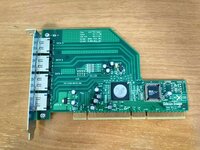
I've been hammering away with Claude and have cooked up a number of ROMs for numerous chipsets that can now boot Mac OS 9!
I should stress that these are BETA ROMs. Don't use them with data you can't afford to lose! All of them were flashed using flashrom, so I don't know if Firmtek flashers can be modified to do it. I have not tested them in old world Macs, but they should work, though the 3124 is a bit iffier.
- SIL3112 - Yes, this ROM has been around for quite a while. I've made an adjustment to account for possible errata, though it's impossible to say for sure as Silicon Image gated errata docs behind an NDA. Give this a shot if you have a flaky 3112. It might help.
- SIL3512 - The 3512 was largely a tweaked and die-shrunk 3112, so modifying the 3112 ROM was enough to get this working. There's also a 512k ROM specifically for the Lacie cards that had a 3512 and an orange finger loop in the back. Those had a jumper to hop between Mac and PC booting and can be flashed as well. Just be sure the jumper is in the Mac position first.
- SIL3114 - This four port SATA I card is now bootable, with all four ports working independently.
- Via VT6421 - The madlads on 68kmla get most of the credit for this. Someone found a rare Mathey card and dumped the ROM along with a tiny EEPROM that served as a hardware lockdown. Projovian at it again. They got this thing up to the point where OS 9 could boot, and I got Claude to rip the copy protection out of the mkext, so now it boots 9 and X. I've also tossed in a DOS flasher I found specifically for this chipset. It flashed my card no problem.
- SIL3124 - This is the big one. This is a PCI-X native SATA II card that Firmtek made just for G5s booting OS X. I've added a Mac OS 9 NDRV to it with full bootability, port multiplier support (up to 56 drives!), hot plug (okay, warm plug as you'll need something like SCSIProbe to mount a freshly-plugged drive), and more! The original ROM oddly lacked optical drive support, so that has also been added to be able to read, boot, and write to optical media. Both PCI and PCI-X variants work with this ROM. The PCI card seems to top out around 75MB/s read and 45MB/s write or so in a Gigabit. This is likely because the chip doesn't like throttling down to PCI, because with a single SSD on a 64-bit card in a Quicksilver, I got about 210MB/s read and up to 170MB/s write! Tested to boot and work in 9.1+, 10.4, and 10.5. I haven't tried 10.3 or the PPC builds of 10.6. Also, when using port multipliers, OS 9 will only boot from the first three ports, and only on port 2 of a PM on the fourth port. I've tested a couple of JMicron port multipliers, one 5 port and one 8 port, and I've removed the limitation on the mkext that locked it down to a few Silicon Image PMs that topped out at 5 ports. There's a 512k ROM if you happen to have the Firmtek card, but be warned that I haven't tested it as I have no Firmtek card. Obviously a 64-bit card is strongly recommended, but if you go with a 32-bit card and put it in a 64-bit slot, you may need to tape pin 60 to prevent it from believing it's a 64-bit card. That was a fun one to troubleshoot.
I should stress that these are BETA ROMs. Don't use them with data you can't afford to lose! All of them were flashed using flashrom, so I don't know if Firmtek flashers can be modified to do it. I have not tested them in old world Macs, but they should work, though the 3124 is a bit iffier.