
Finally printed a vintage Mac mouse designed for the Bambu Mouse 002 kit. The kit is avaialble in the Bambu shop. It is cheap and it is a pretty nice setup with the internals of an optical wireless mouse, USB dongle, power switch cover, battery terminals and wiring, and even a set of screws and teflon pads and scroll wheel. The idea is that you get their kit, then use their printer (or so they hope) to print your perfect ergonomic gaming mouse--or whatever design your heart desires. Want a Millenium Falcon mouse? There's a model for that. Want a quirky replica of some retro styled look? Yep. Plenty of those.
With several designs out there that use this kit, I chose this one:
I used a Bambu Labs P1S and PolyTerra PLA in a very close match to the apple vintage color, though you wouldn't know it next to the yellowed actual mouse.
The build was a bit fiddly, and I still need to make some adjustments. My wheel support struts inside the bottom shell snapped without me even noticing while I was doing some cleanup on the bottom. There is plenty of room for gluing, but this could be improved with some design changes to add minor reinforcements. It snapped on layer lines.
I also ended up gluing a short piece of filament to create a "lip" over the PCB toward the back, otherwise it flexes up into the housing when you are sliding the on/off switch.
My battery wire fell off the negative contact as I bent the metal flat as instructions indicate for assembling this model, so I had to re-solder. I also wanted a consistent look to the scroll wheel color so I replaced the rubber with this:
which worked great, even as hard PLA. You just pop off the rubber wheel rim and snap fit this into place. Works great and looks better than black IMHO.
I used the apple logo version of the top shell which someone uploaded and it looks nice. It printed just fine in the vertically standing orientation with supports.
Overall, I am pleased, but the kit itself has a tracking imager system that isn't perfect. It skips around a little on my mousepad which has some repetitive patterns. I would have expected better performance, but the price is good on these kits. I have two, so I might try another design next. We shall see how well it behaves on a shiny whiteboard style desktop. I like this for a compact mac that has a USB-ADB interface adapter, or for a modern emu scratch build project such as some of the mini mac concepts I have seen recently (like that mac clock). I plan to use mine at work to signal other potential retro nerds that I am in the club.
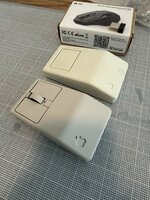
With several designs out there that use this kit, I chose this one:
I used a Bambu Labs P1S and PolyTerra PLA in a very close match to the apple vintage color, though you wouldn't know it next to the yellowed actual mouse.
The build was a bit fiddly, and I still need to make some adjustments. My wheel support struts inside the bottom shell snapped without me even noticing while I was doing some cleanup on the bottom. There is plenty of room for gluing, but this could be improved with some design changes to add minor reinforcements. It snapped on layer lines.
I also ended up gluing a short piece of filament to create a "lip" over the PCB toward the back, otherwise it flexes up into the housing when you are sliding the on/off switch.
My battery wire fell off the negative contact as I bent the metal flat as instructions indicate for assembling this model, so I had to re-solder. I also wanted a consistent look to the scroll wheel color so I replaced the rubber with this:
which worked great, even as hard PLA. You just pop off the rubber wheel rim and snap fit this into place. Works great and looks better than black IMHO.
I used the apple logo version of the top shell which someone uploaded and it looks nice. It printed just fine in the vertically standing orientation with supports.
Overall, I am pleased, but the kit itself has a tracking imager system that isn't perfect. It skips around a little on my mousepad which has some repetitive patterns. I would have expected better performance, but the price is good on these kits. I have two, so I might try another design next. We shall see how well it behaves on a shiny whiteboard style desktop. I like this for a compact mac that has a USB-ADB interface adapter, or for a modern emu scratch build project such as some of the mini mac concepts I have seen recently (like that mac clock). I plan to use mine at work to signal other potential retro nerds that I am in the club.
Last edited:

