
Weird HD Info Discrepancy On My M3 MacBook Pro

2112st

Tinkerer
Oct 8, 2023
298
115
43
Northeastern New Jersey, USA
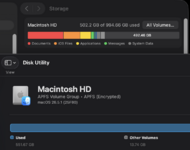
So, I was running Disk Utility on my M3 MacBook Pro. It's using Tahoe 26.5.1.

I checked it against the HD data in System settings. Why the discrepancy???

The M3 is otherwise working ok.
1782495556591.png
 

phunguss

TinkerDifferent Board Vice President
Staff member
Dec 24, 2023
658
562
93
57
Stillwater, MN
Trash or purgeable space? My old MacBookPro8,1 with High Sierra, finder shows 108GB free, disk utility says 104 with 4GB purgeable.
Screen Shot 2026-06-26 at 12.55.16 PM.png
 

2112st

Tinkerer
Oct 8, 2023
298
115
43
Northeastern New Jersey, USA
Trash or purgeable space? My old MacBookPro8,1 with High Sierra, finder shows 108GB free, disk utility says 104 with 4GB purgeable.
View attachment 29274
The trash is empty. Purgeable?? I'm honestly not sure what the purgeable would be. The app on my M3 that uses the most storage is DaVinci Resolve 21 (Studio Version) @ 10.52 GB-all the files I made in Resolve are on an external SSD-a Crucial 4 TB SSD. The only other thing I could think of are video and audio files. I'm getting another Crucial 4 TB SSD because I have iOS files from my M4 iPad Pro backed up onto my M3 and I want to back them up to that other SSD (110 GB in size). I can't do it with this one because it's formatted differently.

I'll be going by this video when I get the new SSD.