
Apple PC Compatibility Card (7" & 12") MS-DOS 6.22 / Windows 3.11 / Windows 95B / Windows 98SE Images
- Thread starter Ron's Computer Videos
- Start date
You are using an out of date browser. It may not display this or other websites correctly.
You should upgrade or use an alternative browser.
You should upgrade or use an alternative browser.

I already tried 2 different beige G3 boards… so it’s not that…I may have a spare DT G3 board if of any interest....
Nor is it the compatibility cards…
Very intriguing.
Worth taking the working HD from the B&W and popping that in the beige G3? Not sure if it'll boot, but probably?


Apple 7" PC Compatibility Card
Hardware problems & repair
I have had problems getting my 7" card to work. It turned out to be a cracked solder joint on the IBM 5x86-100 CPU. It got a hard knock or something since the pins of the QFP-CPU are stressed on the bottom, tilted on the sides and compressed on the upper side.
I reflowed all pins of the CPU and added heatsinks to all chips since they got toasty (especially the ATI Mach 64). I also had some problems with my diy Y-cable that fixed themselves after i screwed the bracket into the PCI-socket.
@croissantking : If you have a spare internal connector cable (GIMO), i would really like to test it in my 8200/120.
-Jonas
Hardware problems & repair
I have had problems getting my 7" card to work. It turned out to be a cracked solder joint on the IBM 5x86-100 CPU. It got a hard knock or something since the pins of the QFP-CPU are stressed on the bottom, tilted on the sides and compressed on the upper side.
I reflowed all pins of the CPU and added heatsinks to all chips since they got toasty (especially the ATI Mach 64). I also had some problems with my diy Y-cable that fixed themselves after i screwed the bracket into the PCI-socket.
@croissantking : If you have a spare internal connector cable (GIMO), i would really like to test it in my 8200/120.
-Jonas
Last edited:
Apple 7" PC Compatibility Card
Hardware modifications
I have successfully changed the bus speed of the 7" Card from 33MHz to 40MHz, resulting in a 120MHz CPU speed (stable as it seems).
On the back of the card, turn the resistor R69 90 degrees to the left (connect it to 5V) onto the bottom pad of the resistor R72.
This changes the input S0 of the SC464 to high which results in the following:
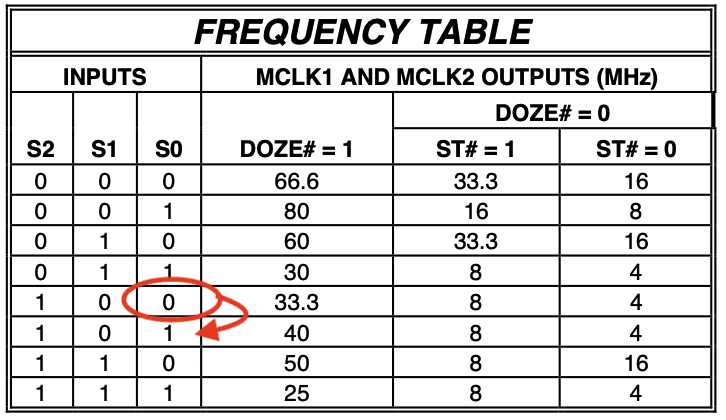
Not every 7"-card may take 120MHz. But i have an IBM 5x86 which are known to be binned better than Cyrix own CPUs. AN IBM 100MHz part is basically comparable to a Cyrix 120MHz part.
Quake went up 19% from 9.8fps to 11.7 fps and the super scape benchmark goes 25% up from 50 fps to 62.5 fps which is more than expected.
There seems to be some more tweaking possible since writing is not cached at all and this reduces memory throughput to about half of what is normal.
PS: i have set the CPU back to 100MHz since the gain was not really worth the possible instability
-Jonas
Hardware modifications
I have successfully changed the bus speed of the 7" Card from 33MHz to 40MHz, resulting in a 120MHz CPU speed (stable as it seems).
On the back of the card, turn the resistor R69 90 degrees to the left (connect it to 5V) onto the bottom pad of the resistor R72.
This changes the input S0 of the SC464 to high which results in the following:
Not every 7"-card may take 120MHz. But i have an IBM 5x86 which are known to be binned better than Cyrix own CPUs. AN IBM 100MHz part is basically comparable to a Cyrix 120MHz part.
Quake went up 19% from 9.8fps to 11.7 fps and the super scape benchmark goes 25% up from 50 fps to 62.5 fps which is more than expected.
There seems to be some more tweaking possible since writing is not cached at all and this reduces memory throughput to about half of what is normal.
PS: i have set the CPU back to 100MHz since the gain was not really worth the possible instability
-Jonas
Last edited:
Apple 7" PC Compatibility Card
Benchmarks, drivers and software tweaks
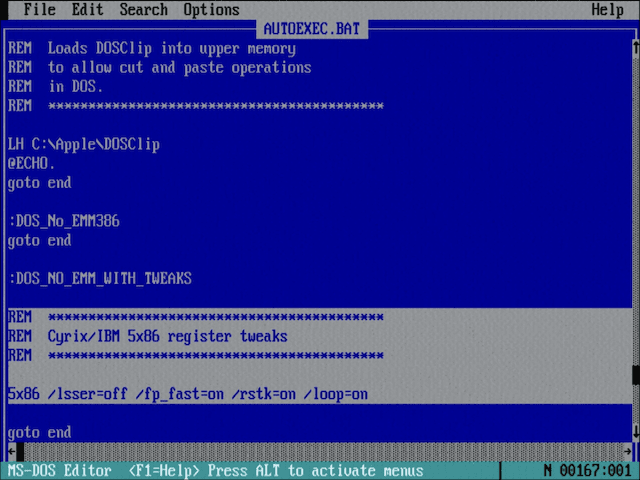
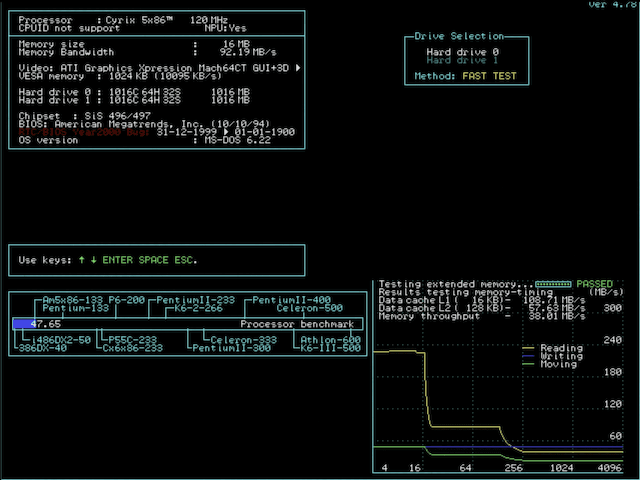
I have tinkered a bit with chipset registers and drivers.
The 5x86 can be tweaked a bit with these tools:
Cyrix5x86_Utilities.zip
SIS496 chipset:
datasheet
IDE enhancements: The SIS496 IDE Driver does not work and will prevent Win 3.11 to start.
SIS496 Registers:
Changes to the registers are possible with a tool available here.
L2 Cache problems:
The L2 cache on the card is set to Write-Through but setting it to Write-Back freezes the machine.
The engineers may have intentionally forced Write-Through for the Apple bridge chip to work.
The limits of the cache are limiting further enhancements...
The 128K L2 Cache does only enable cacheing of 16MiB of system memory which further limits the cards usage.
-Jonas
Benchmarks, drivers and software tweaks
I have tinkered a bit with chipset registers and drivers.
The 5x86 can be tweaked a bit with these tools:
Cyrix5x86_Utilities.zip
SIS496 chipset:
datasheet
IDE enhancements: The SIS496 IDE Driver does not work and will prevent Win 3.11 to start.
SIS496 Registers:
Changes to the registers are possible with a tool available here.
L2 Cache problems:
The L2 cache on the card is set to Write-Through but setting it to Write-Back freezes the machine.
The engineers may have intentionally forced Write-Through for the Apple bridge chip to work.
The limits of the cache are limiting further enhancements...
The 128K L2 Cache does only enable cacheing of 16MiB of system memory which further limits the cards usage.
-Jonas
Last edited:
@croissantking : If you have a spare internal connector cable (GIMO), i would really like to test it in my 8200/120.
Afraid not, just got one Y cable between three cards. They’re going back to their owner soon as I think I’ve had to call time on this project. I did manage to resurrect one of the two failed cards, but neither of the good ones will work in my Beige G3s, which is extremely frustrating. As interesting a concept as these cards are, their execution (or is it just software support) is sadly lacking.
Apple 7" PC Compatibility Card
Issues with shared folders
The SB16 does a good job in DOS and the drivers for Win 3.11 are stable as far as i have noticed. You can even install the original ATI Mach64 drivers in Win 3.11 to get better performance and more colors. I did not have problems using the card in any PCI Mac besides the G3. I have not extensively tested this card on the G3s and G4s, though.
A fun thing is that the PC-side will run at the same time as the Mac, allowing for an interesting workflow.
-Jonas
Issues with shared folders
I have seen issues with the folder-sharing under Windows 98. I had multiple crashes where some VXD stopped working while copying or executing from a shared folder. The implementation of drive-access feels a bit janky. There seems to be an "INT13" device configured in the BIOS that bypasses the SIS496 IDE interface and maps it onto the Apple bridge ASIC (it may simply be the equivalent of a fifo with flow control). I would habe preferred if Apple had emulated an IDE interface to have better hardware support. This method limits drive access to 16bit legacy mode which is slow and has issues with software that tries to access the drives directly. Win 3.11 and DOS did not have many issues, though.Afraid not, just got one Y cable between three cards. They’re going back to their owner soon as I think I’ve had to call time on this project. I did manage to resurrect one of the two failed cards, but neither of the good ones will work in my Beige G3s, which is extremely frustrating. As interesting a concept as these cards are, their execution (or is it just software support) is sadly lacking.
The SB16 does a good job in DOS and the drivers for Win 3.11 are stable as far as i have noticed. You can even install the original ATI Mach64 drivers in Win 3.11 to get better performance and more colors. I did not have problems using the card in any PCI Mac besides the G3. I have not extensively tested this card on the G3s and G4s, though.
A fun thing is that the PC-side will run at the same time as the Mac, allowing for an interesting workflow.
-Jonas
Last edited:
Apple 7" PC Compatibility Card
Memory Compatibility
Swapping out memory has shown me that the 7" PC Compatibility Card is very picky when it comes to the kind of memory it likes.
I have not yet found out what the logic behind this is but:
-Jonas
Memory Compatibility
Swapping out memory has shown me that the 7" PC Compatibility Card is very picky when it comes to the kind of memory it likes.
I have not yet found out what the logic behind this is but:
- The Mac-typical 8 and 16 MiB modules with 2 horizontal chips per side do seemingly not work.
- EDO Memory did not work as well.
- Fast Page 8MiB, 16MiB and 32MiB Modules with 8 per side worked in my Tests.
- Any of my 128MiB FP or EDO modules did not work.
-Jonas