An Introduction: My iMac G4 "Ichigo Daifuku"

jeffburg

Tinkerer
Aug 17, 2025
42
39
18
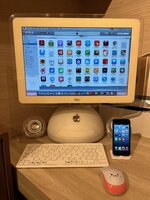
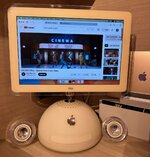
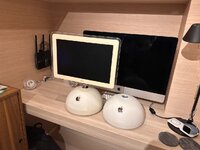
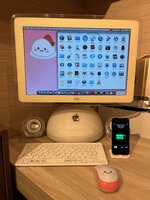
Hey folks, I have been working to get my iMac G4 to a state where I could share it with everyone here, so please give me a moment to introduce いちご大福 (Ichigo Daifuku). When I was in high school, I was becoming so obsessed with Macs (mostly because of the promise of OS X). When the iMac G4 was announced I was completely amazed and I wanted one so badly. But at the time they were only 15" and I already had my big "flat glass" 19" CRT at home. And to make matters worse, these could not do dual display over VGA, only mirroring. So I ended up getting a Quicksilver G4. But I always wanted one of these iMacs and now I have one and ITS AMAZING!

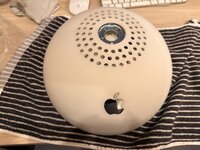
I live in Tokyo and in Japan they call iMac G4's "Daifuku" Macs because they look like the Japanese dessert. My favorite variety is the strawberry kind, thus Ichigo Daifuku is her name. She is a top of the line 17" model (which I prefer over the 20" in terms of looks):
  • 1.25GHz G4
  • 2GB RAM
  • 1TB SSD
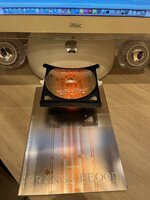
  • SuperDrive
  • Pro Speakers
  • Firewire 400
  • USB 2
  • 10/100 Ethernet
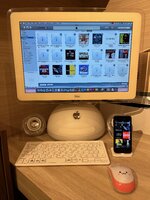
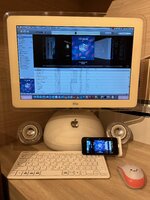
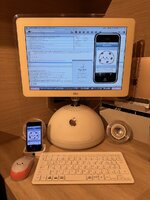
The reason I wanted the fastest version is not for the speed, but instead because these ones have USB 2.0. This means I can sync iPhones with it so I can build back a retro iTunes library. Like many, I got sucked into streaming music and video and so my ancient iTunes library has been sitting dormant on an old hard drive for a long time. So I took about 10GB of my absolute favorite music (down from the original size of 70GB) and put it on this iMac. Then I started buying used CD's for my new KPOP obsessions and imported those like it was 2003 💿. Lastly, I spent an inordinate amount of time getting old iPhone app IPAs so I could also manage them in the library and sync them with my iPhone 5.

But the iPhone 5 was tricky because Apple never allowed iPhone 5 and newer to sync with PowerPC Macs. But I found a way to reverse engineer iTunes to defeat this artificial limitation. I wrote a whole blog post on it here. Now I am finally starting to realize my goal of using an iOS6-powered iPhone as my "main" iPhone with my iPhone 13 mini as as a backup in case needed. This isn't a post about iPhones so I will leave it there... but there is a lot more to come.

What do I do with this iMac?
Well besides the above-mentioned retro iTunes setup. I also have a suite of period-correct apps such as:
  • iLife '09
  • iWork '09
  • Adobe CS3 (I actually use this as I have not had Adobe on my main Mac in ages)
  • NetNewsWire
  • MacTheRipper
  • Max Payne
  • Starcraft
  • World of Goo
  • iStat Menus
  • Xcode 3 (with iPhone OS 3.1.3 Development Enabled)
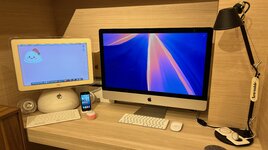
But actually one of the main things I do with it, is play Youtube in the background while I work on my main Mac. I accomplish this via FFMPEG and it's a pretty big hack, but it works surprisingly well with very high quality video output. I also wrote up how I accomplish this hack. Because of this use case, I use the iMac pretty much every day after I get home from work.

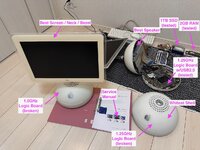
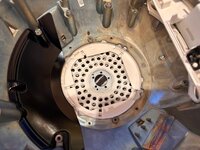
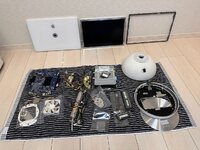
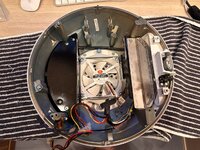
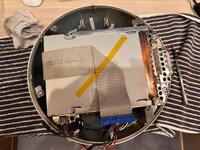
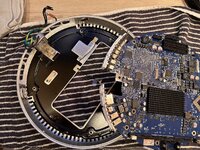
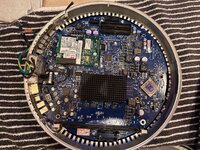
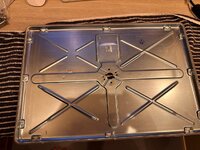
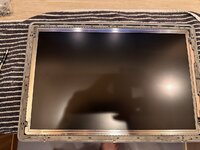
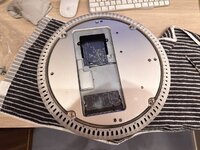
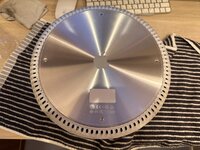
Anyway, this is getting long, in the thread I will leave photos of the full teardown. I cleaned every single surface inside and out before installing the 1TB SSD and new RAM.
 

Attachments
  • IMG_0204.jpeg
    IMG_0204.jpeg
    1.3 MB · Views: 14
  • IMG_0205.jpeg
    IMG_0205.jpeg
    1.5 MB · Views: 14
  • IMG_0206.jpeg
    IMG_0206.jpeg
    1.5 MB · Views: 12
  • IMG_0207.jpeg
    IMG_0207.jpeg
    1.4 MB · Views: 15
  • IMG_0181.jpeg
    IMG_0181.jpeg
    212.6 KB · Views: 16
  • IMG_4516.jpeg
    IMG_4516.jpeg
    199.8 KB · Views: 17
  • IMG_5525.jpeg
    IMG_5525.jpeg
    188.8 KB · Views: 16
  • IMG_0208.jpeg
    IMG_0208.jpeg
    996 KB · Views: 16
Last edited:

jeffburg

Tinkerer
Aug 17, 2025
42
39
18
Getting this iMac to work properly was kind of an ordeal. I even contacted Kay Koba from this forum for help. He offered me just the kind of positive vibes I needed. I ended up buying 3 junk ones in order to get 1 fully functional one that was 1.25GHz. Something about the hot Japanese summers make these thing turn super yellow... but anyway. This is always the Mac I wanted but could never have when I was in high school. But now I have it and it's amazing. Please enjoy these teardown photos.
 

Attachments

  • IMG_5335 (1).jpeg
    IMG_5335 (1).jpeg
    221.8 KB · Views: 18
  • IMG_5140.jpeg
    IMG_5140.jpeg
    177.8 KB · Views: 14
  • IMG_5144.jpeg
    IMG_5144.jpeg
    269.5 KB · Views: 17
  • IMG_5147.jpeg
    IMG_5147.jpeg
    291.6 KB · Views: 14
  • IMG_5148.jpeg
    IMG_5148.jpeg
    228.6 KB · Views: 16
  • IMG_5149.jpeg
    IMG_5149.jpeg
    404.8 KB · Views: 13
  • IMG_5150.jpeg
    IMG_5150.jpeg
    428 KB · Views: 16
  • IMG_5151.jpeg
    IMG_5151.jpeg
    242.9 KB · Views: 13
  • IMG_5153.jpeg
    IMG_5153.jpeg
    216.5 KB · Views: 14
  • IMG_5152.jpeg
    IMG_5152.jpeg
    193.2 KB · Views: 15
  • IMG_5154.jpeg
    IMG_5154.jpeg
    191 KB · Views: 13
  • IMG_5155.jpeg
    IMG_5155.jpeg
    154.3 KB · Views: 12
  • IMG_5333.jpeg
    IMG_5333.jpeg
    159.5 KB · Views: 15
  • IMG_5334.jpeg
    IMG_5334.jpeg
    163.1 KB · Views: 13

akator

New Tinkerer
Aug 25, 2023
36
16
8
I'm glad to see someone else who loves their G4 iMac as much as I do. Thanks for the blog posts, that gives me something else fun to do.
 
  • Love
Reactions: jeffburg

jeffburg

Tinkerer
Aug 17, 2025
42
39
18
Thanks for the reply, yeah let's share the love haha. I am a little surprised because in another forum JDW mentioned that these Macs don't get enough love. And I wonder why? They're so iconic. Like such an adorable, odd-ball, design. With brilliant solutions for things like the power supply, cooling system, and screen. So anyway, I will continue posting stuff about my iMac G4 even if people are not super interested 😍
 

jeffburg

Tinkerer
Aug 17, 2025
42
39
18
I really want to do this display upgrade seen in this video on one of the broken leftover iMacs, but I don't think I have the skills or the patience to painfully wire through the EDP connector 1 wire at a time like that. But those displays he showed are super nice spec wise and cheap AliExpress so I am so tempted to give it a shot.
 

akator

New Tinkerer
Aug 25, 2023
36
16
8
I think there's lots of appreciation for the G4 iMacs, but they never reached the overall popularity and recognition of the earlier G3 iMacs so have less nostalgia associated with them.

Over the years I've seen several modded/repurposed G4 iMac projects like the video you linked and all have been very impressive.
 
  • Like
Reactions: jeffburg

Yoda

Tinkerer
Jan 22, 2023
163
102
43
I looked around for a while to get a 17-inch G4 iMac in reasonable condition, and finally found a 1.25 model selling pretty cheaply due to a hard drive problem. It would boot, but only after a lengthy delay during which the drive would make long beeping noises.

I replaced the drive with an SSD and swapped out the optical drive for a faster Pioneer unit, which gave me my first experience of just how tightly packed-in these systems are!

The plan was to use it as my iTunes music repository and player, but it hung out on my coffee table as a distraction-free word processor for a couple of years instead. I

t's hard not to admire the design and engineering that went into it.
 

akator

New Tinkerer
Aug 25, 2023
36
16
8
I used my G4 iMac as an AirPlay music server for many years, streaming synced audio to speakers in every room. AppleScript and the built-in web server allowed me to control iTunes remotely and also integrate everything with my Home Assistant automation. It worked perfectly as a music server, then as a music server integrated with home autiomation for years.

Part of what inspired my iMac iTunes AirPlay project was how cheap AirPort Expresses were on eBay. Eventually I had 8 AirPort Expresses connected and playing synced music.

Several years ago I wanted to see how far I could push the G4 iMac and connected 4 iSight FireWire cameras (with a FireWire hub) to do time lapse. The time lapse images were combined into a video using FFMPEG. All snapshots and videos were accessible on the iMac's web server, and like iTunes was also integrated into my home automation. The iMac performed perfectly but the iSight cameras did not, each freezing at least once every 24 hours. Adding the iSight cameras and integrations seriously pushed the iMac's capabilities and CPU usage was constantly high, so between the high CPU usage and frequently failing iSight cameras I ended that project after a few months.

In the end, rising electricity prices convinced me to start using a Raspberry Pi for the same tasks. 10W for the RPi3 vs. 70-130W for the iMac running 24/7 was a noticeable difference on my electric bill (and would be even worse now).

It was a lot of fun maxing out my iMac and pushing it to the limits, especially doing things that were prohibitive 20+ years ago because of expense. It was difficult but rewarding to integrate the iMac's iTunes and cameras into Home Assistant — all of the existing methods and tools to integrate iTunes with Home Assistant were available for later Intel Macs running much later versions of Mac OS X and iTunes. It was, of course, all a bit silly because I could do all of the same things and more using a RPi running variious open source projects like ForkedDAAPD (now OwnTone) and MotionEye, but doing these things on a G4 iMac running 10.4 was one of those personal nerd acheivements.