BlueSCSI Ultra & Ultra Wide

ESM-NL

Tinkerer
Jun 4, 2025
52
34
18
The Netherlands
Your log shows a SD error in the bootloader (I can address that, but thats not your issue, can ignore for now)
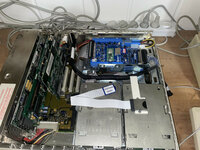
This problem is already solved. What I did not mentioned was that I used a USB extender, because of the way the two BlueSCSIs are mounted (see photo). To make the BlueSCSI UW better reacheble, I added an extender, but since I left it out, the log file does not show the errors:

Platform: BlueSCSI Ultra (Wide)
FW Version: 2026.08.17-rel Aug 17 2026 16:08:59
Flash chip size: 16384 kB
=== Bootloader Log ===
[0ms] Bootloader version: Aug 17 2026 16:08:45 BlueSCSI Ultra
[0ms] Looking for firmware: BlueSCSI_Ultra_Wide*.bin
[132ms] Bootloader continuing to main firmware
=== End Bootloader Log ===
Clocking to standard I2S-compatible base speed
Reclocking with these settings are compatible with CD audio playback
Initial Clock set to 150MHz
Reclocking the MCU to 155MHz
Setting the SDIO clock to 26MHz
After reclocking, system reports clock set to 155MHz
BlueSCSI CD Audio enabled - requires DAC
SD Config Result: 0xFF
SDIO 1.8v High Speed, Mode D

=== SD Card Info ===
SD card detected, FAT32 volume size: 15185 MB
SD Name: SU16G, MID: 0x03 (SanDisk), OID: "SD" (0x53 0x44)

=== Global Config ===
bluescsi.ini not found, using defaults

=== Finding images ===
=== Finding images in / ===
== Opening /HD10_512 Data 1.dsk for ID:1 LUN:0
---- Configuring as disk drive
== Opening /HD00_512 IIfx 1.dsk for ID:0 LUN:0
---- Configuring as disk drive
== Opening /HD20_512 Data 2.dsk for ID:2 LUN:0
---- Configuring as disk drive

== Platform supports ROM drive up to 12284 kB

=== Configured SCSI Devices ===
ID: 0, BlockSize: 512, Type: Fixed, Quirks: Apple, Size: 1843264kB
ID: 1, BlockSize: 512, Type: Fixed, Quirks: Apple, Size: 1843264kB
ID: 2, BlockSize: 512, Type: Fixed, Quirks: Apple, Size: 2048096kB

Clock set to: 155MHz
Initialization complete!
INFO: Pico Voltage: 3.280V.
SCSI ID 2 negotiated synchronous mode 10 MB/s (period 4x25 ns, offset 8 bytes)
INFO: You may get a boost from overclocking as your system supports synchronous SCSI speeds. https://bluescsi.com/docs/Ultra-SCSI-Fast20-OverClock
SCSI ID 1 negotiated synchronous mode 10 MB/s (period 4x25 ns, offset 8 bytes)
SCSI ID 2 negotiated synchronous mode 10 MB/s (period 4x25 ns, offset 8 bytes)
SCSI ID 1 negotiated synchronous mode 10 MB/s (period 4x25 ns, offset 8 bytes)

The only "problem" with that is that I have to screw the BlueSCSI UW lose to reach the SD card. With switching the both cards, the internal SCSI cable is too short to reach the BlueSCSI V2W. To fit both cards in the IIfx, I clued two Heavy-Duty Trays together in a way it fits nice in a slightly modified drive rack.

I do use a USB extender in my SE/30, but that one is shorter (30 cm) and connected to a BlueSCSI V2W. No problems with that. But a longer one on the BlueSCSI UW is not a recommendation.
 

Attachments

  • IMG_5091.jpg
    IMG_5091.jpg
    546.6 KB · Views: 21

eric

Administrator
Staff member
Sep 2, 2021
1,296
2,271
113
MN
bluescsi.com
=== Configured SCSI Devices ===
ID: 1, BlockSize: 9, Type: Fixed, Quirks: None, Size: 9437184kB
ID: 3, BlockSize: 73, Type: Fixed, Quirks: None, Size: 74752000kB
ID: 5, BlockSize: 9, Type: Fixed, Quirks: None, Size: 9437184kB
:slaps forhead: - well i actually fixed this back in May but got busy and didn't push the fix! You can see BlockSize is detected as "9" which is of course incorrect. Its' detected from the file name and something changed to make it looser but this is too loose for sure!

I'm rebasing that fix now and it'll be in the next release but a quick work around for you is to just not have a number after the id definition, eg: HD30_73GB.hda -> HD30_Apps-73GB.hda

That Fragmented log is just informational - it's able to access the raw file(fast) now even with fragments (slow).
 
  • Like
Reactions: ktaggart

ktaggart

New Tinkerer
Aug 24, 2026
4
3
3
:slaps forhead: - well i actually fixed this back in May but got busy and didn't push the fix! You can see BlockSize is detected as "9" which is of course incorrect. Its' detected from the file name and something changed to make it looser but this is too loose for sure!

I'm rebasing that fix now and it'll be in the next release but a quick work around for you is to just not have a number after the id definition, eg: HD30_73GB.hda -> HD30_Apps-73GB.hda

That Fragmented log is just informational - it's able to access the raw file(fast) now even with fragments (slow).
Awesome, that fixed it!

Here are some numbers for you.
Boot to login screen:
BlueSCSI: 8min 32sec
BlueSCSI Ultra: 2min 33sec

Login to desktop:
BlueSCSI: 1min 42sec
BlueSCSI Ultra: 22 sec

Total time:
BlueSCSI: 10min 14 sec
BlueSCSI Ultra: 2min 55sec

Massive improvement!

Now it's time to tackle my SGI O2 and Octane 2 systems... they are still running old spinning rust, so I'll have to start from scratch on how to do that.

Thx!

-k
 
  • Like
Reactions: bakkus and eric

eric

Administrator
Staff member
Sep 2, 2021
1,296
2,271
113
MN
bluescsi.com
Here is the Jackhammer manual. The SCSI Manager 4.3 is yet downloaded and put in the system folder (and on more macs too). I start up with it and watch later if I see changes in the log file or notice improvements.

Just to follow up on this for other people in the future, from the manual:
The default(sic: and max) value is 100 nanoseconds, and that allows for a maximum of 20 MB/second for 16-bit SCSI-2 Wide drives or 10 MB/second for 8-bit SCSI-2 Fast drives.
So while it's Wide it's max speed is still limited on the Wide bus (probably because it was a pretty early wide card, and what would you even do with 40MB/sec on a 68k machine!)

I think SCSIManager will still buy you some speed if it's compatible with their drivers.
 
  • Haha
Reactions: ClassicHasClass

ktaggart

New Tinkerer
Aug 24, 2026
4
3
3
As indicated in my last post, I am now attempting to convert my SGI systems to BlueSCSI Ultra-Wide.
Now it's time to tackle my SGI O2 and Octane 2 systems... they are still running old spinning rust, so I'll have to start from scratch on how to do that.

I am starting with the Octane 2. It is currently configured with three 72GB drives, the root drive and a striped set mounted as /Data.

The Octane has three internal drive bays, and the SCSI ID is associated with the bay number (1-3).

I created two .hda files, a 73GB for the root, and a 146GB for Data.

I removed all the SCSI disks from the Octane, installed the BlueSCSI in drive bay 2 and booted to the PROM command monitor, where I was able to successfully use fx to label the images: drive 2 was configured for root (bootable) and drive 3 as a option drive (non-bootable).

These operations succeeded. Everything after failed with various SCSI parity errors.

First I tried mkfs to create an xfs file system on the drives. SCSI parity error.

I then went through several permutations of attempting to dd disk1 to disk2, all of which failed with parity errors.

Finally, I booted from the original root disk with the BlueSCSI in drive bay 2 to attempt to get some info about the virtual drives and perhaps init them from within Irix.

These pics will save a lot of typing:
disk2.png


What is of note is that the disks appear on the desktop as uninitialized (this is expected), they appear in Disk Manager, and I can attempt to initialize them from Disk Panel.

This pic shows error code 256 :
disk3.png


Error code 256 basically means fx exited with a non-0 exit code (failure).

The console shows the following:
Code:
%hinv -c disk
Integral SCSI controller 0: Version QL1840B (rev. 2), single ended
Disk drive: unit 1 on SCSI controller 0
Disk drive: unit 2 on SCSI controller 0
Disk drive: unit 3 on SCSI controller 0

% dksc0d2vol: [Alert] Aborted command: SCSI interface parity error (asc=0x47, asq=0x0), Block #0
dksc8d2vol: retrying request
…
dksc8d2vol: [Alert] Aborted command: SCSI interface parity error (asc=0x47, asq=0x0), Block #0
|$(3)dksc0d2vol: I/O error, retries exhausted

bluescsi.ini (text in red indicates settings I've tried after first getting the parity errors):
Rich (BB code):
[SCSI]
Quirks=0
EnableSCSI2=0
EnableUnitAttention=0
EnableParity=1
SpeedGrade="TurboMax"
MaxSyncSpeed=20
System="Generic"
[SCSI2]
Vendor = “SEAGATE”
Product = “ST173404LCV”
Version = “BD0A”
Serial = “3CE0R0HM”
HeadsPerCylinder = 4
SectorsPerTrack = 718
[SCSI3]
Vendor = “SEAGATE”
Product = “ST3146855SS”
Version = “S527”
Serial = “3LN311B7”
HeadsPerCylinder = 8
SectorsPerTrack = 718

log.txt (note garbled text in red):
Rich (BB code):
Platform: BlueSCSI Ultra (Wide)
FW Version: 2026.04.27-rel Apr 28 2026 00:35:26
Flash chip size: 16384 kB
SCA Model Detected, Assigned SCSI ID: 2
=== Bootloader Log ===
[0ms] Bootloader version: Apr 28 2026 00:35:10 BlueSCSI Ultra
[0ms] Looking for firmware: BlueSCSI_Ultra_Wide*.bin
[326ms] Bootloader continuing to main firmware
=== End Bootloader Log ===
Clocking to standard I2S-compatible base speed
Reclocking with these settings are compatible with CD audio playback
Initial Clock set to 150MHz
Reclocking the MCU to 155MHz
Setting the SDIO clock to 26MHz
After reclocking, system reports clock set to 155MHz
BlueSCSI CD Audio enabled - requires DAC
SD Config Result: 0x3F
SDIO 1.8v High Speed, Mode D
 
=== SD Card Info ===
SD card detected, exFAT volume size: 244080 MB
SD Name: SR256, MID: 0x03 (SanDisk), OID: "SD" (0x53 0x44)
-- EnableSCSI2 = No
-- SpeedGrade = TurboMax
Speed grade set to TurboMax reclocking system
Reclocking with these settings are compatible with CD audio playback
Initial Clock set to 155MHz
Reclocking the MCU to 251MHz
Setting the SDIO clock to 50MHz
After reclocking, system reports clock set to 251MHz
======== Reinitializing BlueSCSI after reclock ========
SD Config Result: 0xD3
SDIO 1.8v Ultra Speed, Mode D

=== Global Config ===
Reading configuration from bluescsi.ini
-- EnableSCSI2 = No
-- SpeedGrade = TurboMax
Using system preset "Generic"

=== Finding images ===
[SCSI2]
-- SectorsPerTrack = 718
-- HeadsPerCylinder = 4
-- Vendor = “SEAGA
-- Product = ‚ÄúST173404LCV‚Ä
-- Version = “B
-- Serial = “3CE0R0HM”
[SCSI3]
-- SectorsPerTrack = 718
-- HeadsPerCylinder = 8
-- Vendor = “SEAGA
-- Product = ‚ÄúST3146855SS‚Ä
-- Version = “S
-- Serial = “3LN311B7”
=== Finding images in / ===
[SCSI2]
-- SectorsPerTrack = 718
-- HeadsPerCylinder = 4
-- Vendor = “SEAGA
-- Product = ‚ÄúST173404LCV‚Ä
-- Version = “B
-- Serial = “3CE0R0HM”
== Opening /HD20_512_root_73GB.hda for ID:2 LUN:0
---- INFO: Image file is fragmented (11 fragments), FastSeek enabled for best performance.
---- Configuring as disk drive
[SCSI3]
-- SectorsPerTrack = 718
-- HeadsPerCylinder = 8
-- Vendor = “SEAGA
-- Product = ‚ÄúST3146855SS‚Ä
-- Version = “S
-- Serial = “3LN311B7”
== Opening /HD30_512_data_146GB.hda for ID:3 LUN:0
---- Configuring as disk drive

== Platform supports ROM drive up to 12284 kB
 
=== Configured SCSI Devices ===
ID: 2, BlockSize: 512, Type: Fixed, Quirks: None, Size: 74752000kB
ID: 3, BlockSize: 512, Type: Fixed, Quirks: None, Size: 149504000kB

Clock set to: 251MHz
Initialization complete!
INFO: Pico Voltage: 3.303V.
SCSI ID 2 negotiated bus width 1 (16 bits)
SCSI ID 2 negotiated synchronous mode 42 MB/s (period 4x12 ns, offset 8 bytes)
...
SCSI ID 3 negotiated bus width 1 (16 bits)
SCSI ID 3 negotiated synchronous mode 42 MB/s (period 4x12 ns, offset 8 bytes)
...
(these line repeat for a while)

I am guessing there is some setting I am missing that prevents the images from being initialized after creating the labels and partitions, any ideas?

Thx,

-k
 
Last edited:
  • Like
Reactions: Kai Robinson

eric

Administrator
Staff member
Sep 2, 2021
1,296
2,271
113
MN
bluescsi.com
log.txt (note garbled text in red):
First - corruption in the log one is an easy one - you're using typographic quotes instead of normal quotes "". - ini should be plain text not uft8 or anything (in fact you dont even need quotes at all) - do you even need to specify the vendor/product/version/chs for such a new system?

Adding more to the ini usually puts you in a worse position unless it's for an exact, very specific reason. Turning off scsi 2 drastically changes a few timings you don't want. Quirks 0 is set by System=Generic, etc.

Platform: BlueSCSI Ultra (Wide) FW Version: [B]2026.04.27-rel[/B] Apr 28 2026 00:35:26
Please update to the latest release, tons of fixes since april as well.

I'd roll back the ini a bit here and start with simple before we go complex - start with just one image and this ini
[SCSI]
System=Generic # probably not even required
SpeedGrade=TurboMax
MaxSyncSpeed=20

Lastly do a format of the sd card with the sd card formatter utility in our docs - fixes a lot of weird sd issues.
 
  • Like
Reactions: ktaggart

ktaggart

New Tinkerer
Aug 24, 2026
4
3
3
I upgraded the fw, removed the quotes and extraneous settings, shortened the image file names (just in case), and here is the log (note red text):
Rich (BB code):
Platform: BlueSCSI Ultra (Wide)
FW Version: 2026.08.17-rel Aug 17 2026 16:08:59
Flash chip size: 16384 kB
SCA Model Detected, Assigned SCSI ID: 2
=== Bootloader Log ===
s] DBG Writing flash at offset 0x0005A000 data 0x28 0x46 0xF0 0xF7
[3369ms] DBG Writing flash at offset 0x0005B000 data 0x1B 0xB1 0x91 0x46
[3424ms] DBG Writing flash at offset 0x0005C000 data 0x73 0xE6 0xB5 0x4B
[3479ms] DBG Writing flash at offset 0x0005D000 data 0x90 0x63 0x03 0x20
[3536ms] DBG Writing flash at offset 0x0005E000 data 0x98 0x18 0x05 0x20
[3589ms] DBG Writing flash at offset 0x0005F000 data 0x07 0x23 0x4F 0xF0
[3644ms] DBG Writing flash at offset 0x00060000 data 0xBB 0xF1 0x00 0x0F
[3699ms] DBG Writing flash at offset 0x00061000 data 0x0E 0xD1 0x01 0x99
[3756ms] DBG Writing flash at offset 0x00062000 data 0x00 0x28 0xD7 0xD0
[3809ms] DBG Writing flash at offset 0x00063000 data 0x00 0xF0 0xA6 0x80
[3863ms] DBG Writing flash at offset 0x00064000 data 0x38 0xBD 0x20 0x46
[3920ms] DBG Writing flash at offset 0x00065000 data 0x20 0x46 0x21 0xB0
[3973ms] DBG Writing flash at offset 0x00066000 data 0xE4 0xF7 0x70 0xFF
[4028ms] DBG Writing flash at offset 0x00067000 data 0x0B 0x60 0x70 0x47
[4085ms] DBG Writing flash at offset 0x00068000 data 0x53 0x44 0x20 0x53
[4139ms] DBG Writing flash at offset 0x00069000 data 0x61 0x78 0x53 0x79
[4197ms] DBG Writing flash at offset 0x0006A000 data 0x67 0x20 0x66 0x69
[4252ms] DBG Writing flash at offset 0x0006B000 data 0x65 0x00 0x00 0x00
[4307ms] DBG Writing flash at offset 0x0006C000 data 0x61 0x6E 0x64 0x20
[4362ms] DBG Writing flash at offset 0x0006D000 data 0x79 0x20 0x6C 0x69
[4418ms] DBG Writing flash at offset 0x0006E000 data 0x20 0x69 0x74 0x20
[4472ms] DBG Writing flash at offset 0x0006F000 data 0x67 0x20 0x42 0x53
[4528ms] DBG Writing flash at offset 0x00070000 data 0x7C 0xFD 0x02 0x20
[4583ms] DBG Writing flash at offset 0x00071000 data 0x38 0x7B 0x03 0x20
[4640ms] Firmware update successful!
[4645ms] SDIO card reports unknown write S: 0x00000050 M: 0x00
[4645ms] SdioCard::writeSector(0x00018000) failed: 8
[4645ms] Failed to remove firmware file
[4645ms] Bootloader continuing to main firmware
=== End Bootloader Log ===
Clocking to standard I2S-compatible base speed
Reclocking with these settings are compatible with CD audio playback
Initial Clock set to 150MHz
Reclocking the MCU to 155MHz
Setting the SDIO clock to 26MHz
After reclocking, system reports clock set to 155MHz
BlueSCSI CD Audio enabled - requires DAC
SD Config Result: 0x3F
SDIO 1.8v High Speed, Mode D
 
=== SD Card Info ===
SD card detected, exFAT volume size: 244080 MB
SD Name: SR256, MID: 0x03 (SanDisk), OID: "SD" (0x53 0x44)
-- SpeedGrade = TurboMax
Speed grade set to TurboMax reclocking system
Reclocking with these settings are compatible with CD audio playback
Initial Clock set to 155MHz
Reclocking the MCU to 251MHz
Setting the SDIO clock to 50MHz
After reclocking, system reports clock set to 251MHz
======== Reinitializing BlueSCSI after reclock ========
SD Config Result: 0xD1
SDIO 1.8v Ultra Speed, Mode D


=== Global Config ===
Reading configuration from bluescsi.ini
-- SpeedGrade = TurboMax
Using system preset "Generic"


=== Finding images ===
[SCSI2]
-- SectorsPerTrack = 718
-- HeadsPerCylinder = 4
-- Vendor = SEAGATE
-- Product = ST173404LCV
-- Version = BD0A
-- Serial = 3CE0R0HM
[SCSI3]
-- SectorsPerTrack = 718
-- HeadsPerCylinder = 8
-- Vendor = SEAGATE
-- Product = ST3146855SS
-- Version = S527
-- Serial = 3LN311B7
=== Finding images in / ===
[SCSI3]
-- SectorsPerTrack = 718
-- HeadsPerCylinder = 8
-- Vendor = SEAGATE
-- Product = ST3146855SS
-- Version = S527
-- Serial = 3LN311B7
== Opening /HD30_512_data.hda for ID:3 LUN:0
---- Configuring as disk drive
[SCSI2]
-- SectorsPerTrack = 718
-- HeadsPerCylinder = 4
-- Vendor = SEAGATE
-- Product = ST173404LCV
-- Version = BD0A
-- Serial = 3CE0R0HM
== Opening /HD20_512_root.hda for ID:2 LUN:0
---- INFO: Image file is fragmented (11 fragments), FastSeek enabled for best performance.
---- Configuring as disk drive


== Platform supports ROM drive up to 12284 kB
 
=== Configured SCSI Devices ===
ID: 2, BlockSize: 512, Type: Fixed, Quirks: None, Size: 74752000kB
ID: 3, BlockSize: 512, Type: Fixed, Quirks: None, Size: 149504000kB


Clock set to: 251MHz
Initialization complete!
INFO: Pico Voltage: 3.280V.

Even though the fw update reported errors, it looks like it updated successfully.

I kept both images as I am going to experiment with fx and mkfs for a bit.

I'll comment out the second image if I run into any further trouble.

ETA:
Same error as before, but block #2 this time instead of #0 - I don't know what the distinction is or if it matters. Maybe it made it slightly further in the process?
Code:
% dksc0d2vol: [Alert] Aborted command: SCSI interface parity error (asc=0x47, asq=0x0), Block #2
dksc8d2vol: retrying request
…
dksc8d2vol: [Alert] Aborted command: SCSI interface parity error (asc=0x47, asq=0x0), Block #2
|$(3)dksc0d2vol: I/O error, retries exhausted

Thx,

-k
 
Last edited: