If you feel like this thread looks like a previous one I made, then you're right. I made a separate post for MIDI out, but this is about MIDI in.
Quick difference primer:
MIDI out: the mac produces MIDI out commands through code or through parsing a standard midi file, sends them on a specially tweaked serial port and it goes to a MIDI module, oftentimes passing through a mac serial MIDI interface first.
MIDI in: an external device sends its MIDI commands to the mac's specially tweaked port, often through a mac serial MIDI interface first and pure code has to interpret the MIDI commands and what to do about them.
That's where I come in with this thread. Here are the milestones I've accomplished as I try to push this into a finished application, launched for #MARCHintosh 2026 before the end of the month.
Goals achieved:
* Figure out if a command is a Note On or Note Off event
* Dispatch it back on on the same serial port as a MIDI out event, driving a MIDI module like the Roland MT-32, or Sound Canvas, or any MIDI device that can deal with those (including other computers...)
* Dispatch it to drive a monophonic square wave synth of the old Sound Driver (System 6 and below)
* Dispatch it to drive a polyphonic arbitrary 256-byte defined wave of the four-tone synth of the old Sound Driver
* Dispatch it to drive a monopĥonic free form wave synth of the old Sound Driver. These can be found in aiff files, or snd resources. (1)
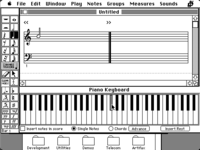
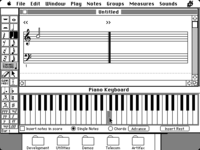
* (accomplished March 11th) Leave the crude text-only console-like application and make a "Macintosh" application with a simple GUI.
* (accomplished March 26th) A piano graphics that highlights notes being played in real time
* (accomplished mid-March) Add a typing keyboard scheme for those who can't use or don't have MIDI in gear
Goals left to be achieved:
* Programatically mix multiple freeform waves together to create polyphony - a goal of 6 simultaneous sounds would be good and imitate Studio Session's technology
* Load up arbitrary sound files, including Studio Session instruments
Long term goals (past March 2026 probably)
* Create a simple looping system; record loop one by one; tweak with quantization; play them back and layer new sounds over it
Notes:
(1) There is a requirement for freeform waves as you have to provide what musical note the sound file should be associated with, so that it can be properly placed on a standard piano layout for its default pitch.
Last edited: