

I'm trying to think of a way to increase the cooling power inside a G4 iMac. It's cramped inside, the CPU and GPU are in strange places, and they run incredibly hot even with their strange method of cooling by sinking heat into its metal dome chassis. The processor is on the top of the logic board, sinking its heat into the bubble-like metal inner chassis, and the GPU is on the bottom of the logic board and sinks into a large metal plate on the bottom. The idea is that cool air is drawn from the bottom and hot air blows out of the top.
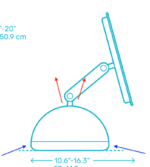
After playing a CPU/GPU intense game for 15-20 minutes, the machine generates enough heat to warm the table it sits on. The front of the machine, where the optical drive door is, gets warm, as if the heat can not sink into the inner bell of the chassis fast enough. The heatsink that branches off of the processor directly gets INCREDIBLY hot. Outlined in RED are the processor and GPU relative locations, and the ORANGE parts are where heat spreads to.
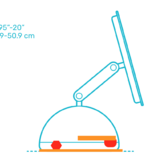
Unfortunately, there is very little space inside of the G4 iMac, the thickness of a simple small fan is too much to fit between the Optical drive and the logic board, as seen below.
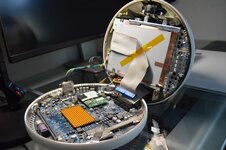
There's a small gap where the speaker is, but it's not realistically useable. However, if you're willing to remove the optical drive to create space, there is a few possible solutions, though the logistics of it could make it weird.
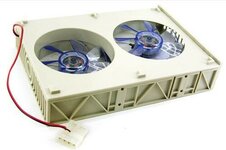
This or something like this seems like a clear winner, with the issue now being which direction the fans blow. The stock fan that's in the G4 iMac blows up and out of the top (From the first example), and in theory this 5.25 inch bay fan can point whatever direction you'd like. Having two fans inside pointed two directions won't work, so both will have to point one direction. Ideally, to cool something, you want to blow air directly at the hot object in question, which means the 5.25 inch bay fan needs to point down at the logic board, with the upper fan flipped to suck air into the chassis where hot air will be blown out of the bottom. Both fans pointed up and out will likely result in no change.
Before attempting this, I could also try flipping the iMac fan around, so that it draws air into the chassis from the top, fighting the laws of thermodynamics in the process. I really don't know how well that one could go. Other options include replacing the hard drive with a smaller, cooler SSD as well as the optical drive, but I'm not sure if the additional open space in the chassis is going to make things better. The CPU/GPU are central points of heat that I think need to be addressed directly.
After playing a CPU/GPU intense game for 15-20 minutes, the machine generates enough heat to warm the table it sits on. The front of the machine, where the optical drive door is, gets warm, as if the heat can not sink into the inner bell of the chassis fast enough. The heatsink that branches off of the processor directly gets INCREDIBLY hot. Outlined in RED are the processor and GPU relative locations, and the ORANGE parts are where heat spreads to.
Unfortunately, there is very little space inside of the G4 iMac, the thickness of a simple small fan is too much to fit between the Optical drive and the logic board, as seen below.
There's a small gap where the speaker is, but it's not realistically useable. However, if you're willing to remove the optical drive to create space, there is a few possible solutions, though the logistics of it could make it weird.
This or something like this seems like a clear winner, with the issue now being which direction the fans blow. The stock fan that's in the G4 iMac blows up and out of the top (From the first example), and in theory this 5.25 inch bay fan can point whatever direction you'd like. Having two fans inside pointed two directions won't work, so both will have to point one direction. Ideally, to cool something, you want to blow air directly at the hot object in question, which means the 5.25 inch bay fan needs to point down at the logic board, with the upper fan flipped to suck air into the chassis where hot air will be blown out of the bottom. Both fans pointed up and out will likely result in no change.
Before attempting this, I could also try flipping the iMac fan around, so that it draws air into the chassis from the top, fighting the laws of thermodynamics in the process. I really don't know how well that one could go. Other options include replacing the hard drive with a smaller, cooler SSD as well as the optical drive, but I'm not sure if the additional open space in the chassis is going to make things better. The CPU/GPU are central points of heat that I think need to be addressed directly.


