
G4 iMac and its intense heat. A brainstorm.

Arbystpossum

Tinkerer
Jan 8, 2024
86
57
18
USA
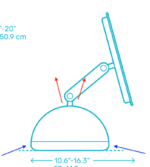
I'm trying to think of a way to increase the cooling power inside a G4 iMac. It's cramped inside, the CPU and GPU are in strange places, and they run incredibly hot even with their strange method of cooling by sinking heat into its metal dome chassis. The processor is on the top of the logic board, sinking its heat into the bubble-like metal inner chassis, and the GPU is on the bottom of the logic board and sinks into a large metal plate on the bottom. The idea is that cool air is drawn from the bottom and hot air blows out of the top.
G4Heat.png
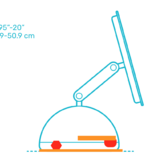
After playing a CPU/GPU intense game for 15-20 minutes, the machine generates enough heat to warm the table it sits on. The front of the machine, where the optical drive door is, gets warm, as if the heat can not sink into the inner bell of the chassis fast enough. The heatsink that branches off of the processor directly gets INCREDIBLY hot. Outlined in RED are the processor and GPU relative locations, and the ORANGE parts are where heat spreads to.
G4Heatplates.png
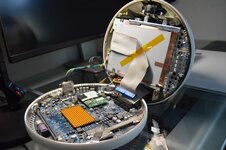
Unfortunately, there is very little space inside of the G4 iMac, the thickness of a simple small fan is too much to fit between the Optical drive and the logic board, as seen below.
G4Cramped.jpeg
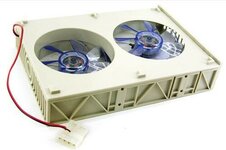
There's a small gap where the speaker is, but it's not realistically useable. However, if you're willing to remove the optical drive to create space, there is a few possible solutions, though the logistics of it could make it weird.
s-l960.jpeg
This or something like this seems like a clear winner, with the issue now being which direction the fans blow. The stock fan that's in the G4 iMac blows up and out of the top (From the first example), and in theory this 5.25 inch bay fan can point whatever direction you'd like. Having two fans inside pointed two directions won't work, so both will have to point one direction. Ideally, to cool something, you want to blow air directly at the hot object in question, which means the 5.25 inch bay fan needs to point down at the logic board, with the upper fan flipped to suck air into the chassis where hot air will be blown out of the bottom. Both fans pointed up and out will likely result in no change.

Before attempting this, I could also try flipping the iMac fan around, so that it draws air into the chassis from the top, fighting the laws of thermodynamics in the process. I really don't know how well that one could go. Other options include replacing the hard drive with a smaller, cooler SSD as well as the optical drive, but I'm not sure if the additional open space in the chassis is going to make things better. The CPU/GPU are central points of heat that I think need to be addressed directly.
 

Certificate of Excellence

Active Tinkerer
Nov 1, 2021
829
583
93
48
United Sates
I’m
I'm trying to think of a way to increase the cooling power inside a G4 iMac. It's cramped inside, the CPU and GPU are in strange places, and they run incredibly hot even with their strange method of cooling by sinking heat into its metal dome chassis. The processor is on the top of the logic board, sinking its heat into the bubble-like metal inner chassis, and the GPU is on the bottom of the logic board and sinks into a large metal plate on the bottom. The idea is that cool air is drawn from the bottom and hot air blows out of the top.

View attachment 26895
After playing a CPU/GPU intense game for 15-20 minutes, the machine generates enough heat to warm the table it sits on. The front of the machine, where the optical drive door is, gets warm, as if the heat can not sink into the inner bell of the chassis fast enough. The heatsink that branches off of the processor directly gets INCREDIBLY hot. Outlined in RED are the processor and GPU relative locations, and the ORANGE parts are where heat spreads to.

View attachment 26896
Unfortunately, there is very little space inside of the G4 iMac, the thickness of a simple small fan is too much to fit between the Optical drive and the logic board, as seen below.

View attachment 26897
There's a small gap where the speaker is, but it's not realistically useable. However, if you're willing to remove the optical drive to create space, there is a few possible solutions, though the logistics of it could make it weird.

View attachment 26898
This or something like this seems like a clear winner, with the issue now being which direction the fans blow. The stock fan that's in the G4 iMac blows up and out of the top (From the first example), and in theory this 5.25 inch bay fan can point whatever direction you'd like. Having two fans inside pointed two directions won't work, so both will have to point one direction. Ideally, to cool something, you want to blow air directly at the hot object in question, which means the 5.25 inch bay fan needs to point down at the logic board, with the upper fan flipped to suck air into the chassis where hot air will be blown out of the bottom. Both fans pointed up and out will likely result in no change.

Before attempting this, I could also try flipping the iMac fan around, so that it draws air into the chassis from the top, fighting the laws of thermodynamics in the process. I really don't know how well that one could go. Other options include replacing the hard drive with a smaller, cooler SSD as well as the optical drive, but I'm not sure if the additional open space in the chassis is going to make things better. The CPU/GPU are central points of heat that I think need to be addressed directly.
If it were me I think I’d approach this from outside. I’d 3D print a circular case/base that the imacg4 would sit on and would house a couple thin profile fans that would blow up on the base of the imacg4. Similar to what a laptop cooler does but is round effectively. You could power either by a usb port or wall wart.

If you want it internal, I’d remove the cdrom drive, add a fan there and put front facing I/o where the CDROM flap would be.
 

phunguss

Active Tinkerer
Dec 24, 2023
573
482
63
57
Stillwater, MN
I don't know how much something like a base would help with air draw from the bottom like this UFO HUB. I would think that you could 3D print a nice ring the same size and give the top and bottom a nice 1/4 or 1/2 inch gap to install a taller heatsink on the motherboard and a couple fans for exhaust, keeping the full size optical drive intact.
 

Certificate of Excellence

Active Tinkerer
Nov 1, 2021
829
583
93
48
United Sates
I don't know how much something like a base would help with air draw from the bottom like this UFO HUB. I would think that you could 3D print a nice ring the same size and give the top and bottom a nice 1/4 or 1/2 inch gap to install a taller heatsink on the motherboard and a couple fans for exhaust, keeping the full size optical drive intact.
That's a really great idea actually. As long as its not bigger than the PATA cable, you could build up the case with 3d printed mounts for a thin fan that come off the circular surround and not lose the functionality of your cdrom.

Awesome idea :)

I would use some rainbow colored PETG (if there is such a thing). Oh that makes me want to get a new 3d printer as I have three lampshades sitting around here!
 
  • Like
Reactions: phunguss

phunguss

Active Tinkerer
Dec 24, 2023
573
482
63
57
Stillwater, MN
This is not an accurate model, but shows my idea. Just make a 1/2" high ring to fit in between the top and bottom shells.

Original:
AirRing1.jpg

Lifted:
AirRing2.jpg

The ring:
AirRing3.jpg


Of course you have to add some holes in the back for exhaust, depending on what fans you will utilize. The four main screws to attach the top to the bottom are quite long, and could probably take the full 1/2" height adjustment. Although you would want to put some 1/2" metal offsets between to keep the rigidity of the whole unit and to not crush the 3D printed ring.

The same can be done for the bottom mounting plate, maybe a 1/4" lift so that you can get some airflow onto the base where the GPU is located. You could probably use a couple salvaged laptop fans for under the bottom.
 

jeffburg

Tinkerer
Aug 17, 2025
43
40
18
I should preface this by saying I have a 1.25GHz model and I run it at 75% CPU constantly for hours and it never overheats. But you are right, the bottom gets warm. I think the metal-inner-shell-based cooling system works well, even though the plastic shell outer-shell keeps all the heat inside the case, the fan does seem to be able to keep it up.

That said, if you remove the optical drive, you might be better off trying to retrofit a heatsink on top of the flat heatsink that is already in there. That way the existing fan will work will be able to move air over something with actual fins on it, which the iMac lacks by default.

Of course, if you have not ever replaced the thermal material on the CPU and on the heat pipes that go to the case, that might be a cause for the excessive heat you are seeing as well.
 
  • Like
Reactions: Arbystpossum

Arbystpossum

Tinkerer
Jan 8, 2024
86
57
18
USA
I should preface this by saying I have a 1.25GHz model and I run it at 75% CPU constantly for hours and it never overheats. But you are right, the bottom gets warm. I think the metal-inner-shell-based cooling system works well, even though the plastic shell outer-shell keeps all the heat inside the case, the fan does seem to be able to keep it up.

That said, if you remove the optical drive, you might be better off trying to retrofit a heatsink on top of the flat heatsink that is already in there. That way the existing fan will work will be able to move air over something with actual fins on it, which the iMac lacks by default.

Of course, if you have not ever replaced the thermal material on the CPU and on the heat pipes that go to the case, that might be a cause for the excessive heat you are seeing as well.


I could try to take it apart and put it back together, but for me it doesn't feel like the metal inner shell is absorbing enough heat. I don't have the shielding in place on the bottom of the optical drive, so I can poke my finger into the optical drive door and physically tough the CPU, and that thing is intensely hot, yet the air coming out of the top isn't as warm as I think it should be.. I did do a fan replacement on one, with a Noctua fan. Is it possible the fan isn't spinning fast enough? I don't know what the default fan sounded like or how fast it spun, because cat pee killed it.

Sticking a heatsink on top of the heat pipes is another idea I've considered, I was looking at some unique heatsinks that are usually used in sound equipment, so that the fins would be vertical and allow air to pass through them, more in line with the airflow internally. What scares me is what kind of adhesive to use, and how to secure it. I don't want to take it off of a shelf and have the heatsink come loose and fly around internally.

I have replaced the thermal paste on the CPU and where the heatsink connects to the inner metal shell. I forget if I cleaned the old paste off of the shell side, but I absolutely cleaned it CPU side, before replacing of course.
 

scj312

Tinkerer
Oct 29, 2021
79
88
18
On my 800 MHz model, the fan is audible but moves quite a bit of air. It's not extremely warm, even though I keep the paste fresh, but that may simply be due to the lower clock speed.
 

mac27

Tinkerer
Apr 30, 2024
131
149
43
Virginia, USA
www.mac27.net
Yeah, unlike the G3s I've never personally heard of any iMac G4 overheating issues, though (as others have stated) they do run warm. But as long as you're keeping the thermal paste fresh, it shouldn't ever be an issue. I've run my 15", 17", and 20" all day in various cases and have never had any issues.

Any additional cooling capacity would have to be in the form of an external solution (like that UFO linked from my site) or significant modifications to the internals (i.e., removal of drives). But this kinda seems to me like a solution in search of a problem.
 

jeffburg

Tinkerer
Aug 17, 2025
43
40
18
I think the issue with telling if they are warm is that the plastic shell does not get warm even if the inside metal shell does. But I can definitely feel the warmth in the base of the neck and from the flowing out. When I push my 1.25ghz hard for hours on end, they are definitely warm. But yeah, touching the side of the plastic you would never feel it or know its warm.
 

Certificate of Excellence

Active Tinkerer
Nov 1, 2021
829
583
93
48
United Sates

phunguss

Active Tinkerer
Dec 24, 2023
573
482
63
57
Stillwater, MN
Huh, I wonder if a metal cookie sheet or sheetpan would have a similar effect lol ... or cast iron trivet or pan for that matter. Cheap way to test before dropping $25 on a monster heatsink :)

Oh that reminds me. I need to bake some cookies.
I don't think a cookie sheet or a heatsink under the base will be helpful without active cooling.

Another problem: air gaps.
There is a gap at the very bottom, because the plastic touches the desk and not the metal plate.
G4basegapbottom.jpg

It is only a couple of millimeters, but enough to insulate rather than transfer heat effectively. 0.0875 inches by my measurement. If you wanted to put a head sink under there, it would have to be less than 9 inches round (approx 220cm diameter). To put a square in contact inside the circle, you would require a 6.25 inch square, or about 16cm.
G4basegap.jpg

Internally, there is another air gap between the inner bottom plate and the bottom plate. You can see the GPU heat pad touching the inner plate, but then there is an air gap. You could fill that gap on the GPU opposite side of the inner plate to the bottom plate with a 1.9mm or 2mm thermal pad to help transfer the heat to the bottom plate.
G4basePlateGap.jpg


Just some food for thought.
 

Certificate of Excellence

Active Tinkerer
Nov 1, 2021
829
583
93
48
United Sates
I fired up a couple of my lampshades and I am unable to reproduce the heat that Op is describing. I was being facetious more than anything in my prior post. Not terribly helpful I suppose BUT my Peanutbutter chocolate chip cookies are 100% FIRE.

Delicious :)

I am still very intrigued with the collar concept you posted about earlier. When I get into a new 3d printer, Im totally going to play with that idea. Very cool thought.