Hacking the Kodak Reels 8mm Film Digitizer (New Thread)

Graziano

New Tinkerer
Oct 26, 2026
4
2
3
Hello,
I am using a "C" version, and the scanning process is too fast.
I scan the film reels without using any zoom; by raising my 12mm macro lens just 5.2mm, I achieve a full frame without needing to zoom in.
To avoid the risk of jitter and the need for multiple passes over the film, it would be ideal to reduce the speed to one frame per second instead of two.
Is this possible by modifying the firmware?
 

melw

Tinkerer
Jun 23, 2026
54
80
18

Type D - FW 295​

  • 24 FPS support. In recording mode it's possible to toggle now between 16/18/24 frames per second.
  • Card only mode. Build and deploy with -Card to generate FW96658T.BIN - this build never flashes anything on the device, it is executed at boot as long as the bin file is kept on the SD card.
  • Type probe. Experimental Type probe that launches in Card mode and attempts to detect which firmware or device type you're running.
For permanent flash:
  • FWDV280.BIN: put this on the card together with empty folder NVTDELFW
For runnings from the card:
  • FW96658T.BIN: the firmware will boot as long as it's found from the card. Once removed, the previous / permanently stored firmware will be used instead
For type probe:
  • See thread post #833

The source, the user guide and the changelog are on GitHub: https://github.com/melw/reels-type-d
 

Attachments

  • FW96658T.BIN
    171.3 KB · Views: 15
  • FWDV280.BIN
    3.8 MB · Views: 15

thilosde

New Tinkerer
Oct 21, 2026
6
2
3

Type D - FW 295​

  • 24 FPS support. In recording mode it's possible to toggle now between 16/18/24 frames per second.
  • Card only mode. Build and deploy with -Card to generate FW96658T.BIN - this build never flashes anything on the device, it is executed at boot as long as the bin file is kept on the SD card.
  • Type probe. Experimental Type probe that launches in Card mode and attempts to detect which firmware or device type you're running.
For permanent flash:
  • FWDV280.BIN: put this on the card together with empty folder NVTDELFW
For runnings from the card:
  • FW96658T.BIN: the firmware will boot as long as it's found from the card. Once removed, the previous / permanently stored firmware will be used instead
For type probe:
  • See thread post #833

The source, the user guide and the changelog are on GitHub: https://github.com/melw/reels-type-d
Ich denke dieses FW96658T.BIN ist nicht das richtige. 171.3 KB is too small
 
Last edited:

BravaCentauri83

New Tinkerer
Nov 23, 2026
1
0
1

Type D - FW 295​

  • 24 FPS support. In recording mode it's possible to toggle now between 16/18/24 frames per second.
  • Card only mode. Build and deploy with -Card to generate FW96658T.BIN - this build never flashes anything on the device, it is executed at boot as long as the bin file is kept on the SD card.
  • Type probe. Experimental Type probe that launches in Card mode and attempts to detect which firmware or device type you're running.
For permanent flash:
  • FWDV280.BIN: put this on the card together with empty folder NVTDELFW
For runnings from the card:
  • FW96658T.BIN: the firmware will boot as long as it's found from the card. Once removed, the previous / permanently stored firmware will be used instead
For type probe:
  • See thread post #833

The source, the user guide and the changelog are on GitHub: https://github.com/melw/reels-type-d
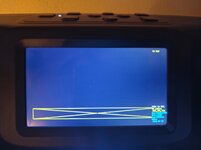
New A3026 owner here (picked one up during the Amazon Black Friday deal). I tried running FW 292, which works until I hit record—at that point, an "X" box appears across the bottom of the screen and the buttons become unresponsive. After a few seconds, it returns to the capture menu.

Also, the attachment for this FW 295 release seems unusually small, and it looks like the same temporary firmware used to check the existing version rather than the full build. Could you confirm if the right file is attached?
 

Attachments

  • 1795482334670.jpg
    1795482334670.jpg
    146.3 KB · Views: 4

ioeuqr

New Tinkerer
Nov 17, 2026
9
2
3
I tried running FW 292, which works until I hit record—at that point, an "X" box appears across the bottom of the screen and the buttons become unresponsive. After a few seconds, it returns to the capture menu.
I had the same issue. For me it turned out to be the SD card. Get a quality card (V30 is recommended) and format it in the Reels machine itself. Settings > Erase Card.
 

melw

Tinkerer
Jun 23, 2026
54
80
18
New A3026 owner here (picked one up during the Amazon Black Friday deal). I tried running FW 292, which works until I hit record—at that point, an "X" box appears across the bottom of the screen and the buttons become unresponsive. After a few seconds, it returns to the capture menu.

Also, the attachment for this FW 295 release seems unusually small, and it looks like the same temporary firmware used to check the existing version rather than the full build. Could you confirm if the right file is attached?
I haven't seen the "X" box before. As another reply suggested, check your SD card setup? 32GB FAT32, high speed class (v10 or better). The ExFAT formatted large SD cards are known to have issues on the Kodak Reels devices for struggling with keeping up with required write speed.

Regarding the unusually small file: It's a patch file, the runs on top of the device firmware. If there's an unrecognized firmware, it does nothing - in practice it should work only on top of Type D compatible devices/firmwares. There seem to be quite many firmware and device variants, so again it's possible that it doesn't work (same as the probe showing unrecognized device). But still worth a try.

EDIT: I tested it on my device having FW 292 and then running the FW 295 as a patch on top of it from the SD card. Once card was removed, it went back to booting with FW 292.
 

thilosde

New Tinkerer
Oct 21, 2026
6
2
3

Type D - FW 295​

  • 24 FPS support. In recording mode it's possible to toggle now between 16/18/24 frames per second.
  • Card only mode. Build and deploy with -Card to generate FW96658T.BIN - this build never flashes anything on the device, it is executed at boot as long as the bin file is kept on the SD card.
  • Type probe. Experimental Type probe that launches in Card mode and attempts to detect which firmware or device type you're running.
For permanent flash:
  • FWDV280.BIN: put this on the card together with empty folder NVTDELFW
For runnings from the card:
  • FW96658T.BIN: the firmware will boot as long as it's found from the card. Once removed, the previous / permanently stored firmware will be used instead
For type probe:
  • See thread post #833

The source, the user guide and the changelog are on GitHub: https://github.com/melw/reels-type-d
I think the FW96658T. BIN should be the same size as in post #846.