

Hi yall,
I was hoping to share during MARCHintosh but sharing now that I finally got things over the finish line.
Similar to others (notably Sideburn and Colin, and others I'm sure), I built my own mini Macintosh using one of those Maclock clocks from AliExpress. I decided to go the route of designing my own custom PCB that replaces the clock completely, and brings brightness control, buttons, sound, and power (both USB-C and battery).
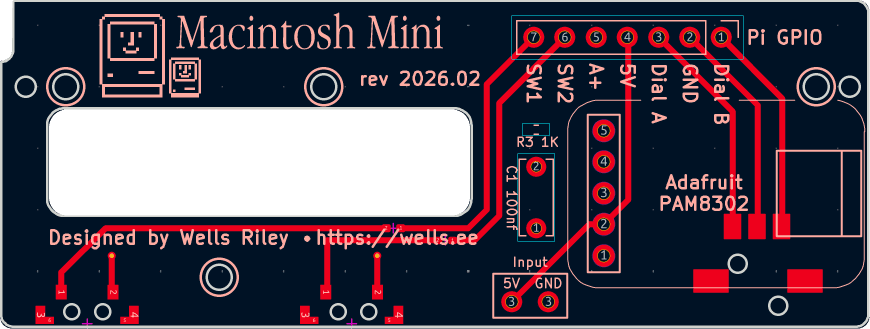
I'm a novice with circuit design, so the implementation is basic and there's certainly a lot of room for improvement. Regardless, I wanted to share my project with you all to hopefully inspire you or help you build your own. I'm not selling the boards or any premade assembled Maclocks, but you can order your own boards from PCBway for a very reasonable price.
I posted a written guide on my GitHub, as well as a full assembly walkthrough video:
On the software side, I wanted to run a more modern Linux kernel andSheepShaver Basilisk II (see update below) rather than the Mini vMac guides I've seen posted online running on Bullseye. With some doing, I finally got it to run.
If you want to follow the same steps I did, I have my Macintosh Mini install guide, and it includes an automation script that installs the emulator, sets it up to run at boot, adds the button/brightness controls, and even a user-selectable boot chime—all in one shot. (Disclaimer: yes, I did use AI to turn my written guide into the automation script. If that's not your jam, the written guide is just as complete... it just takes longer!)
Let me know what you think, and thanks for checking it out.
PS: if there's enough interest, I'd be willing to organize a group buy for the PCBs and passive components on the board.
I was hoping to share during MARCHintosh but sharing now that I finally got things over the finish line.
Similar to others (notably Sideburn and Colin, and others I'm sure), I built my own mini Macintosh using one of those Maclock clocks from AliExpress. I decided to go the route of designing my own custom PCB that replaces the clock completely, and brings brightness control, buttons, sound, and power (both USB-C and battery).
I'm a novice with circuit design, so the implementation is basic and there's certainly a lot of room for improvement. Regardless, I wanted to share my project with you all to hopefully inspire you or help you build your own. I'm not selling the boards or any premade assembled Maclocks, but you can order your own boards from PCBway for a very reasonable price.
I posted a written guide on my GitHub, as well as a full assembly walkthrough video:
On the software side, I wanted to run a more modern Linux kernel and
If you want to follow the same steps I did, I have my Macintosh Mini install guide, and it includes an automation script that installs the emulator, sets it up to run at boot, adds the button/brightness controls, and even a user-selectable boot chime—all in one shot. (Disclaimer: yes, I did use AI to turn my written guide into the automation script. If that's not your jam, the written guide is just as complete... it just takes longer!)
Let me know what you think, and thanks for checking it out.
PS: if there's enough interest, I'd be willing to organize a group buy for the PCBs and passive components on the board.
Last edited:


