
New Network Software for the Macintosh XL (MacWorks)

Bmwcyclist

New Tinkerer
Nov 8, 2026
8
0
1
For Everyone: Some information on the Macintosh XL

(short version ;) )

In January of 1984 Apple decided to phase out the LISA hardware line.
To reduce losses, the remaining LISA inventory was rebranded as Macintosh XL
The mac 128k/512k/MacXL were now marketed together as the "SuperMicros" and "Apple 32 Family"
Apple Dealers were given a kit to install that took a Lisa 2 and gave it new ROM and a screen mod kit.
Once the current ROM and screen kit were installed, the Macintosh XL could no longer run the LISA operating system.
Apple developed MacWorks, which allowed the Macintosh XL to operate as a very enhanced Mac Plus.
In November of 1985, Apple released the XL Migration Kit, which allowed you to export Lisa OS documents to Mac formats.

3rd Parties continuted to support the Macintosh XL with Xlerators 16-18mhz, SCSI expantion boards, 800 floppies, PFG boards and more, all of which did not support the Lisa OS, just MacWorks.

There is, of course, much more to the story, but you can get that elsewhere.

Here is some NEW Macintosh XL software!

While SOME of this software should be able to run on classic Macs (OS 6-7) it has not been tested on Classic Mac Hardware.

Note:
Sherpa will run without a FujiNet device; it only requires a connection to an AppleTalk network.
Checkers will run standalone, but multiplayer requires a FujiNet device.
Solstice will run standalone.

FujiNet:

There are several ways to add FujiNet networking to your MacXL. Serial FujiNet. Upgrade your ESProfile firmware to allow it to co-function as a FujiNet, Serial cable to a modern PC, Linux or Mac and let the modern PC act as the FujiNet or use some other ESP32 hacks.

The Software:

In a likely vein, to reduce confusion, I will post an overview graphic in this main post and then cover the other apps in replies.

Included are two Mac OS extensions specifically for Macintosh XL:

1. Microseconds Fix is an extension that fixes some network issues I ran into with MacWorks (see readme)
2. Macintosh XL Name. Allows a MacXL to show up in the "about" menu and on the Sherpa scans as a Macintosh XL rather than a Mac Plus.
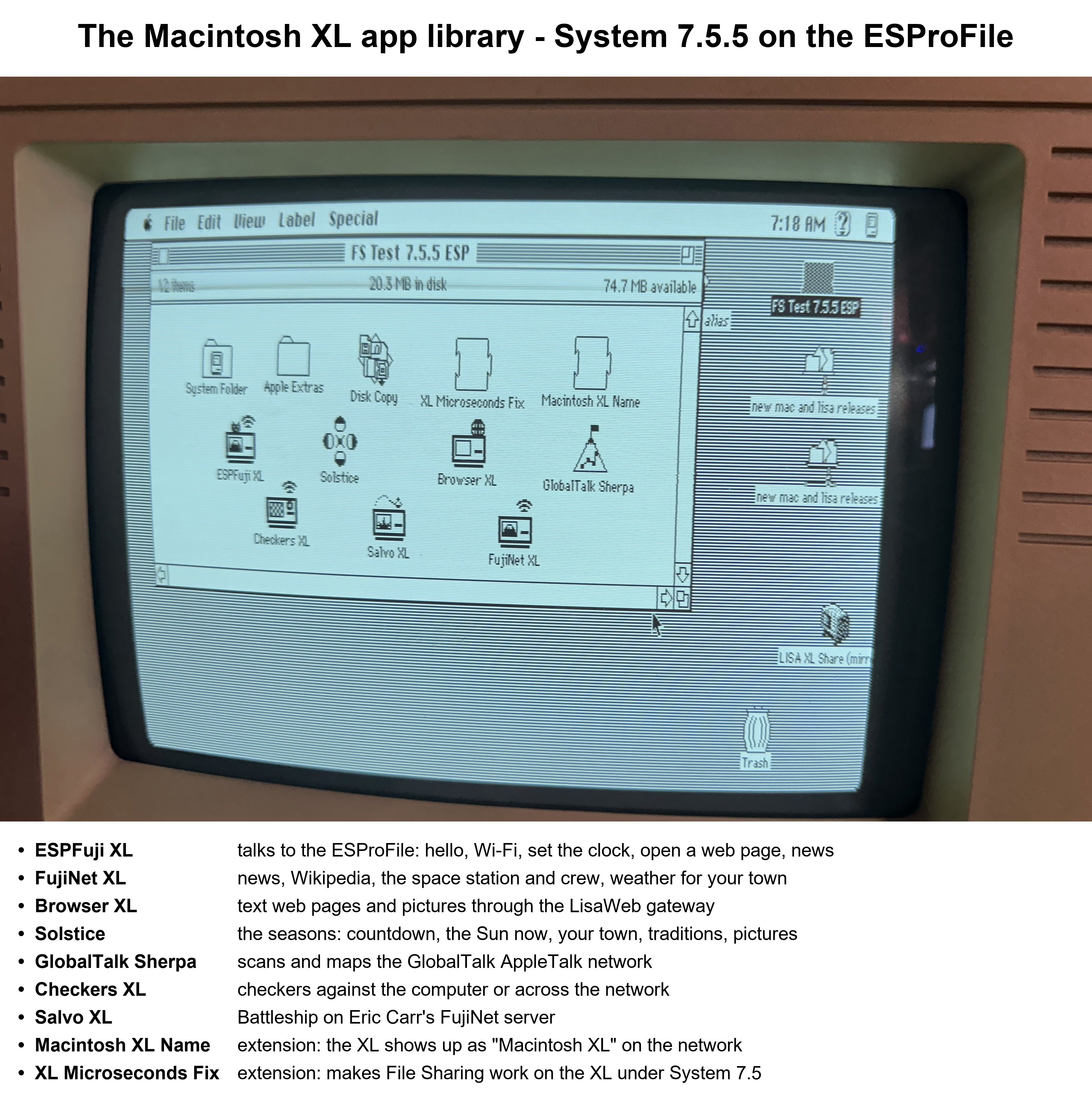

Icon view (04) - captioned.jpg
 

Bmwcyclist

New Tinkerer
Nov 8, 2026
8
0
1
Solstice 1.0 shows how long it is until the next solstice or equinox, and where the Sun and the Earth are right now. It's the Mac counterpart of LisaSolstice.

It runs on System 6.0.2 and later, on a Mac Plus or newer, and it's tested on a real Macintosh XL under System 6.0.8-7.5.5. With and without Xlerators.

It opens on your solargraph. Press any key to go on.

The Seasons menu, each item with a one-letter key (alone or with Apple):

Days to the Next Season (D)

The Earth's Orbit (O) and The Earth's Tilt (E)

Where the Sun Is Now (W)

Your Town (Y): the season where you are. Cincinnati and UTC-5 are the defaults; Set Your Town and Set Your Time Zone change them.

A Fun Fact (F)

Solstice Traditions (L)

Pictures from History (P): Newgrange, Stonehenge and others, from Wikimedia Commons.

The Solargraph (G)

World Map (M), from Natural Earth.

It needs no network.

Solstice (13 14 15 16 18 19 20 22 23) - captioned.jpg
 

Bmwcyclist

New Tinkerer
Nov 8, 2026
8
0
1
GlobalTalk Sherpa maps AppleTalk networks for a classic Mac.

It scans the zones and devices on your own network and across GlobalTalk, then draws them as a map, with each device's name and kind (Mac model, file server, printer and so on).

Runs on System 6.0.8 and System 7, on a Mac Plus or newer.

Version: the releases share READ ME lists Sherpa 1.0.3. It comes as an 800K disk image with the application, a Read Me and a sample scan, plus a .hqx of the application on its own.

On a Macintosh XL: with the XL Name extension installed, an XL shows up as a "Macintosh XL" with its own icon instead of a plain Macintosh.


GlobalTalk Sherpa (38 39 40 41 42) - captioned.jpg
 

Bmwcyclist

New Tinkerer
Nov 8, 2026
8
0
1
Browser XL 1.1 is a web browser for the Macintosh XL. It's the Mac XL version of LisaFuji Browser 1.3.

How it works: pages come through a LisaWeb gateway (the public one is your Raspberry Pi), which turns modern sites, HTTPS included, into text the XL can show. The XL reaches the gateway through the ESProFile or, new in 1.1, an RS-232 FujiNet on Serial A or B.

Pages: text with numbered links, 14 lines at a time. Click a link's number or type it, and SPACE goes to the next page.

Pictures: a picture icon on a page opens the picture, dithered to black and white with Bill Atkinson's method.
Keys: H start page, G go to an address, S search, B back, R reload, L links, ? help.

Apple-period stops a page that's loading.

Runs in 1 MB, on System 6.0.2 and later.

Browser XL (06 07 08 09 10 46) - captioned.jpg
 

Bmwcyclist

New Tinkerer
Nov 8, 2026
8
0
1
FujiNet XL 1.1 brings the FujiNet's online services to the Macintosh XL. It's the Mac XL counterpart of LisaFuji.

News: top stories and categories from FujiNet's news service, with numbered stories to open and read page by page.

Wikipedia: search, then read an article page by page.

Space: a world map with where the ISS is now, its track every 4 minutes, and its position, height and speed. A second item lists who is in space and which craft they're on.

Weather: current conditions and today's forecast for your town.

Network menu:
Hello: the FujiNet's firmware, network and address.
Wi-Fi: the network the FujiNet is on.
Set Clock from the Network: sets the XL's clock.

Open Page: shows any web address as text.

How it connects: through the ESProFile or, new in 1.1, an RS-232 FujiNet on Serial A or B. The FujiNet needs firmware v1.6.1 or later, set to 19200 baud.

Runs on System 6.0.2 and later. It's aimed at a 1 MB XL.

FujiNet XL (27 28 29 30 31) - captioned.jpg
 

Bmwcyclist

New Tinkerer
Nov 8, 2026
8
0
1
Salvo XL 1.1 is Battleship on the Macintosh XL. It's the Mac XL counterpart of LisaSalvo.

It plays on Eric Carr's public FujiNet Battleship server. Your opponents are other FujiNet machines (Ataris, Apple IIs, Commodores, Lisas and more) or the server's AI admirals.

Pick a table and press R when you're ready. Place your five ships by clicking, with SPACE to turn a ship or A to place them all at random, then press RETURN.

Fire by clicking a square of the target sea. One shot hits every other fleet at that square, and the last fleet afloat wins. Turns are 45 seconds, and the YOUR TURN line can flash.

It connects through the ESProFile or, new in 1.1, an RS-232 FujiNet on Serial A or B. It needs a network connection to play.

32.jpg
 

Bmwcyclist

New Tinkerer
Nov 8, 2026
8
0
1
Checkers XL 1.1 is American checkers on the Macintosh XL. It's the Mac XL counterpart of LisaCheckers.

Against the Mac: four levels, with no network needed. Undo is U, and N starts a new game.

Over the network: play people on Lisas, Macs and FujiNet machines through the checkers server. You can offer or accept a draw, resign, or start another game.

Moving: click a piece and then where it goes, or use the arrow keys and Return. Forced jumps are enforced.

It connects through the ESProFile or, new in 1.1, an RS-232 FujiNet on Serial A or B.

36.jpg
 

Bmwcyclist

New Tinkerer
Nov 8, 2026
8
0
1
Updated Links:

Easiest place to get: GlobalTalk LisaGaming (assuming you are on GlobalTalk)

MACINTOSH XL APPS (MacWorks, System 6 or 7)
FujiNet XL 1.1 https://github.com/GyroPilot/FujiNet-XL/releases/tag/v1.1
Browser XL 1.1 https://github.com/GyroPilot/Browser-XL/releases/tag/v1.1
Checkers XL 1.1 https://github.com/GyroPilot/Checkers-XL/releases/tag/v1.1
Salvo XL 1.1 https://github.com/GyroPilot/Salvo-XL/releases/tag/v1.1
Solstice 1.0 https://github.com/GyroPilot/Solstice-XL/releases/tag/v1.0
ESPFuji XL 1.0 https://github.com/GyroPilot/ESPFuji/releases/tag/v1.1-beta3 (in the ESPFuji 1.1 beta 3 release)

MACINTOSH XL EXTENSIONS
Macintosh XL Name 1.0 REV F https://github.com/GyroPilot/Macintosh-XL-Name/releases/tag/v1.0-revF (the XL shows up as "Macintosh XL" on the network)
XL Microseconds Fix 1.0 https://github.com/GyroPilot/XL-Microseconds-Fix/releases/tag/v1.0 (makes File Sharing work on the XL under System 7.5)

ESPFUJI (ESProFile firmware with FujiNet services)
ESPFuji 1.0 (current) https://github.com/GyroPilot/ESPFuji/releases/tag/v1.0
ESPFuji 1.1 beta 3 (test; the XL apps need it to use the ESProFile) https://github.com/GyroPilot/ESPFuji/releases/tag/v1.1-beta3

GLOBALTALK SHERPA
GlobalTalk Sherpa 1.0.3 https://github.com/GyroPilot/GlobalTalk-Sherpa/releases/tag/v1.0.3

All repositories: https://github.com/GyroPilot

LISA BBS
theapplelisabbs.duckdns.org, telnet port 1983

File area IMG_RELEASES (Images > Releases): disk images and READ MEs
Mac XL Apps 1.1: MAC_XL_APPS_1_1.dc42 (all six XL apps and both extensions on one 800K disk) + MAC_XL_APPS_1_1_README.txt
GlobalTalk Sherpa 1.0.1 and the Lisa apps' release floppies are in the same area.
File area SW_SOURCE (Software > Source): source zips for the Lisa apps
 
Last edited: