Options for hard drive replacement

reallyrandy

Tinkerer
Oct 30, 2021
192
83
28
New Jersey
Hi all,
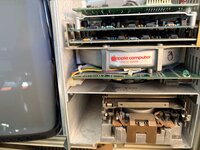
I have a Lisa 2/10 that has a very loud and often stuck hard drive. I know it's a matter of time before it dies. I'd like to replace it with a modern drive of some sort. Since I'm more of a Mac guy, I don't know much about the type of drive it is or what are the potential replacements. it says "Widget Controller Two Layer" on the top of the stacked boards. I guess widget just means hard drive?
Any advice or links to products would be appreciated.

I'll have to get the OS off of it or maybe just download a new one. I have a Floppy emu if that helps. But I want an internal solution ultimately.
 

Attachments

  • IMG_1115.jpeg
    IMG_1115.jpeg
    2.2 MB · Views: 65

ried

New Tinkerer
Jan 23, 2022
10
9
3
The internal Widget hard drive can be replaced with:
  • X/ProFile by SigmaSevenSystems, sold by VintageMicros (currently being relaunched).
  • ESProFile drive emulator by Alex Anderson-McLeod. This is an open-source project and you can have your ESProFile manufactured very inexpensively. This is your most likely option.
  • ArcaneByte parallel hard drive emulator, based on the PocketBeagle. This is no longer being made, as far as I can tell.
  • IDEFile, which is a DIY replacement for ambitious folks who can build their own.
 

reallyrandy

Tinkerer
Oct 30, 2021
192
83
28
New Jersey
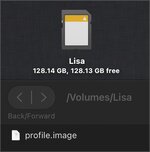
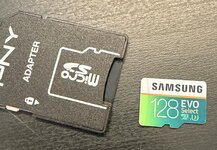
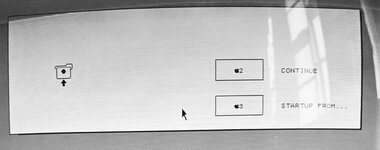
So I got the ESProFile delivered. I installed it by mounting it to the old drive cage. I formatted a 128GB Samsung EVO Select as exfat, and copied the "Lisa Office System 2.0 5MB.image" to it and renamed it "profile.image". I set the ESProFile switch to emul. When I boot, I get the Continue or Startup From dialog. Selecting Continue just refreshes the page, Startup From gives me a dropdown on the upper left. when I select it, it brings me right back. This happens with every image I've tried from the github repo. I can boot successfully from the original hard drive so I know the Lisa works. Anyone have any ideas? here are screenshots:
 

Attachments

  • CleanShot 2026-11-24 at 1 .57.36@2x.jpg
    CleanShot 2026-11-24 at 1 [email protected]
    18.1 KB · Views: 1
  • IMG_1157.jpeg
    IMG_1157.jpeg
    553.8 KB · Views: 1
  • IMG_1158.jpeg
    IMG_1158.jpeg
    566.8 KB · Views: 1

tor_z

New Tinkerer
Nov 1, 2021
1
0
1
You need to format the SD card in FAT32 (not EXFAT), as outlined here: https://github.com/alexthecat123/ESProFile#sd-card . Note that Windows is stupid and does not allow you to create a FAT32 partition larger than 32GB (the actual FAT32max limit is 2 TB). So if using windows, you will need to create a partition on the card that is smaller than 32GB and then format it to FAT32.