Radius Rocket V1.0 - Error #4614

Garrett

Tinkerer
Oct 31, 2021
169
156
43
South Carolina
A few months back, I picked this card up from eBay sold as "untested." I've never had a Rocket and was excited, so I paid too much and pulled the trigger. Finally got around to testing it last night in my IIci. First I installed RocketWare 1.5 under System 7.5.3. After some reading, it appears the rocket only supported System 6-7.1, so I downgraded the IIci to System 7.0.1. Thinking that this v1 Rocket was also not compatible with the RocketWare 1.5 software, I installed RocketWare 1.3.

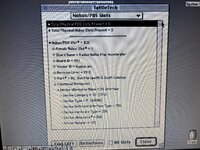
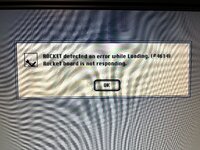
What happens regardless of the version of OS or Radius driver, is the rocket extension loads (with splashscreen and fun sound effect), it sits idle for ~1min, then a dialog box appears saying the Rocket isn't responding. I know the system is detecting it, because the card shows up in TattleTech. This tells me at least the ROM is likely valid.

Rocket experts - what am I doing wrong? Is my combination of driver/OS never going to work? Should I be looking at something else entirely? I can't find any documentation to tell me what Error 4614 refers to (if anything). I also have not touched the RAM installed on the card. I don't even know if it's required for successful initialization.
 

Attachments

  • A.jpg
    A.jpg
    1.7 MB · Views: 31
  • B.jpg
    B.jpg
    1.8 MB · Views: 35
  • C.jpg
    C.jpg
    1.2 MB · Views: 34
  • D.jpg
    D.jpg
    527.1 KB · Views: 31
  • Sad
Reactions: JDW

JDW

Administrator
Staff member
Founder
Sep 2, 2021
2,791
2,180
113
55
Japan
youtube.com
@max1zzz has extensive experience with that edition Rocket because he has cloned it...

My Rocket, however, differs from yours because mine is the ASIC version that looks the photo in my post below (lower down in that post):

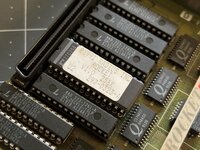
If you are able to carefully remove the 040 CPU and somehow test in another card or computer, then you could then safely rule out the CPU as being the root problem. But it could be one of those socketed chips either being bad or needing to simply be re-socketed. With that said, I must defect to owners of that edition Rocket because they most likely have experience with its hardware quirks.

If you are in a hurry, then I would suggest that you join the Vintage Apple Macintosh Enthusiasts group on Facebook so you can post about it there and tag Petar Puskarich, who owns a rather large number of Rockets and has all the documentation too.
 

max1zzz

Moderator
Staff member
Sep 23, 2021
270
675
93
29
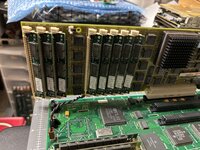
While I don't know specifically what that error code refers to one specific thing I have found with the IIci is that often GAL rockets don't work with Rocket Share when installed in the slot closest to the PDS slot. There is no logical reason for this as there is nothing special about that slot but I have observed it on multiple IIci's with multiple clone rockets (which are a exact hardware clone of the original so should act the same)

Have you tried Rocket Share to see if it acts any differently?

You can use the latest versions of Rocket Share / Ware with the original rocket so that's not your issue ans 7.0.1 should work fine though personally I used 7.1

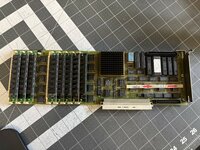
RAM is required for it to function (and you need a minimum of 8MB installed), it looks like the card has a bit of a random assortment of sticks so it might be someone just threw whatever random RAM they had to hand on so I would start by swapping that out for known good sticks (or at least testing them in annother system)
 

Garrett

Tinkerer
Oct 31, 2021
169
156
43
South Carolina
Thank you for the ideas! I made time last night to dig in a little more.

The RAM (while a hodge podge of sticks) does work fine, and totals 8MB. I installed these old 1MB SIMMs into my IIci and installed 8 new 4MB SIMMs in the Rocket. No change to the Rocket's functionality with RocketWare.

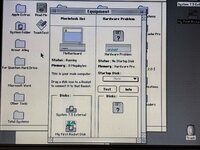
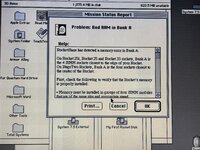
I uninstalled RocketWare and installed RocketShare. The extension loaded and I was able to open Mission Control after entering the serial number. Unfortunately, on the right side of the window where the Rocket info would be, I got a message saying Hardware Problem. I was able to open up the "Test" dialog, but the program crashed shortly after. I have never been able to re-open it (crashes with error type -1).

Not very great news so far. Next I will swap the CPU with a known working one. I have never seen a 68040 go bad, but I don't want to rule anything out yet. Keep the ideas coming!
 

Attachments

  • Rocket.jpg
    Rocket.jpg
    1,023.7 KB · Views: 2