2026 PowerPC Challenge, is it happening?

iBookSpeedster88

Tinkerer
Jan 1, 2024
42
43
18
I checked back with OpenBSD and noticed that XFCE was re-added to OpenBSD's macppc branch with the release of OpenBSD 7.8, which was yet to be released when I installed OpenBSD 7.7 on my PowerBook G4. Some packages were removed, such as Gramps 5.2.4 and LuaKit 2.4.0 (the only other graphical web browser I could find in the repository, so you're stuck with NetSurf again). I could have always installed MATE 1.26, as it is present in both the 7.7 and 7.8 repositories, but I went with IceWM to tax my PowerBook the least I could. Experience with OpenBSD 7.8 will probably be better than with 7.7 if you go with XFCE, which is pretty lightweight if you stick with GTK2 programs and not GTK3 ones, but XFCE has seen a trend of switching more of their pre-installed software over to GTK3 in the past few versions, so I don't know how much performance will be affected. XFCE and MATE come with their own sound mixers, but standalone sound mixers don't exist in OpenBSD, so I was without sound with IceWM (at least the three that I thought might be in the repository; alsa-mixer, pnmixer, and qastools, none of which OpenBSD provides even in the latest 7.8 release I just checked).

I'm sure if I tried OpenBSD 7.8, I would have a better time if I went with a full desktop environment now that XFCE is available again in the macppc repository, but I want to give NetBSD a shot. Their installation guide for PowerPC Macs is the most daunting procedure I have ever seen for installing a modern operating system.
What is your impression of MorphOS? Not exactly linux but more Amiga like. And not free.
I really like MorphOS. Or, rather, I really want to like MorphOS. Don't get me wrong, I'm mostly satisfied and would say that MorphOS meets 80% of my needs for it to be a daily driver, but I wish the software selection weren't so lacking. Alas, that is simply par for the course of being an obscure operating system on a CPU architecture found in no computer one could simply pick up at any local brick and mortar retail store. Most of the software one might want is covered by at least one generous developer's contributions to morphos-storage.net. Over time, I have scoured the internet to find MorphOS programs exclusive to sites like Aminet, Morphos.lukysoft.cz, and many personal websites of developers who don't host their software anywhere but their own website and it's been interesting what I could find. Most of the 3rd party software is developed by a handful of people operating out of their free time, which results in ... many seemingly abandoned programs that saw maybe two or three updates past their first release. The 79 Euro price tag is understandably a turn off for most would-be MorphOS users, but in my opinion it's the best chance at continuing our use of PowerPC Macs, far more so than Linux or BSD, which might anger some if I said that. The lingering rumors of MorphOS ditching PowerPC for x86 for the past last decade still gets me nervous, though. In any case, if Mac OS X weren't an option, then my go-to choice would be MorphOS. I am a firm believer in MorphOS's potential. It is already very polished, actively developed and can only get better with time.

During last year's challenge, I tested MorphOS on my PowerBook G4 DLSD to see what the experience of using MorphOS on a laptop would be like. I already have MorphOS installed to my Mac Mini and, although many of the 3rd party software selection is frequently rather half-baked and behaves like software perpetually living in a Beta development state, I really do quite enjoy using MorphOS. Just a few of my must-have recommended programs MorphOS has available are AmiNetRadio, MPlayer, Basilisk II, RNOComics, Easy2Install, Iris, and Odyssey Web Browser. If there is some software that MorphOS doesn't have or there is only one or two programs of its kind that are left in an unfinished state (like the two or three word processors for MorphOS like Morpheus), then I can just fire up Basilisk II and get to work on Microsoft Office 4.2, WordPerfect 3.5e, or Adobe Photoshop 4 and get a large selection of 68k System 7 software as a stopgap solution.

powerpc-challenge-29.jpeg
 
Last edited:

Trash80toG4

Active Tinkerer
Apr 1, 2022
1,168
346
83
Bermuda Triangle, NC USA
Day 16?

Stripped all the HDDs out of the MDD'03, got it booting from OS9Lives Installer and hit another dead end. :rolleyes:

For now anyway: Drive Setup says my 128MB mSATA SSDs are unsupported

1) Tried one with SATA adapter on new card, not surprised it didn't work out of the gate
2) Tried another with PATA Adapter on MDD's Master and Slave connectors, still not supported

Looking to build a Utility Suite on Zip 200 (maybe even 100?) to run under Optical Media Installer.
_TattleTech's a no-brainer
_is there a Memory Test Utility I chould look for, getting an error at startup, but everything runs fine so far.

FWB guy from day one, but would appreciate other recommendations for mSATA formatting; Silverlining?
 

phunguss

Active Tinkerer
Dec 24, 2023
550
464
63
57
Stillwater, MN
_is there a Memory Test Utility I chould look for, getting an error at startup, but everything runs fine so far.
Look for Apple Service Diagnostic CD... I think you want 2.5.8 or earlier... 2.6.3 is not for PPC.

January 2003 – Apple Service Diagnostic Dual Boot CD v 2.1.5 – (ASD-215)
  • PowerBook G4 (12-inch),
  • PowerBook G4 (17-inch),
  • iMac (17-inch 1GHz),
  • Power Mac G4 (FW 800),
  • Xserve (slot load),
  • eMac (ATI Graphics),
  • Power Mac G4 (Mirrored Drive Doors 2003),
  • iMac (USB 2.0),
  • PowerBook G4 (15-inch FW800),
  • PowerBook G4 (17-inch 1.33GHz),
  • PowerBook G4 (12-inch DVD).
 

Trash80toG4

Active Tinkerer
Apr 1, 2022
1,168
346
83
Bermuda Triangle, NC USA
Thanks, p! Ran into some trouble, there's no Zip driver on the OS9Lives installer CD. Started thread at the MLA:

Suggested support be added to the Installer CD:

Trying to keep this thread free of the extraneous crud I'm running into. Wondering if installing another Optical Drive for utility suite would be supported on the MDD? HRMMM . . . more crud.
 

Certificate of Excellence

Active Tinkerer
Nov 1, 2021
783
543
93
48
United Sates
I checked back with OpenBSD and noticed that XFCE was re-added to OpenBSD's macppc branch with the release of OpenBSD 7.8, which was yet to be released when I installed OpenBSD 7.7 on my PowerBook G4. Some packages were removed, such as Gramps 5.2.4 and LuaKit 2.4.0 (the only other graphical web browser I could find in the repository, so you're stuck with NetSurf again). I could have always installed MATE 1.26, as it is present in both the 7.7 and 7.8 repositories, but I went with IceWM to tax my PowerBook the least I could. Experience with OpenBSD 7.8 will probably be better than with 7.7 if you go with XFCE, which is pretty lightweight if you stick with GTK2 programs and not GTK3 ones, but XFCE has seen a trend of switching more of their pre-installed software over to GTK3 in the past few versions, so I don't know how much performance will be affected. XFCE and MATE come with their own sound mixers, but standalone sound mixers don't exist in OpenBSD, so I was without sound with IceWM (at least the three that I thought might be in the repository; alsa-mixer, pnmixer, and qastools, none of which OpenBSD provides even in the latest 7.8 release I just checked).

I'm sure if I tried OpenBSD 7.8, I would have a better time if I went with a full desktop environment now that XFCE is available again in the macppc repository, but I want to give NetBSD a shot. Their installation guide for PowerPC Macs is the most daunting procedure I have ever seen for installing a modern operating system.

I really like MorphOS. Or, rather, I really want to like MorphOS. Don't get me wrong, I'm mostly satisfied and would say that MorphOS meets 80% of my needs for it to be a daily driver, but I wish the software selection weren't so lacking. Alas, that is simply par for the course of being an obscure operating system on a CPU architecture found in no computer one could simply pick up at any local brick and mortar retail store. Most of the software one might want is covered by at least one generous developer's contributions to morphos-storage.net. Over time, I have scoured the internet to find MorphOS programs exclusive to sites like Aminet, Morphos.lukysoft.cz, and many personal websites of developers who don't host their software anywhere but their own website and it's been interesting what I could find. Most of the 3rd party software is developed by a handful of people operating out of their free time, which results in ... many seemingly abandoned programs that saw maybe two or three updates past their first release. The 79 Euro price tag is understandably a turn off for most would-be MorphOS users, but in my opinion it's the best chance at continuing our use of PowerPC Macs, far more so than Linux or BSD, which might anger some if I said that. The lingering rumors of MorphOS ditching PowerPC for x86 for the past last decade still gets me nervous, though. In any case, if Mac OS X weren't an option, then my go-to choice would be MorphOS. I am a firm believer in MorphOS's potential. It is already very polished, actively developed and can only get better with time.

During last year's challenge, I tested MorphOS on my PowerBook G4 DLSD to see what the experience of using MorphOS on a laptop would be like. I already have MorphOS installed to my Mac Mini and, although many of the 3rd party software selection is frequently rather half-baked and behaves like software perpetually living in a Beta development state, I really do quite enjoy using MorphOS. Just a few of my must-have recommended programs MorphOS has available are AmiNetRadio, MPlayer, Basilisk II, RNOComics, Easy2Install, Iris, and Odyssey Web Browser. If there is some software that MorphOS doesn't have or there is only one or two programs of its kind that are left in an unfinished state (like the two or three word processors for MorphOS like Morpheus), then I can just fire up Basilisk II and get to work on Microsoft Office 4.2, WordPerfect 3.5e, or Adobe Photoshop 4 and get a large selection of 68k System 7 software as a stopgap solution.

View attachment 26131
I do like Morph os as well but I am not willing to pay a $85 premium for each machine I want to put it on which as of right now would be five including two Powermac G5s, an Ibook & Powerbook G4 and a Mini G4. I'm not spending $425 to accomplish that, so until an affordable group license option occurs, OSX and Linux it is.
 
  • Like
Reactions: phunguss

PowerRCP-G3

Tinkerer
Jan 31, 2022
49
33
18
Here is a recap of what happened yesterday.

Day 16: Since a LEGO set came in the mail, I wanted to dedicate the video to testing out LEGO Star Wars on the Mac.
 

phunguss

Active Tinkerer
Dec 24, 2023
550
464
63
57
Stillwater, MN
Day 17

I started with a 7300/200 and tried to install OSX 10.0 with XPostFacto, but got stuck on not having an HFS+ formatted volume. I couldn't find the Disk Utilities in the menu on 10.0, so will try another machine with a G3 in it.
PPC2026d15-7300.jpg


PPC2026d15-hfsplus.jpg

I then pulled out my 7100/66 and ran some standard benchmarks. I will then install the NewerTech G3 PDS and compare those benchmarks.

Then I started working on converting my Quad G5 to air cooled. I purchased two Dell T5820 CPU coolers off eBay for total $14 delivered.
PPC2026d15-T5820.jpg

They are shorter than standard G5 coolers, and have 3 pipes instead of two. So hopefully they will work out. There is a PDF document about converting to air cooled, and it recommends some 4 pipe coolers ($25-40 each) but I didn't want to shell out that kind of money right now.
PPC2026d15-sink2.jpg

So I will mod these and see how it goes.
 
  • Wow
Reactions: Arbystpossum

PowerRCP-G3

Tinkerer
Jan 31, 2022
49
33
18
Here is a recap of what happened on Day 17

Day 17: The hard drive on my G5 gives later that night. But, it's not a big deal as I plan on getting an SSD for it. So, I had to use the PowerBook G4 in the meantime. I tested out three different models of the iPod to see which one will work best on PowerPC Macs.
 

phunguss

Active Tinkerer
Dec 24, 2023
550
464
63
57
Stillwater, MN
Day 17

I managed get the NewerTech MaxPower G3 into the 7100/66. I found the correct installer app at the Mac Repo to get the extension enabled.
PPC2026d18-pm7100g3boot.jpg

Before and after System Profiler.
PPC2026d18-pm7100ba.jpg

Speedometer 4.02 looks like about 5-6x improvement.
PPC2026d18-pm7100g3speedometer.jpg

MacBench 4.0, I will have to run further benchmarks, but it sure feels snappier!
PPC2026d18-pm7100g3mb4.jpg


Day 18

Back to the G5 Quad air cooled mod. I started by stripping off the outer shell and fan, then marking the mount holes on the bottom of the heatsinks. Drilling holes for the M3 screws that will hold the tension springs.
PPC2026d18-g5q01.jpg

Then I cut off the excess that would be touching components on the CPU cards. Makes them lighter, but less thermal mass to absorb heat.
PPC2026d18-g5q02.jpg

Then I had to choose the springs.
PPC2026d18-g5q03.jpg

What the CPU cards will look like once the fans are mounted in. I will 3D print an outer shell to direct the airflow.
PPC2026d18-g5q04.jpg

Finally, the heat sinks mounted and ready to install in the G5 Quad for testing. I will likely run it without the fans and they will be in high speed mode with no fans connected.
PPC2026d18-g5q05.jpg

I will fire it up tomorrow and see what kinds of problems I have.
 

Arbystpossum

Tinkerer
Jan 8, 2024
69
44
18
USA
I've finally caved and I'm getting a replacement Noctua fan for my G4 iMac. It's quieter than the replacement I have, which the replacement IS indeed a 12v fan, it just spins at an insane RPM. The Noctua comes with in-line resistors, so I can fine tune it if I want, which is splendid.

I also found that someone made Minecraft 1.8.9 for PowerPC, and I fell down that hole and hit every ledge on the way down, using my G5 tower. It swallowed my entire weekend and all I have to show for it is a kingdom.
 

PowerRCP-G3

Tinkerer
Jan 31, 2022
49
33
18
Here is a recap of what happened yesterday.

Day 18: After the G5's original hard drive gave up, I decided to take it out until I can get an SSD for it. It had a good run. It processed clips for the LEGO Gameboy let's build video and it was the best at running YouTube. But for now, it's time to use the PowerBook G4. I also tested three models of the iPod Touch to see which one would work best with the PowerBook G4 itself.
 

phunguss

Active Tinkerer
Dec 24, 2023
550
464
63
57
Stillwater, MN
Day 19

G5 Quad 2.5GHz again. I started out with no boot chime and no video.
PPC2026d19-G5Q01.jpg

Overtemp? Well I put some water in a short tube and connected the LCS pumps just to have them connected to the logic board. They are not cooling anything.
PPC2026d19-G5Q02.jpg

Powered on, water circulates, but still no love. They appear white because of the air bubbles in there, I was not particularly concerned about bleeding them out.
PPC2026d19-G5Q03.jpg

I had to figure out what was going on... I pulled out my Seek thermal cam adapter for my iPhone and tried to take a look.
PPC2026d19-G5Q04.jpg

That's strange... the acrylic panel seems to block IR. Here is my hand over the hoses.
PPC2026d19-G5Q05.jpg

Ok, since the fans are on high speed anyway due to overtemp, lets pull off the acrylic panel.
PPC2026d19-G5Q06.jpg

There we go! One CPU heated up, the other didn't. I have three CPU boards, so I spent some time swapping them around to finally get boot chime!
PPC2026d19-G5Q07.jpg

Finally 4 x 2.5GHz! I added the rest of the ram sticks I had and got it up to 14GB. Since the CPU coolers do not yet have fans on them, and they are shorter than stock air coolers, I had to cobble a baffle to increase air flow over the fins.
PPC2026d19-G5Q08.jpg

This is GeekBench 2.20 running under load with max temps in the low 70s C.
PPC2026d19-G5Q09.jpg

And at idle after completion, back down to 30s C.
PPC2026d19-G5Q10.jpg

This is Cinebench R10 under load, again low 70s C.
PPC2026d19-G5Q11.jpg

And idle after completion, back down to mid 30s C.
PPC2026d19-G5Q12.jpg


Overall happy with those results, and I don't think I really need the CPU fans, but they may lower the temps slightly. The real trouble is keeping the intake and exhaust fans at reasonable speeds when I disconnect the LCS pumps. I don't have an oscilloscope, so I can really read the PWM signal to the LCS, so that may be a future project. I guess I could read it with a multimeter and see what voltage range I get when the fans are high, assuming anything over 5V would mean it is 12V PWM (or sinewave as mentioned previously).
 

Trash80toG4

Active Tinkerer
Apr 1, 2022
1,168
346
83
Bermuda Triangle, NC USA
Day 19? Caught a break!

Clonked the 3.5" spinner that was making death rattles on the bench a couple of times and tried it again. I booted right up! Found the install of DiskWarrior I'd done in preparation for trying to recover the HDD from the DA.

I'd moved it over to a Beige G3 when the DA went teats up many years back and it worked fine in there for a while. Then the G3 chewed it up good when it finally found the partition size too big a bite. My bad, hasn't mounted since . . . until today! Didn't even need to run DiskWarrior! Got all the data copied over to the (all of a sudden functioning again) boot drive, shut it down and pulled the DA's drive to stow it away again. Rebooted to make sure everything seemed OK and shut down.

I'd ordered a 160GB 2.5" IDE drive today so of course things came together soon thereafter. :rolleyes:

Not turning the dang thing on again until I've got the little spinner locked and loaded when it arrives next Tuesday to copy everything over yet again.
 

PowerRCP-G3

Tinkerer
Jan 31, 2022
49
33
18
Here is a recap of what happened yesterday.

Day 19: Because of a snowstorm, an unexpected power outage just happened in my area. And, that also meant... I had to change plans! 😔


Trash80toG4

Active Tinkerer
Apr 1, 2022
1,168
346
83
Bermuda Triangle, NC USA
Day 20 - Decided to spin the stictionistic drive up every day until the new one arrives after all.

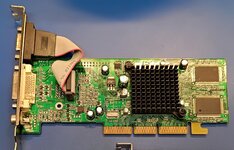
Tried to install drivers for the new VidCard:

ATI Radeon 9250.jpg

Interesting results:

Picture 4.jpeg


Forcing boot from the OS9Lives CD got me up and running the iterative which freakin' extension is poleaxing the system swapfest. :rolleyes:

Picture 10.jpeg


No joy on finding a way to output anything over 1080p from the DVI output of the card. Gotta give VGA a try I think?

While I was at it, I started to play with RAM sticks to try to pinpoint the error that cropped up on every boot. First thing I tried was pulling the stick from J20 and the error went away! Still reported 1.5MB available as had always done before. Pulled the stick from the next slot over, J23 and replaced it with the first one I'd pulled, same same, not the stick apparently. So I put the J23 stick into J20 just to see . . .

So now About This Computer reports 1.99GB of Built-in Memory? I've never seen such a thing before and never expected to see anything over 1.5GB!!!!

LEM says: RAM: 256 MB standard, expandable to 2 GB (although Mac OS 9 will only recognize 1.5 GB) using PC2700 memory in 4 DIMM slots

WTF? :eek:
 

Trash80toG4

Active Tinkerer
Apr 1, 2022
1,168
346
83
Bermuda Triangle, NC USA
Picture 11.jpg


Powerbase over at the MLA said he understands this to be standard behavior. Looks to me to be behaving like unclean Macs running without MODE32 addressing memory over 8MB and listing it as system memory allocation.

But 1.99GB? That's just strange. Sure would be nice to have an OS9 extension like MODE32 for that extra half gig. :)
 

Trash80toG4

Active Tinkerer
Apr 1, 2022
1,168
346
83
Bermuda Triangle, NC USA
Day 21 ended with a victory of sorts. Gave up on running the 1440p Display from the DVI port on the new card. Haven't been able to get more than 1080p from there and thru the KVM switch so I gave up and hooked up a VGA Cable.

Gotta switch the display to VGA manually, PITA that. But VGA is pumping out 2048 x 1152 so I can live with that for now. :sneaky:
 

phunguss

Active Tinkerer
Dec 24, 2023
550
464
63
57
Stillwater, MN
Day 21

I received my DSO-152 from Temu and have yet to learn it. I set out to try to find the fan speed signaling on the G5Q. I was ramping up the temps by running benchmarks.
PPC2026d21-G5Q02.jpg

I noticed my tubes were getting warm.
PPC2026d21-G5Q01.jpg

They are not connected to the CPUs... but just having the motors run creates enough heat in the short tubes.
PPC2026d21-G5Q06.jpg

Not super hot, but warmer than air.
PPC2026d21-G5Q05.jpg

Hopefully on Day 22, I can figure out the fan signalling and find a way to convert it to control the CPU cooler PWM replacement fans.
 

PowerRCP-G3

Tinkerer
Jan 31, 2022
49
33
18
Here is a recap of what happened yesterday.

Day 21: The first of the G4's upgrades has finally arrived and it's now back in business! The adapter worked even if I had to format it to Mac OS Extended. For some reason, the G4 will not recognize the Mac OS Extended (Journaled) format.