

LC575 computer killed LC520 motherboard! 😭
- Thread starter JDW
- Start date
-
- Tags
- color classic lc520 lc575 repair
-
Board Nominations
Nominations have now closed and the results are available here. -
Hey Guest, MARCHintosh 2026 is upon us. Check out community projects, join GlobalTalk, and have fun!
You are using an out of date browser. It may not display this or other websites correctly.
You should upgrade or use an alternative browser.
You should upgrade or use an alternative browser.
I am testing my LC 520 board in my Color Classic using the reproduction TechStep.
ADB mode works for me.
1. Mac power switch off.
2. Plug in all cables to TechStep
3. Mac power switch on.
4. Power up TechStep
5. Choose LC520
6. Choose 3. TstMde
It turns on the Mac as though the keyboard power button was pressed (fan, drive) and then it successfully enters test mode using ADB.
For my LC520 board, my screen is blank during TechStep testing except step 7 gray pattern. When booted normally, my screen works. For Color Classic, gray screen the entire time. But, my Color Classic body and LC 520 board are both stock. That may explain the difference.
Color white = same results as you
Color green = my results are similar
Color orange = my results are different
1. Power Supply: 4.92V (normal)
2. Power Up Voltage 4.94V (normal)
3. TstMd: Enabled via ADB
4. CPU ID: LC 520 (have you modified your 520 board to run as a CC II with the resistor removal?), but it also shows: ROM Version: $67C, Subversion: $25F1
5. Logic
7. Built-in Video
9. More RAM Tests: did not perform
10. ADB Status: PASSED
11. SCSI Functions:
Last but not least, I tried my TechStep. I tried to enter TestMode but the TechStep responded saying ADB communications failed.
ADB mode works for me.
1. Mac power switch off.
2. Plug in all cables to TechStep
3. Mac power switch on.
4. Power up TechStep
5. Choose LC520
6. Choose 3. TstMde
It turns on the Mac as though the keyboard power button was pressed (fan, drive) and then it successfully enters test mode using ADB.
For my LC520 board, my screen is blank during TechStep testing except step 7 gray pattern. When booted normally, my screen works. For Color Classic, gray screen the entire time. But, my Color Classic body and LC 520 board are both stock. That may explain the difference.
Color white = same results as you
Color green = my results are similar
Color orange = my results are different
1. Power Supply: 4.92V (normal)
2. Power Up Voltage 4.94V (normal)
3. TstMd: Enabled via ADB
4. CPU ID: LC 520 (have you modified your 520 board to run as a CC II with the resistor removal?), but it also shows: ROM Version: $67C, Subversion: $25F1
5. Logic
- ROMck: ROM Checksum PASSED
- RAMsz: Soldered 4MB (correct because I have no RAM SIMM installed)
- Addr.: Address Bus Test PASSED
- Data: Data Bus Test PASSED
- RAM: Standard Test PASSED
- VIA: PASSED
- RBV: RBV Registered FAIL : Mon Mismatch (I haven't modified my CC monitor resolution) Expected 14" found 10"
- VRMsz: Video RAM Size 1 MB (I have a VRAM SIMM installed. Forgot to remove it)
- VRAM: Video RAM Test PASSED
- CLUT: Color Lookup Table PASSED
- Clock: Clock Test PASSED
- P/RAM: Non-Destructive Test PASSED, Destructive Test PASSED
- ADB: ADB Test PASSED
- SCC: Serial Comm. Test PASSED
- SCSI: SCSI Logic Test FAIL (Data Xfer) Same as you!
- SWIM: PASSED (I heard the floppy drive make a brief sound during this test)
- Sound: PASSED
7. Built-in Video
- Turn PwSvr ON: "Screen should be solid black" (my comment: well, it is because it never turns on!)
- Turn PwSvr OFF: "In 10-30s, screen should turn gray" mine turned on and showed gray
- Video Patterns (test): failed because it did not recognize monitor
9. More RAM Tests: did not perform
10. ADB Status: PASSED
11. SCSI Functions:
- Termination Power: 4.68V (Normal is >4.15V)
- SCSI Term Check: PASSED
- SCSI Bus SCAN Found my internal drive at 0
- Power OFF CPU: Command Worked. Case Fan and HDD powered OFF.
- Power ON CPU: Command Worked (without any bong because I have the headphone jack plugged in as part of the TechStep). Case Fan and HDD powered up.

@Garrett
Thank you for your advice. I actually had removed both ROM chips and re-socketed them at the time I recapped and overclocked (via resistor removal) the board even though the board was working fine. I did that restocking just to make sure everything would be OK. Even so I could go further and “scrape the legs” as you suggest.
I’ve noted how more than one of you have said that “these boards“ are finicky. Your use of the plural term “these” seems to indicate you’re referring to all of them: the stock Color Classic board, the LC 520 board, the LC 550 and 575 boards. But here’s the thing. I’ve used my 575 board for a very long time and never had a single problem with it. That significant because I’ve handled it a lot. I’ve swapped in RAM, VRAM, CPU, etc. many times and I even soldered in a ROM socket and I’ve been using a custom ROM too. I’ve added and removed CPU heatsinks and fans, Spicy O’Clock, and the Apple IIe card. In fact, I’ve done more to this 575 board than any of my SE/30 boards or any other motherboard I’ve ever owned. And through it all, there’s not been one problem with that board. It’s the single most real best board I have. And so, I’m trying to put your word “finicky“ into perspective in light of my good experience with that particular board.
But the good experience I’ve had doesn’t just stop there with a 575 board either. I’m not had a single issue with the stock Color Classic board either.
Maybe my experience is just abnormal and maybe most people find that all of these motherboards boards can be finicky. All I can say is that my LC520 board worked flawlessly until I tried it in the LC 575 body. And because of that, there’s no way I’m going to try either of my other two boards in that body just to see what happens, even though that would be the definitive test.
But if you read what I wrote previously, there is a curious thing. I don’t know if any of you picked up on it or not, so I’ll emphasize that point now. When I use the LC 520 board in my CC body and press the power key on the keyboard, the case fan turns on and the hard drive (spinning platter) spins up. But when I do the same test in the LC 575 body, the fan and hard drive don’t power up and there’s no sign of life.
Thank you for your advice. I actually had removed both ROM chips and re-socketed them at the time I recapped and overclocked (via resistor removal) the board even though the board was working fine. I did that restocking just to make sure everything would be OK. Even so I could go further and “scrape the legs” as you suggest.
I’ve noted how more than one of you have said that “these boards“ are finicky. Your use of the plural term “these” seems to indicate you’re referring to all of them: the stock Color Classic board, the LC 520 board, the LC 550 and 575 boards. But here’s the thing. I’ve used my 575 board for a very long time and never had a single problem with it. That significant because I’ve handled it a lot. I’ve swapped in RAM, VRAM, CPU, etc. many times and I even soldered in a ROM socket and I’ve been using a custom ROM too. I’ve added and removed CPU heatsinks and fans, Spicy O’Clock, and the Apple IIe card. In fact, I’ve done more to this 575 board than any of my SE/30 boards or any other motherboard I’ve ever owned. And through it all, there’s not been one problem with that board. It’s the single most real best board I have. And so, I’m trying to put your word “finicky“ into perspective in light of my good experience with that particular board.
But the good experience I’ve had doesn’t just stop there with a 575 board either. I’m not had a single issue with the stock Color Classic board either.
Maybe my experience is just abnormal and maybe most people find that all of these motherboards boards can be finicky. All I can say is that my LC520 board worked flawlessly until I tried it in the LC 575 body. And because of that, there’s no way I’m going to try either of my other two boards in that body just to see what happens, even though that would be the definitive test.
But if you read what I wrote previously, there is a curious thing. I don’t know if any of you picked up on it or not, so I’ll emphasize that point now. When I use the LC 520 board in my CC body and press the power key on the keyboard, the case fan turns on and the hard drive (spinning platter) spins up. But when I do the same test in the LC 575 body, the fan and hard drive don’t power up and there’s no sign of life.
@David Cook
I really appreciate the time you took to do that TechStep testing and provide a detailed report. Thank you!
I’m getting ready for work now, so it all will have to be done after work tonight. Specifically:
1. Remove and scrape all legs of both ROM chips. Test and see what happens.
2. Use headphones to test headphone jack and listen for the bong at time of Power Key press.
============
Yes, I have removed the 3 resistors to Overclock to 33MHz and that was done in this video.
David, if you have the stock CC motherboard too, can you test that with your TechStep? I ask because I wasn’t able to enter test mode when I tested my stock CC board. (This is unrelated to the LC520 problem.)
I really appreciate the time you took to do that TechStep testing and provide a detailed report. Thank you!
I’m getting ready for work now, so it all will have to be done after work tonight. Specifically:
1. Remove and scrape all legs of both ROM chips. Test and see what happens.
2. Use headphones to test headphone jack and listen for the bong at time of Power Key press.
============
Yes, I have removed the 3 resistors to Overclock to 33MHz and that was done in this video.
David, if you have the stock CC motherboard too, can you test that with your TechStep? I ask because I wasn’t able to enter test mode when I tested my stock CC board. (This is unrelated to the LC520 problem.)
What have we learned?
Your CPU is working. Your ROMs are good (checksum passed). Your bus is working (memory and ROM tests).
Your CUDA is working (crystal, PRAM, clock, power on, and ADB tests).
That's why the TechStep is saying it doesn't recognize the CPU. The id has been changed from LC 520 (#56) to Color Classic II (83). That means those test 'failures' are red herrings.
Yes. I am able to enter test mode using ADB using my reproduction TechStep with the Color Classic unmodified body and motherboard. Please note my steps differ slightly from your video, in that my Color Classic starts in the off state (power switch off, plug in tech step, power switch on, power up tech step, choose color classic, choose 3 TstMde).
In your video, yours is already on, then you attempt test mode, then you turn power switch off/on. See below... I don't start test mode in that state. Oh, maybe you already tried and failed to enter ADB mode when you shot this portion of the video.

11. SCSI Functions: SCSI Bus SCAN (Let's you type any SCSI ID, but the TechStep is ID6. I tried all others but the internal HDD was not found. Interesting.)
Does yours show the 0?

Your CPU is working. Your ROMs are good (checksum passed). Your bus is working (memory and ROM tests).
Your CUDA is working (crystal, PRAM, clock, power on, and ADB tests).
Yes, I have removed the 3 resistors to Overclock to 33MHz and that was done in a video.
That's why the TechStep is saying it doesn't recognize the CPU. The id has been changed from LC 520 (#56) to Color Classic II (83). That means those test 'failures' are red herrings.
David, if you have the stock CC motherboard too, can you test that with your TechStep?
Yes. I am able to enter test mode using ADB using my reproduction TechStep with the Color Classic unmodified body and motherboard. Please note my steps differ slightly from your video, in that my Color Classic starts in the off state (power switch off, plug in tech step, power switch on, power up tech step, choose color classic, choose 3 TstMde).
In your video, yours is already on, then you attempt test mode, then you turn power switch off/on. See below... I don't start test mode in that state. Oh, maybe you already tried and failed to enter ADB mode when you shot this portion of the video.
11. SCSI Functions: SCSI Bus SCAN (Let's you type any SCSI ID, but the TechStep is ID6. I tried all others but the internal HDD was not found. Interesting.)
Does yours show the 0?
I got my reproduction TechStep from @max1zzz during the following thread:
 68kmla.org
You could reach out to him to see if he has a newer version of Vol. 4 tests or whether his is better at entering test mode for some reason.
Recreateing the Apple TechStep
Me and @jajan547 are currently working on creating a replica of the Apple Techstep This will be a functional and (mostly) electrical clone of the original but will not be a exact 1:1 copy as the design will be optimised where changes can be made to make the board easier or cheaper to assemble...
68kmla.org
You could reach out to him to see if he has a newer version of Vol. 4 tests or whether his is better at entering test mode for some reason.
One more thing when you get home from work. Confirm that you hear a sound from the floppy drive during test step 5 SWIM test.
Understood. Thanks.[Removing the 3 resistors in order or overclock the LC520 motherboard is] why the TechStep is saying it doesn't recognize the CPU. The id has been changed from LC 520 (#56) to Color Classic II (83). That means those test 'failures' are red herrings.
I suspect "unmodified body" is key here. I have the 84V Mod installed. As I speculated in my video, that is possibly playing a role. Another funny thing about using the stock CC motherboard with the 84V VGA Mod installed is that left/right borders are noticeably THICKER than when using the LC520 or 575 motherboards.Yes. I am able to enter test mode using ADB using my reproduction TechStep with the Color Classic unmodified body and motherboard.
Although I suspect my issue is nothing more than having the 84V mod installed, I shall try it your way later tonight, after work. (I'm talking about the stock CC motherboard here, not the LC520 board, of course.)[In regards to TechStep testing...] my Color Classic starts in the OFF state (power switch off, plug in tech step, power switch on, power up tech step, choose color classic, choose 3 TstMde).
I don't believe I saw the zero there, no. But my Internal HDD wasn't found either, so I'm not surprised. The TechStep only found itself at SCSI ID6.11. SCSI Functions: SCSI Bus SCAN (Let's you type any SCSI ID, but the TechStep is ID6. I tried all others but the internal HDD was not found. Interesting.) Does yours show the 0?
TD forum member, @pocketscience , very graciously created the cartridge for me back when @max1zzz did the recreation. Searching through my PMs, I see that he flashed it on July 6, 2022 — whatever version was current at that time. So the question is, have there been multiple version releases of that "CPU Tests Vol. 4" cartridge by Max, and if so, were those versions released AFTER July 6, 2022? If not, then I guess mine is current.I got my reproduction TechStep from @max1zzz during the following thread. You could reach out to him to see if he has a newer version of Vol. 4 tests or whether his is better at entering test mode for some reason.
I will, but I believe I hear a very brief FDD sound when I press the Power Key while the 520 board is inside my CC body. It's hard to know because there are multiple sounds coming out at once when I press that key, but I'm pretty sure it's the floppy drive. But the sound is very brief though. You might hear it when you press the PWR key on your own system. Even so, I will check tonight.Confirm that you hear a sound from the floppy drive during test step 5 SWIM test.
ROM CHIPS
I meticulously scraped both the outer and inner sides of every single pin on both ROM chips (which took a heck of a long time, let me tell you), inspected them under a lens to ensure no crud was flaking off them, then I properly install them in to their respective sockets.
LC575 CHASSIS TEST
After that, I put the LC520 board (no RAM SIMM, no VRAM SIMM, no FPU) into the LC575 body, then connected my IIgs keyboard, headphones to the sound output jack, then flipped on Power so I could hear the "boom" of the CRT circuitry powering up, and finally I pressed the Power Key on the keyboard. No audio at all from the heaphones (and yes, they are good, working, and with volume sider set to max), and no signs of life (no case fan spinning, etc.). In other words, no change whatsoever in that Mac body.COLOR CLASSIC CHASSIS TEST
Next, I put the LC520 board into my CC body with headphones attached. Same as before in that the case fan spins up, HDD spins up, but I was shocked to hear the BONG from my headphones! Not only that, but when I press CMD-CTRL-PWR (to reset), I hear the bong again! Not only that, but I am now hearing the teensy tiny faint static sound of the CRT being powered and then shutting down 2-3 seconds later. That likely happened before today but the sound is so faint I can only hear it with my ear to the machine. The faint static sounds occur I press CMD-CTRL-PWR too. But again, the LED on front (at left) is not lit (abnormal) and the CRT never comes on, and there's no audio through the machines speakers (yet I do get it via headphones). Hmmm...
TECHSTEP TESTING
I then reconnected my TechStep again. I first powered on the TechStep, chose LC520, then switched on the main power switch of my Color Classic. When I tried to enter Test Mode it powered on the machine but complained it couldn't use ADB, just like last time. But unlike last time where I chose to use SCSI instead (which worked), this time I backed out and then pressed "3" for Test Mode again, and this time it said it was already connected. That tells me the TechStep isn't waiting long enough to do whatever it's doing on the ADB cables, I think. Now, it didn't tell me if it was using ADB or SCSI, but since I never chose SCSI, I can only assume it entered Test Mode control via ADB.TechStep's HOME menu shows 1-PowrS, 2-PwUpV...6-FPU. When I press the Down Arrow, I see 1+Floppy Drive, 2+BuiltIn Video and 3-PDF Card ID. When I press 1, I immediately hear the floppy drive access once, and the LCD says "1+Dr.1: 1.4MB". If I then press "1" it will show me a menu of 3 commands: 1-800K GCR (Mac), 2-720K MFM (DOS), 3-1.4MB MFM. Since my TechStep is the complete Apple kit, it includes a Blank 800K and a Blank 1.44MB disk. So I proceeded to do the 800K disk test and it worked on the disk for more than a minute (I didn't time it), and it PASSED. I then did the 1.44MB disk test but it FAILED with Error #5402 saying it's either the Drive or Media. So I tried a different 1.44MB disk and this time it PASSED.
Next, I returned to MENU PAGE 2 and choose "2+BuiltIn Video", which show you the Video Patterns tests. I started with Color (4-bit). To my surprise, after hearing the static sound, the CRT came alive and displayed 5 GRN, 5 BLU, & 6 RED (left to right)! I then did the B&W Bars test and it worked too! I also did the PowerSaver and it worked this time, turning off the CRT (which let me hear the static sound), and then I was able to turn on the screen and display Gray. So both of those tests passed today.
After that, I dug down into the menus and choose SCSI Bus Scan. This time I see exactly what you saw, David...
When I press the 0 key on the TechStep, it says NO SCSI TARGET DEVICE FOUND AT THAT SCSI ID#. And then when I press Back to return to the menu, I see the same as the screenshot above EXCEPT that the zero (0) is now gone. But what I can say is that my spinner drive installed inside the CC is definitely SCSI ID 0.
After that, I went back to the HOME menu and choose the Logic Tests, then chose 5-SWIM. I heard the drive access, and the TechStep LCD says:
LC 520
SWIM Test
Test PASSED
I tried SCSI: SCSI Logic Test again but got the same "FAIL (Data Xfer)" as last night.
Finally, I did a Power OFF CPU, which turned it off (no fan spinning, no HDD spinning — all off). Then I did CPU ON, and to my surprise, the CRT came to life with a gray screen and even the arrow pointer in top left, and eventually the disk icon with flashing "?" inside!
I then tried to Power OFF but the TechStep said it was no longer in Test Mode. So I entered Test Mode again and the CRT went black. I then disconnected the Sound Output cable so I could listen for sound coming from the Speaker. I used the TechStep to Power ON again, and this time I heard to bong through the computer's speaker! The CRT lit up too.
DISCONNECTING TECHSTEP TESTS
I then used the TechStep to Power Down the machine. I left the Power Switch at back ON. I turned the TechStep OFF and disconnected all the cables, then attached my IIgs Keyboard and the Mouse. I pressed the Power Key and this time I got a Bong and the LED on the front of the machine now is lit! Sadly, the CRT remains black, and I cannot hear any drive access, which means it isn't trying to boot. The SCSI HDD is spinning though.Lastly, I flipped OFF the CC's power switch, waited 30 seconds, then flipped it ON, waited 5 seconds, then pressed the Power Key on the IIgs keyboard. I got the bong and the LED on front. Case fan and HDD spin, but CRT is black and not booting sounds from the HDD.
RECONNECTING TECHSTEP
Okay, not "last" I guess because I'm kind of bewildered and upset, both at the same time. I disconnected by IIgs keyboard and reconnected only ADB and serial cables to my TechStep. Powered on the TechStep first, then flipped ON power at back of the CC. I chose LC520, then entered Test Mode, which produced a bong and then death chimes and then the TechStep said it was connected. CRT was black. I did the Color Video bars again, and I could hear the static sound, but the CRT remained black! Drat! Toggled Power Saver but the CRT remained black! Tried CPU OFF then CPU ON, but despite the bong, I get no LED lit on front and CRT remains black.I then did a ROM Checksum, which PASSED, and I decided to end this post so I can go to bed. Not sure what to think at this point. But I wish to thank all of you for your ongoing assistance!
Not sure if we are making progress or just getting false hope from these unexplainable changes to the behavior. Hmmm....
Last edited:
Not sure if we are making progress or just getting false hope from these unexplainable changes to the behavior. Hmmm....
We are making progress. We have seen a number of things that are working. The fact that audio worked and the CRT worked briefly means the chips are working. The LC 520 board is not at all dead.
I have a theory. What if the edge connector is finicky? And for whatever reason, your LC 520 board's connector is just enough out of tolerance (thinner) from the CC and 575 chassis? Every time a board is inserted into those chassis, the little fingers on the mating end get pushed further apart.
Here is part of the reason for my theory... the pins in the middle of the connector control turning on sound and the monitor. If those are making intermittent (or no contact), then the motherboard would work but the screen and speaker would not. (Obviously if a bunch of other pins are not mating -- such as on the 575 chassis, then the motherboard wouldn't even turn on)
I guess the next step is to clean the edge connector on the LC 520 motherboard with Deoxit -- just to make sure there is no oil or capacitor gunk. That might fix it.
If you're determined enough, maybe even disassemble the chassis enough to inspect (bend down?) the pins, make sure the board is firmly mating, and even probe pins 37 and 39 with power turned on to make sure they are high.
Wait! Didn't you say you were about to discard the 575 body? Then there's no loss in disassembling it to perform this analysis on those parts.
@David Cook
Thank you for your ongoing advice.
I have DeOxit D5, but in my experience with using it on SE/30 connectors (Analog Board, etc.), I find that it cleans well, but then it leaves a somewhat oily film/residue behind deliberately so the contacts don't oxidize again. I think it's great for set-and-forget contacts, but if you disconnect something for a long time, anything oily or "not dry" can act as a dust magnet, and my concern has always been that using D5 on any connections that will be left alone for a long while may be asking for trouble. Whereas, if you simply used 100% IPA to do the contact clean (which is possible on flat gold fingers of a LC motherboard, there would be no oily residue left behind. It would be dry. Of course, you can't really do that on the computer side pins which mate with the gold finders, and perhaps for that reason you recommended DeOxit be used, so it would touch the motherboard and the computer's contacts too. Even so, the D5 instructions say to spray, and then mate and disconnect the two sides of your connectors at least 5 times to ensure D5 gets on both. So that would need to be true of the motherboard as well.
Anyway, let me know your thoughts on this whenever you have time.
Thank you for your ongoing advice.
I have DeOxit D5, but in my experience with using it on SE/30 connectors (Analog Board, etc.), I find that it cleans well, but then it leaves a somewhat oily film/residue behind deliberately so the contacts don't oxidize again. I think it's great for set-and-forget contacts, but if you disconnect something for a long time, anything oily or "not dry" can act as a dust magnet, and my concern has always been that using D5 on any connections that will be left alone for a long while may be asking for trouble. Whereas, if you simply used 100% IPA to do the contact clean (which is possible on flat gold fingers of a LC motherboard, there would be no oily residue left behind. It would be dry. Of course, you can't really do that on the computer side pins which mate with the gold finders, and perhaps for that reason you recommended DeOxit be used, so it would touch the motherboard and the computer's contacts too. Even so, the D5 instructions say to spray, and then mate and disconnect the two sides of your connectors at least 5 times to ensure D5 gets on both. So that would need to be true of the motherboard as well.
Anyway, let me know your thoughts on this whenever you have time.
I know exactly your concern about DeOxit. I think you should play it safe and just use IPA on the motherboard for the first attempt. Don't be disappointed if it doesn't work -- this is just a theory I have.
I am going to look through some of my Macs from that era and see if I can find one broken enough to be worth disassembling. I just have a hunch that these connectors aren't mating as well after all these years. (BTW, I have a similar board where video failed a couple of years ago. I'll see if I can diagnose the problem now.)
I am going to look through some of my Macs from that era and see if I can find one broken enough to be worth disassembling. I just have a hunch that these connectors aren't mating as well after all these years. (BTW, I have a similar board where video failed a couple of years ago. I'll see if I can diagnose the problem now.)
Had to take the day off due to the flu. This is the first time I've been in bed all day since I was a kid. Nasty stuff.
I did make time a few minutes ago to use 100% IPA and a soft used toothbrush to clean the gold fingers of the LC520 board top and bottom and side. I gave it multiple scrubbings. These gold fingers are cleaner than my teeth. That's all I had energy for though, so it will dry over night. I will then measure the thickness of the PCB access the gold fingers tomorrow and compare with my LC575 board and if it is pretty much the same, then I would say that should settle the matter. Because I know the 575 board has ZERO ISSUES with the CC body across multiple removals and insertions.
The other thing I can try is solder back in the 3 resistors to reduce the clock speed down to the stock 25MHz. Makes no sense why that would do anything since I had no issues immediately after the overclock, across multiple insertions and removals in my CC body.
I did make time a few minutes ago to use 100% IPA and a soft used toothbrush to clean the gold fingers of the LC520 board top and bottom and side. I gave it multiple scrubbings. These gold fingers are cleaner than my teeth. That's all I had energy for though, so it will dry over night. I will then measure the thickness of the PCB access the gold fingers tomorrow and compare with my LC575 board and if it is pretty much the same, then I would say that should settle the matter. Because I know the 575 board has ZERO ISSUES with the CC body across multiple removals and insertions.
The other thing I can try is solder back in the 3 resistors to reduce the clock speed down to the stock 25MHz. Makes no sense why that would do anything since I had no issues immediately after the overclock, across multiple insertions and removals in my CC body.
Hope you feel better soon!
I don't think the clock speed has anything to do with it.
Thanks for cleaning the fingers. It will be interesting either way.
I don't think the clock speed has anything to do with it.
Thanks for cleaning the fingers. It will be interesting either way.
@David Cook , you're a miracle worker. At least, I think you are.
Last night, I cleaned the gold fingers with 100% IPA. Against the advice of my wife, I decided to go to work today, in part because I hate being absent, but also because my soldering equipment is at the office, and well, PRIORITIES are priorities! So I soldered the 3 resistors back in, cleaned off the flux, then came home, put the 520 board into my CC body, flipping the Power Switch on back to ON, then with great doubt in my mind, I pressed the Power Key on the IIgs Keyboard. Bong. LED lights. HDD spins up. Static sound from the CRT circuit. Then I could hear the drive boot! Then I saw the CRT come to life!
I confirmed it's running at 25MHz and am now running Norton System Info. I've restarted once with success.
So I don't know if it was the gold finger cleaning or the drop in clock speed or both, but for now, it's working. I will of course need to power off and keep testing a bit longer before I make any final conclusions, but one thing I can say for sure...
THIS BOARD SHALL NEVER GO BACK IN THAT HORRID LC575 BODY AGAIN!
Last night, I cleaned the gold fingers with 100% IPA. Against the advice of my wife, I decided to go to work today, in part because I hate being absent, but also because my soldering equipment is at the office, and well, PRIORITIES are priorities! So I soldered the 3 resistors back in, cleaned off the flux, then came home, put the 520 board into my CC body, flipping the Power Switch on back to ON, then with great doubt in my mind, I pressed the Power Key on the IIgs Keyboard. Bong. LED lights. HDD spins up. Static sound from the CRT circuit. Then I could hear the drive boot! Then I saw the CRT come to life!
I confirmed it's running at 25MHz and am now running Norton System Info. I've restarted once with success.
So I don't know if it was the gold finger cleaning or the drop in clock speed or both, but for now, it's working. I will of course need to power off and keep testing a bit longer before I make any final conclusions, but one thing I can say for sure...
THIS BOARD SHALL NEVER GO BACK IN THAT HORRID LC575 BODY AGAIN!

Thank you for your perseverance -- even in sickness.
When you're up to it, bump the speed back to 33 MHz. I'm almost positive that the root cause was residue on the connector rather than the speed. I think other people will run into the same situation as they swap and store boards.
When you're up to it, bump the speed back to 33 MHz. I'm almost positive that the root cause was residue on the connector rather than the speed. I think other people will run into the same situation as they swap and store boards.
This is a great thread. I have struggled with the boards with this design a lot. Very hard to test outside the body and they are so frail. I have a CC apart for a couple of years. Booted once. Recapped both boards. Nothing. I will definitely visit this one again. Thanks for the great exchange of knowledge.
Just for entertainment purposes why not see what if anything comes out of the slot of the LC575's chassis harness?THIS BOARD SHALL NEVER GO BACK IN THAT HORRID LC575 BODY AGAIN!
Using some contact cleaner, insert and remove a couple times a piece of thin cardboard with a layer of paper. A person could fold the paper over itself a few times and get the same result, I just happen to have the cardboard and wanted something to grab onto.
I'm sure there are dedicated slot cleaning tools, but I'm not that fancy or worried, personally. It's a one-off event and beats grinding scum against the contacts every board-insertion in my opinion. (and I use my loose harnesses.)
Here is a Performa 631CD chassis harness I got off ebay a couple years ago I just did as an example. As I type this that system is sitting beside me testing some random unmarked RAM before I pack it away again.
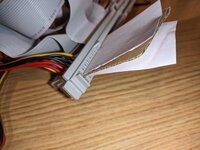
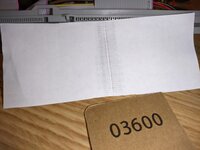
I certainly don't expect miracles and I'm not saying this fixes anything/everything, but it can be a fun game of "Did I really want to know..." if something turns out to be more gross than expected.

Please keep us updated if you do decide to further investigate the LC575 analog board&chassis harness for potential issues.
Hopefully the issue with your 520 board was simple, and not it having degraded beyond running at higher speeds or some such condition of age and use.