Instructions for loading the lspci for Open Firmware script is at
#50
Here's another link to the lspci script:
https://www.dropbox.com/scl/fi/ddwv...ware.zip?rlkey=rujv8sbhb8v4ehk9b845bd3k1&dl=0
but you need a serial port to capture all the info.
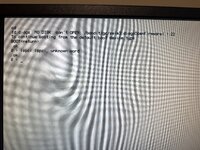
Alternatively, you can try this command to read just the PCI class/revision from the first 53c825 controller:
Code:
dev pci1
8808 config-l@ .
The startup is like this:
Code:
Note: 80, C0, 94, D4 are lines 1,2,3,4 of the 20x4 LCD.

These tests are in ExceptionTable:
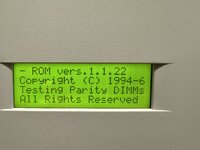
80: |  ROM vers.1.1.22   |
94: |Sounding Boot Beep  |
c0: |Copyright (C) 1994-6|
94: |Apple Computer, Inc.|
d4: |All Rights Reserved |
d4: || ?
d4: || ?
80: |00000800Video ID Bad~| // because DingusPPC doesn't have video yet
80: |MainLBU Video Failed|
80: |MainLBU 825#1 Failed| // because DingusPPC just has a stub
80: || ?
80: |MainLBU 825#2 Failed| ?
94: |MainLBU Enet Setup  |
94: |Sizing RAM DIMMs    |
94: |ROM SIMM Data Access|
94: |Testing Parity DIMMs|
C0: |0512 MB Parity RAM  |
Note: the code switches DRAM timing here from 70ns for normal RAM down to 60ns for parity RAM.
94: |Jumping To RAM Prog.|

These tests are in HWInit:
94: |RAM Test #1 Begins  |
94: |ROM SIMM Test Begins|
94: |NVRAM Test Begins   |
94: |RAM Test #2 Begins  |
94: |LONG RAM Test Begins|
d4: |-----------------|
d4: |RAM/ROM/NVRAM:PASSED|

Back to ExceptionTable:
94: |Allocating RAM DIMMs|
94: |MainLBU NVRAM Setup |
94: |L2 Cache SIMM Setup |
94: |Testing L2Cache SIMM|
94: |CPU Card Info Setup |
94: |200MHz 604, 50MHzBus|
d4: |0000KB Level 2 Cache| // because DingusPPC doesn't emulate cache
c0: || ?
So the photo would have needed to be taken before "LONG RAM Test Begins" unless there's a way to make the tests run in a different order.