GlobalTalk - Global AppleTalk network for MARCHintosh 2024 (and beyond!)

  • Nominations will close March 25th. If you'd like to join the board and influence how TinkerDifferent runs in the next year, put your name in now!
  • Hey Guest, MARCHintosh 2026 is upon us. Check out community projects, join GlobalTalk, and have fun!

RetroTechChris

New Tinkerer
Oct 31, 2021
22
20
3
Ghostscript has a GDI output option on Windows, so it can print to literally any Windows printer.
I'm not seeing that in the options above, perhaps it was added in a later version of GhostScript? I'm on Windows '95, so am limited to what I can use. As noted, I did try a newer version of GhostScript. I think 8.60 was the cutoff.. I was able to find 8.54 but it had issues processing the PostScript from the "LaserWriter"
 

RetroTechChris

New Tinkerer
Oct 31, 2021
22
20
3

eric

Administrator
Staff member
Sep 2, 2021
1,194
2,052
113
MN
bluescsi.com
Awesome 2026 #GlobalTalk image created by nanoraptor

1772291280805.png
 

caver01

Tinkerer
Oct 30, 2021
225
159
43
I just posted messages about getting GlobalTalk working on my SE/30 over on Discord, and while I might not normally cross-post here too, I figured there might be someone struggling through the same simple problem I was running into.

The issue was this:
AIR configured properly on an SE/30, system 7.1, BlueSCSI2 Wif internet connection. Following the Mac84 guide, everything went fine without errors, and yet NO ZONES show up in Chooser.

my root cause was a firewall configuration. I run a fairly robust firewall using OPNSense. It wasn’t enough to define an inbound UDP 387 port using NAT. The actual traffic was still getting rejected. I had to create an explicit firewall rule on the WAN interface in OPNSense to permit traffic to my AIR host on UDP 387 too. Once this inbound traffic was allowed, Chooser started showing other GlobalTalk zones (after closing and re-opening Chooser).

While this may seem obvious in retrospect, it did cause a little head scratching for me until I decided to check live traffic logs on the router right after posting about it on Discord. I noticed the firewall denying inbound connections immediately and quickly solved my own problem. Even if you aren’t planning to host a shared folder or printer, it seems you still need to properly map the port and permit traffic for Chooser to see the zones!

 

Ron's Computer Videos

Active Tinkerer
Oct 15, 2021
209
303
63
I just posted messages about getting GlobalTalk working on my SE/30 over on Discord, and while I might not normally cross-post here too, I figured there might be someone struggling through the same simple problem I was running into.

The issue was this:
AIR configured properly on an SE/30, system 7.1, BlueSCSI2 Wif internet connection. Following the Mac84 guide, everything went fine without errors, and yet NO ZONES show up in Chooser.

my root cause was a firewall configuration. I run a fairly robust firewall using OPNSense. It wasn’t enough to define an inbound UDP 387 port using NAT. The actual traffic was still getting rejected. I had to create an explicit firewall rule on the WAN interface in OPNSense to permit traffic to my AIR host on UDP 387 too. Once this inbound traffic was allowed, Chooser started showing other GlobalTalk zones (after closing and re-opening Chooser).

While this may seem obvious in retrospect, it did cause a little head scratching for me until I decided to check live traffic logs on the router right after posting about it on Discord. I noticed the firewall denying inbound connections immediately and quickly solved my own problem. Even if you aren’t planning to host a shared folder or printer, it seems you still need to properly map the port and permit traffic for Chooser to see the zones!

Glad you got it working!
 

caver01

Tinkerer
Oct 30, 2021
225
159
43
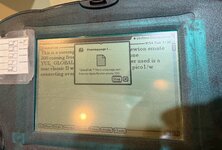
Haven’t seen anyone mention this (haven’t specifically searched yet), but I see GlobalTalk zones from the eMate!
IMG_1540.jpeg


Not sure what else I can do with AppleTalk from a Newton device, but it works (via PhoneNET connectors). Kinda neat. I guess I could sync from my eMate to halfway around the world!